Model composition
Model composition#
2D and 3D file destructuring#
Prior to 4.3, Revit-derived projects were comprised of a single 2D file and a single 3D file. After the release of 4.3, Revit-derived projects are now comprised of an array of linked files. This change means that load times are now optimized. Segmenting the project into multiple 3D and 2D files allows the user to configure which parts of the model to load for their use-case.
Model Composition pane#
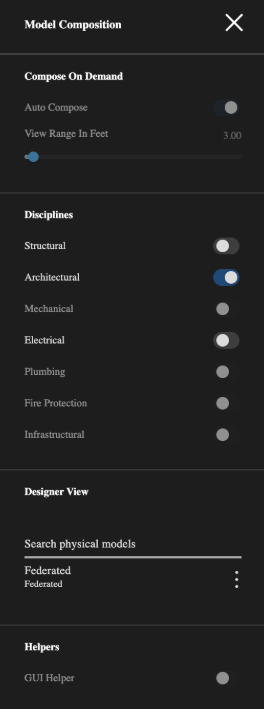
The Model Composition pane comprises the Compose On Demand and Designer View sections. Use the Compose On Demand section to configure which parts of the model to load, and use the Designer View section to view the source Revit project files and track which of the linked models are loaded and visible and which are not.
Figure: Model Composition pane
Compose on Demand configurations#
In the Compose On Demand section you can configure which parts of the model render, either by range in feet or by discipline, such as Structural and Electrical. You can also enable Auto Compose, which automates the composition.
The distance in feet allows the viewer to loading of segment / view / linked model if the linked model lies within the specified viewing range in feet. One import thing to note here is that Distance in Feet is used on segmented models for the decision making and not on individual assets in the model.
Loads linked model segments that are within the specified viewing range measure in feet.
| UI element | Description |
|---|---|
| Auto Compose | Enable to leave the model composition decision-making to the IafViewer and Graphics Service based on view parameters such as view position and the user's enabled disciplines, such as Structural and Electrical. |
| Distance in Feet | Set the range in feet that you want the viewer to load the model. |
| Structural | Enables structural elements |
| Architectural | Always enabled |
| Mechanical | Enables mechanical elements |
| Electrical | Enables electrical elements |
| Plumbing | Enables plumbing elements |
| Others | Enables all other unlisted disciplines |
Designer View#
Use the Designer View section to view how the original Revit project is structured in the Autodesk Revit Project as linked files. Track which of the linked models are loaded and visible and which are not.