Oauth2 Authorization code Grant
The authorization code grant type is used to obtain both access tokens and refresh tokens. Suitable for server-side rendering web applications that can store appSecret securely. Since the token exchange involves sending appSecret, keep it on a secure location.
Prerequisites#
- Platform Application(PA) is required, because PA is considered as a OAUTH2 client. The registered redirect_uri and appId should be specified in authentication process.
- Familiarize with Oauth2 Authorization code flow
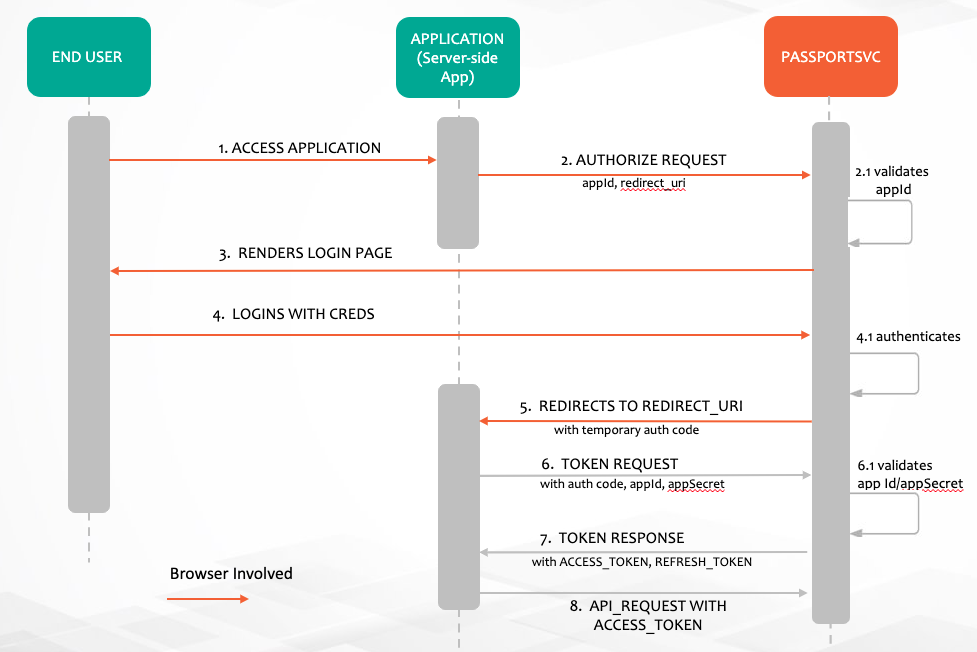
For more info: What is the OAuth 2.0 Authorization Code Grant Type?
Authentication process#
To set up authentication, do the following:
STEP 1: Direct the User to the Authorization Web Flow#
Make a HTTP authorize request from browser with redirect_uri and appId as client_id
https://api.xxxxxx.com/passportsvc/api/v2/oauth/authorize?response_type=code&redirect_uri=https://apps.xxxxxxx.com/serverapp/&client_id=6f42efd3-0d2e-45c2-b829-7614dd8343c4&scope=read writeAll the query params are mandatory here
- - This is the endpoint URI and should be used verbatim.
response_type=code- This is what tells the OAuth server that you’re using theAuthorization codegrant type and should be used verbatim.redirect_uri=https://apps.xxxxxx.com/serverapp/- This is the url you want the user to be redirected after a successful login. Replace the value here with the appropriate URL for your app. Note that it must be one of the value specified in_redirectUrisin your registered platform applicationclient_id=6f42efd3-0d2e-45c2-b829-7614dd8343c4Replace the value here with your app’s ID.scope=read write- Keep the scope as read write. Yet to implement authorization based on scope.
Making this request will take the end user to the Sign In page:
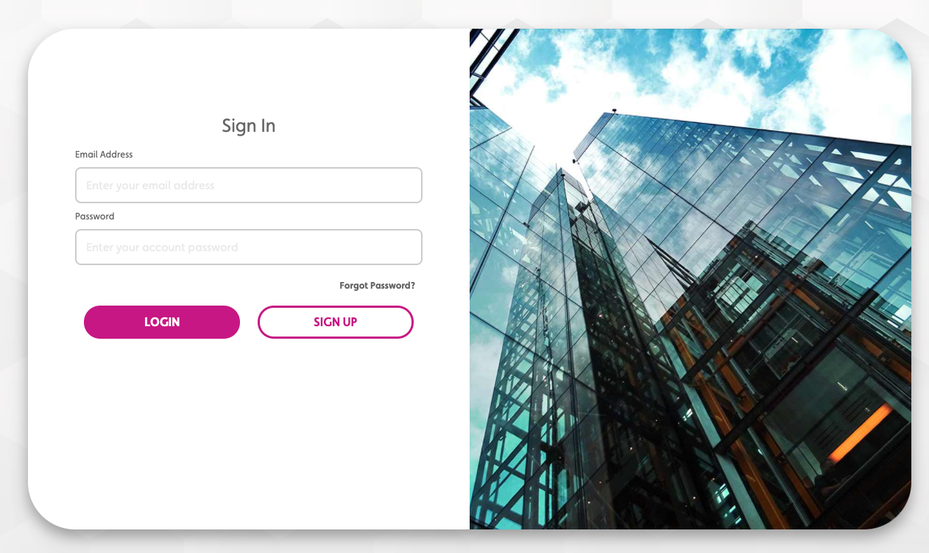
After a successful login, the user will be redirected back to your callback URL (redirect_uri) with the code included as a fragment of the URL.
Step 2: Implement Code that Extracts the Authorization Code#
In this example, the user was redirected to
https://apps.xxxxxxxx.com/serverapp?code=IuUW1bYour code that handles the /serverapp/ URL in your app should extract this code query parameter
Step 3: Exchange the Authorization Code for an Access Token#
You should exchange the authorization code for an access token using the POST /oauth/token endpoint with Authorization header Base64 of <appId>:<appSecret>.
Endpoint#
POST /passportsvc/api/v2/oauth/tokenParameters#
grant_type: authorization_codecode: exctracted code from previous stepredirect_uri: Registered redirect uriclient_id: appId
Headers#
Authorization: Basic {Bas64 encode appId:appSecret}
Response codes#
200 - Success
403 - Forbidden
Sample Request#
curl -v 'https://api.company.com/passportsvc/api/v2/oauth/token' \ -X 'POST' \ -H 'Content-Type: application/x-www-form-urlencoded' \ -H 'Authorization: Basic NmY0MmVmZDMtMGQyZS00NWMyLWI4MjktNzYxNGRkODM0M2M0Om9DcUd3SnNoNFduQloyZFV3VkJONm9pTmZoejZ3UVNrdGFmbzNaN0VkeVF4cG1RREZEM2VSMFcxN1FHYm53Nk0=' \ -d 'grant_type=authorization_code' \ -d 'code=IuUW1b' \ -d 'redirect_uri=https://apps.company.com/serverapp' \ -d 'client_id=6f42efd3-0d2e-45c2-b829-7614dd8343c4'
Sample response#
{ "access_token": "eyJhbGciOiJSUzI1NiIsInR5cCI6IkpXVCJ9.eyJ1c2VyX25hbWUiOiJmZGJjOGQ3MC0wMTllLTRjYmQtYWQ2Mi02MGE3YTY2ODMwOTciLCJzY29wZSI6WyJyZWFkIiwid3JpdGUiXSwiZXhwIjoxNjM3NzAzMzQ1LCJhcHBfaWQiOiI2ZjQyZWZkMy0wZDJlLTQ1YzItYjgyOS03NjE0ZGQ4MzQzYzQiLCJhdXRob3JpdGllcyI6WyJST0xFX1VTRVIiXSwianRpIjoiZmIyZDljYmUtYTBiMi00ZDkyLWFiMTktYzY2N2UwNzQxZGMzIiwiY2xpZW50X2lkIjoiNmY0MmVmZDMtMGQyZS00NWMyLWI4MjktNzYxNGRkODM0M2M0In0.Bmv_LXE2OC6y7rzj3HN91nnHz5E6Az0HEoM4EA_LfSW66U25Zz8VnKfTfmOkS9MpjHzCKqvEtGvzkn0zroIpMr6UllHZj-hq1vUeVR1sL_5SPMjUVBE-HpxOft3B6VD228xyuLeNVxPSiPGznZ3fcpl9RQbUdCfjeF0Evmirl93bNgrmQwXX9fH_qJmH1qzAxsVW4J6ld9KTLmJYxiA8Wb35lSWjeZ0Q0hL1QfaRJFIEcWKIOGdXDhZbnwQ4MfqekTnMenZ7a_SeO5E-xbslL6rvcdnACHHQblbRhDTuOP22Kg6PMmmhfvm4b8nF1P_7hjPeYYtVmHrcHtUXQPlvGg", "token_type": "Bearer", "refresh_token": "eyJhbGciOiJSUzI1NiIsInR5cCI6IkpXVCJ9.eyJ1c2VyX25hbWUiOiJmZGJjOGQ3MC0wMTllLTRjYmQtYWQ2Mi02MGE3YTY2ODMwOTciLCJzY29wZSI6WyJyZWFkIiwid3JpdGUiXSwiYXRpIjoiZmIyZDljYmUtYTBiMi00ZDkyLWFiMTktYzY2N2UwNzQxZGMzIiwiZXhwIjoxNjQwMjUyMTQ1LCJhcHBfaWQiOiI2ZjQyZWZkMy0wZDJlLTQ1YzItYjgyOS03NjE0ZGQ4MzQzYzQiLCJhdXRob3JpdGllcyI6WyJST0xFX1VTRVIiXSwianRpIjoiYmRjZDI4YjktNzdhNy00OWFlLWE5OGQtMzljMmQwYjdjY2RjIiwiY2xpZW50X2lkIjoiNmY0MmVmZDMtMGQyZS00NWMyLWI4MjktNzYxNGRkODM0M2M0In0.Dk6rWz9GH6qql9lREAWpavZlUOz9XjLeGeAxAyjuQF3-zjtqofih8gWhVrMAMIzN5yIV29HXQl5mMCpEhjptJ04iZuz7ZeP8XzzLzpDzxuKWuPb0ajLpfh4xErEaWzlhh4XvN_siZwJ7hbefD-BpzEOjdBqfyWWWsQfjr9xi7KBqoXHn9NKy79eZzMhybahbtgVxSYTZSnhDP0jc04Z0GAOJKpxxQM-YanW2Se3R4fxvWpnCeZ5KbN2Ur0W-m-b3rf6QtDKlPtxW8VP9-sPVMBUZEiIaHSI7DEffr_4OxrL5B-2wKzuhYoqCrEoLsRcw3lkCJcgrR6Z7Tsct9Me-Bw", "expires_in": 43199, "scope": "read write" }Steps to get refresh token#
Acquire a new access_token by using the refresh token when access_token expires. This allows apps to continue to have a valid access_token without further interaction with the user.
Endpoint#
POST /passportsvc/api/v2/oauth/tokenParameters#
grant_type: refresh_tokenrefresh_token: Refresh Token from previous step
Headers#
Authorization: Basic {Bas64 encode appId:appSecret}
Response codes#
200 - Success
403 - Forbidden
Sample Request#
curl --location --request POST 'https://api.company.com/passportsvc/api/v2/oauth/token' \--header 'Authorization: Basic NmY0MmVmZDMtMGQyZS00NWMyLWI4MjktNzYxNGRkODM0M2M0Om9DcUd3SnNoNFduQloyZFV3VkJONm9pTmZoejZ3UVNrdGFmbzNaN0VkeVF4cG1RREZEM2VSMFcxN1FHYm53Nk0=' --header 'Content-Type: application/x-www-form-urlencoded' --data 'grant_type=refresh_token' --data 'refresh_token=eyJhbGciOiJSUzI1NiIsInR5cCI6IkpXVCJ9.eyJ1c2VyX25hbWUiOiJmZGJjOGQ3MC0wMTllLTRjYmQtYWQ2Mi02MGE3YTY2ODMwOTciLCJzY29wZSI6WyJyZWFkIiwid3JpdGUiXSwiYXRpIjoiZmIyZDljYmUtYTBiMi00ZDkyLWFiMTktYzY2N2UwNzQxZGMzIiwiZXhwIjoxNjQwMjUyMTQ1LCJhcHBfaWQiOiI2ZjQyZWZkMy0wZDJlLTQ1YzItYjgyOS03NjE0ZGQ4MzQzYzQiLCJhdXRob3JpdGllcyI6WyJST0xFX1VTRVIiXSwianRpIjoiYmRjZDI4YjktNzdhNy00OWFlLWE5OGQtMzljMmQwYjdjY2RjIiwiY2xpZW50X2lkIjoiNmY0MmVmZDMtMGQyZS00NWMyLWI4MjktNzYxNGRkODM0M2M0In0.Dk6rWz9GH6qql9lREAWpavZlUOz9XjLeGeAxAyjuQF3-zjtqofih8gWhVrMAMIzN5yIV29HXQl5mMCpEhjptJ04iZuz7ZeP8XzzLzpDzxuKWuPb0ajLpfh4xErEaWzlhh4XvN_siZwJ7hbefD-BpzEOjdBqfyWWWsQfjr9xi7KBqoXHn9NKy79eZzMhybahbtgVxSYTZSnhDP0jc04Z0GAOJKpxxQM-YanW2Se3R4fxvWpnCeZ5KbN2Ur0W-m-b3rf6QtDKlPtxW8VP9-sPVMBUZEiIaHSI7DEffr_4OxrL5B-2wKzuhYoqCrEoLsRcw3lkCJcgrR6Z7Tsct9Me-Bw'Sample Response#
{ "access_token": "eyJhbGciOiJSUzI1NiIsInR5cCI6IkpXVCJ9.eyJ1c2VyX25hbWUiOiJmZGJjOGQ3MC0wMTllLTRjYmQtYWQ2Mi02MGE3YTY2ODMwOTciLCJzY29wZSI6WyJyZWFkIiwid3JpdGUiXSwiZXhwIjoxNjM3NzAzODgwLCJhcHBfaWQiOiI2ZjQyZWZkMy0wZDJlLTQ1YzItYjgyOS03NjE0ZGQ4MzQzYzQiLCJhdXRob3JpdGllcyI6WyJST0xFX1VTRVIiXSwianRpIjoiMDkzODU3N2ItMWExNS00ODJiLTg0YzktNWMzODA2M2NmMDBiIiwiY2xpZW50X2lkIjoiNmY0MmVmZDMtMGQyZS00NWMyLWI4MjktNzYxNGRkODM0M2M0In0.JFcZopqlDask5dnnAz2zo1yEKToIo4HmoyF3eUlqeImbmUkHHI0EDIVC4_RPL2B4KKsoChasRge2adMKyAwRXgoHMxm9M2P5uRCTSw3jDFydwQ5LOdyyIw4B7TZaUqEz6sAFdXPYPlHrPrIwsedOgoabyDkEBAdV9m3jsUYJkfQbSa3-lUmjV_kkONc2Ogs0jScWZsXaCBBeXtdOEOfc9Cdk_QCglUskYiX9nyyXRJNRYxKsdJnQUCym8zyPi92bn7ukiPNvc7MbSdSPLpT3SNI1hzy8a_KTzqC9VUnQjbgz99JPDRxxy5_KuvyuSxUxTwNv3u2XvCAOZAjIC-3GGg", "token_type": "Bearer", "refresh_token": "eyJhbGciOiJSUzI1NiIsInR5cCI6IkpXVCJ9.eyJ1c2VyX25hbWUiOiJmZGJjOGQ3MC0wMTllLTRjYmQtYWQ2Mi02MGE3YTY2ODMwOTciLCJzY29wZSI6WyJyZWFkIiwid3JpdGUiXSwiYXRpIjoiZmIyZDljYmUtYTBiMi00ZDkyLWFiMTktYzY2N2UwNzQxZGMzIiwiZXhwIjoxNjQwMjUyMTQ1LCJhcHBfaWQiOiI2ZjQyZWZkMy0wZDJlLTQ1YzItYjgyOS03NjE0ZGQ4MzQzYzQiLCJhdXRob3JpdGllcyI6WyJST0xFX1VTRVIiXSwianRpIjoiYmRjZDI4YjktNzdhNy00OWFlLWE5OGQtMzljMmQwYjdjY2RjIiwiY2xpZW50X2lkIjoiNmY0MmVmZDMtMGQyZS00NWMyLWI4MjktNzYxNGRkODM0M2M0In0.Dk6rWz9GH6qql9lREAWpavZlUOz9XjLeGeAxAyjuQF3-zjtqofih8gWhVrMAMIzN5yIV29HXQl5mMCpEhjptJ04iZuz7ZeP8XzzLzpDzxuKWuPb0ajLpfh4xErEaWzlhh4XvN_siZwJ7hbefD-BpzEOjdBqfyWWWsQfjr9xi7KBqoXHn9NKy79eZzMhybahbtgVxSYTZSnhDP0jc04Z0GAOJKpxxQM-YanW2Se3R4fxvWpnCeZ5KbN2Ur0W-m-b3rf6QtDKlPtxW8VP9-sPVMBUZEiIaHSI7DEffr_4OxrL5B-2wKzuhYoqCrEoLsRcw3lkCJcgrR6Z7Tsct9Me-Bw", "expires_in": 43199, "scope": "read write"}Via POSTMAN#
Goto
Authorizationtab.Choose OAuth2.0.
Enter the appropriate values in the fields shown in the image below. Note: Use valid app id as client ID and registered
redirect_uriin Callback URL and client secret. Auth URL should be{{url}}/passportsvc/api/v2/oauth/authorize. Access Token URL should be{{url}}/passportsvc/api/v2/oauth/token.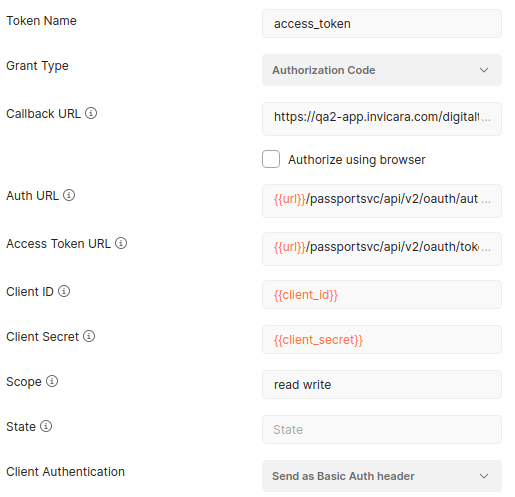
Click
Get New Access Tokenbutton.