Azure AD as an identity provider and SCIM configuration for the platform
The following procedures demonstrate how to configure the platform as a service provider and to configure SCIM with Azure AD.
Download the service provider metadata from the Passport service at the following endpoint and save it to a local machine:
Configuring as a Service Provider in Azure AD#
To create an application in Azure AD, log in to Login to Azure AD and complete the following steps:
a. From the sidebar, click Enterprise Applications.
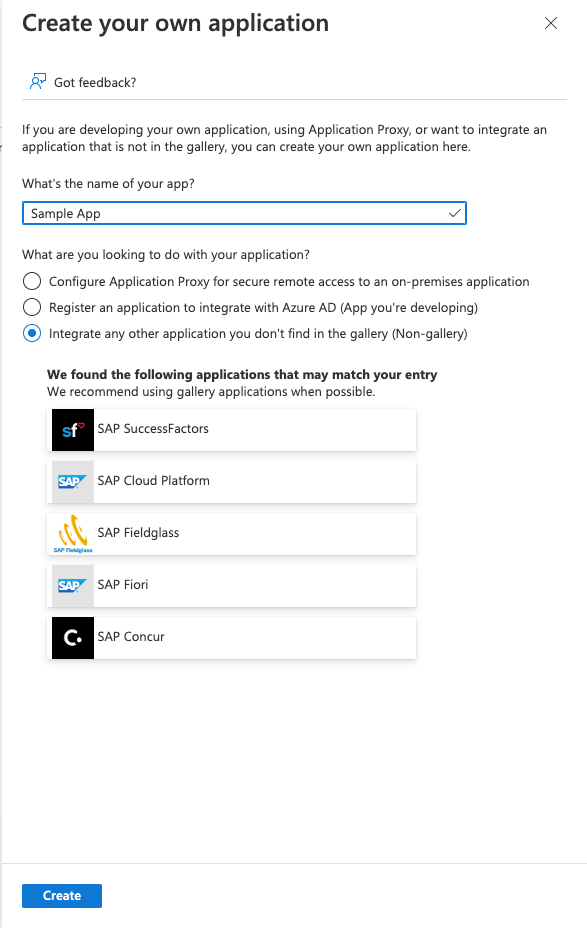
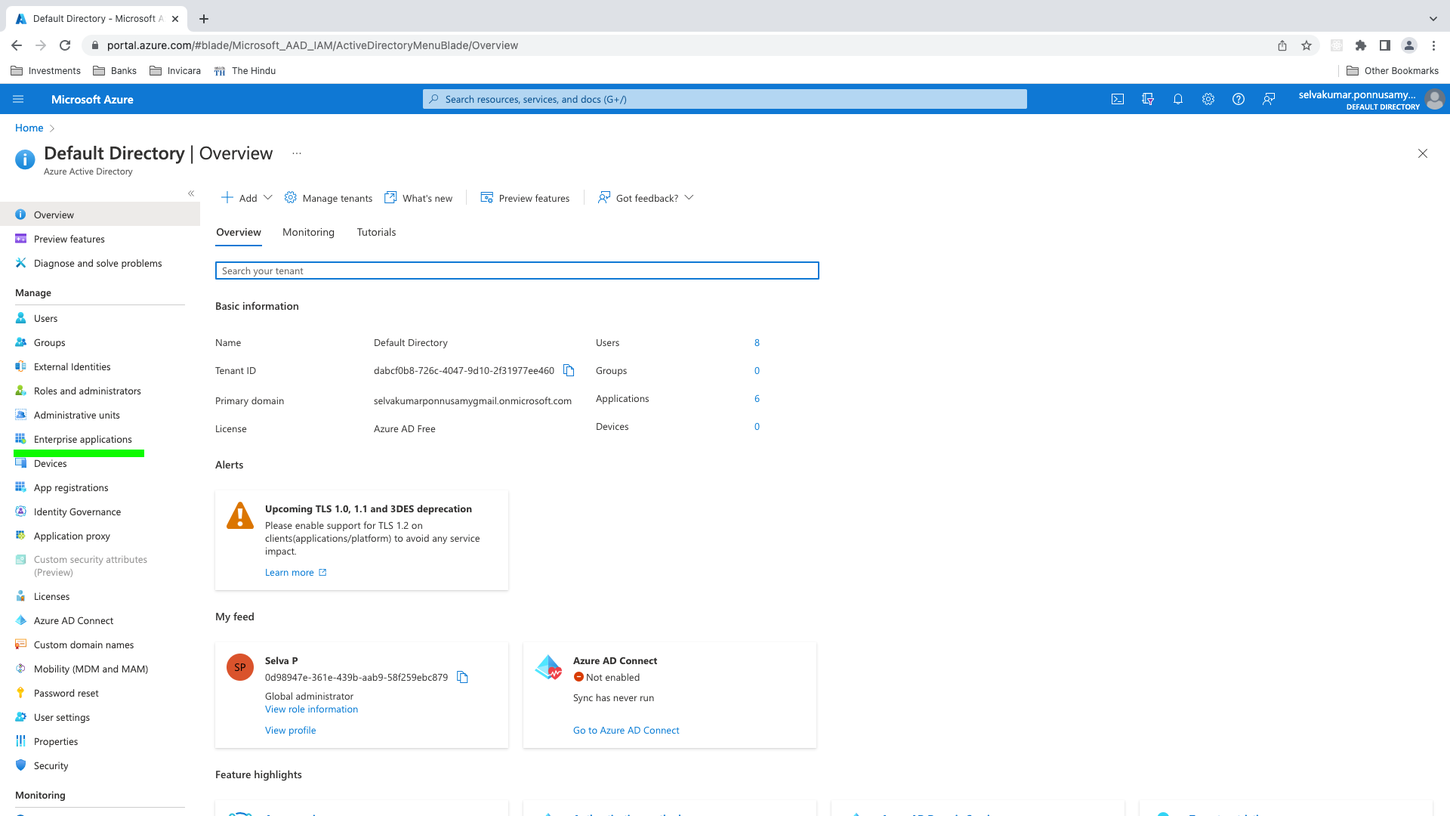 b. On the Enterprise applications pane, click New application, then click Create your own application.
c. In the What's the name of your app? field, enter your app's name, then click Create.
To set up single sign on, complete the following steps:
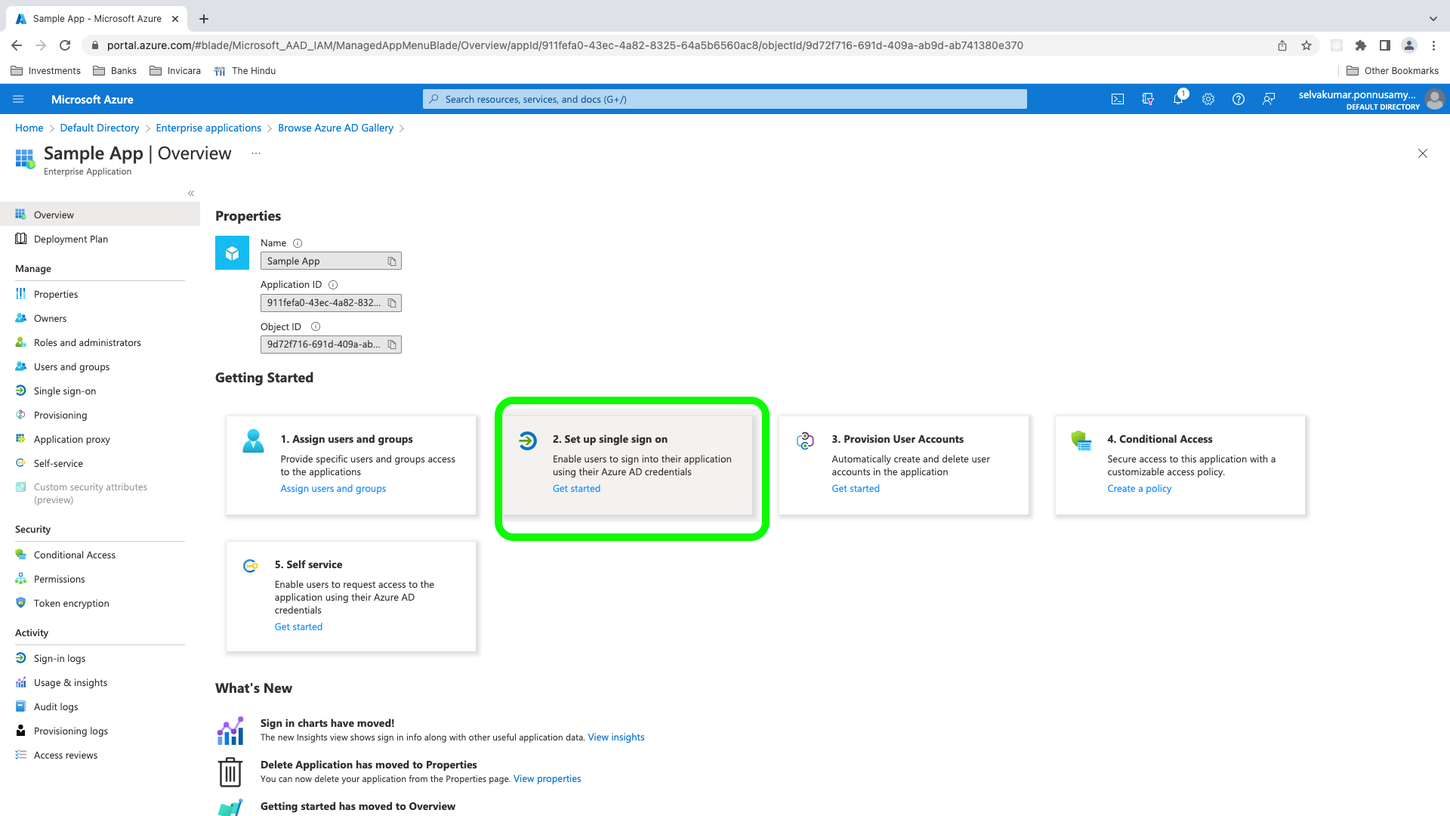
a. From the sidebar, click Overview. In the Getting Started section, click Set up single sign on.
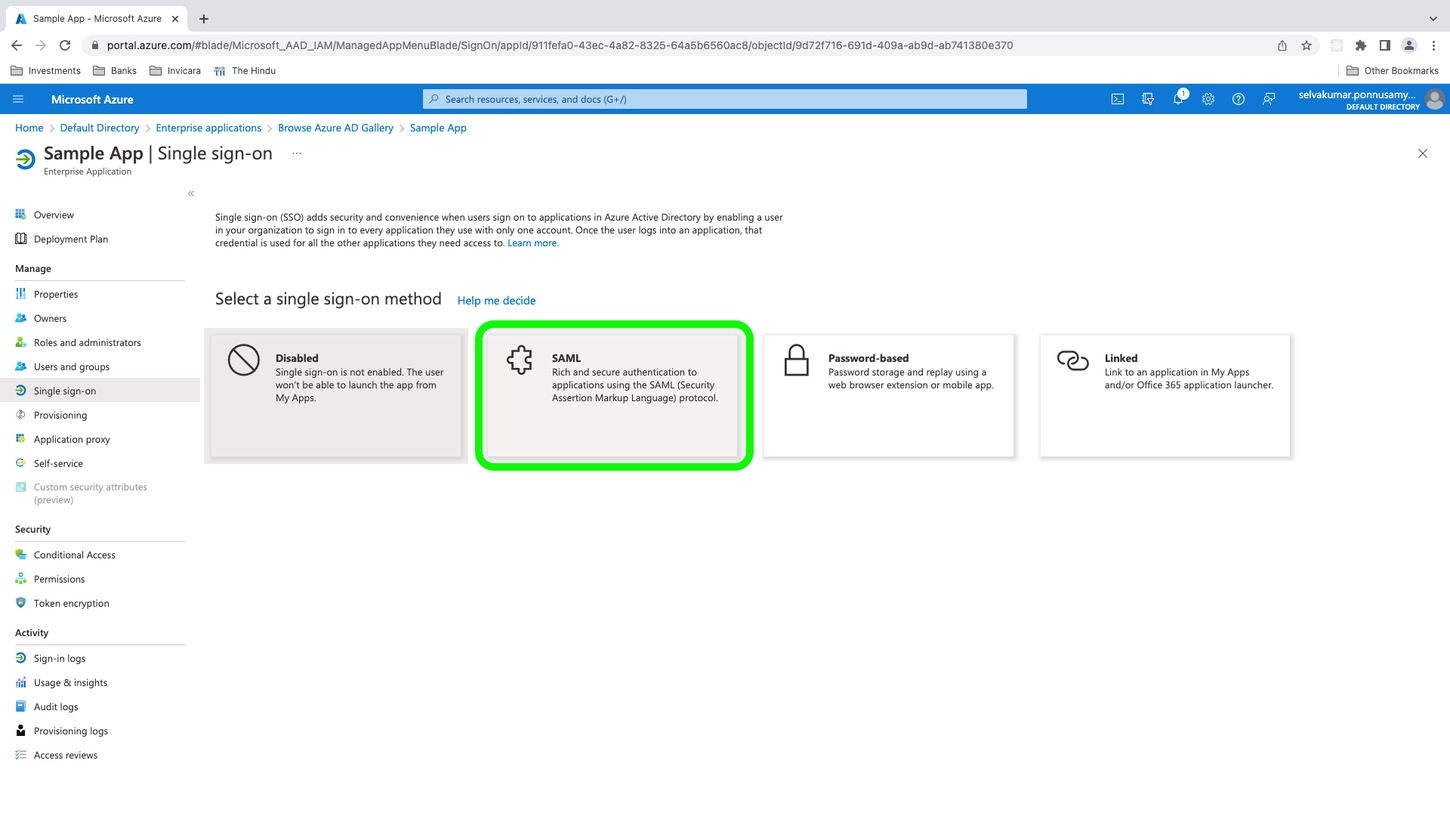
b. Click SAML.
c. Click Upload metadata file.
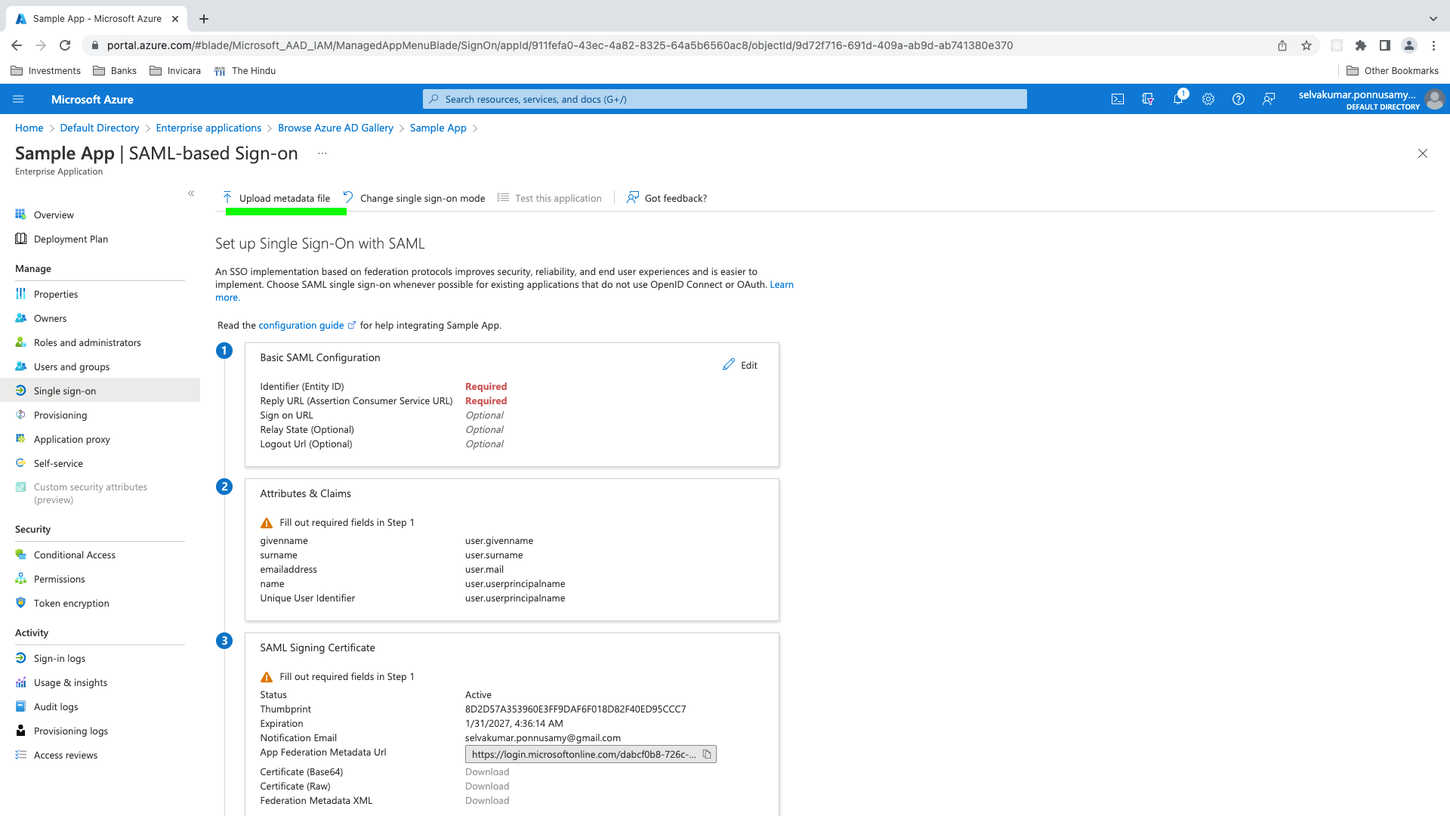
d. Select the metadata file you downloaded locally from the Passport Service as part of the prerequisite step, then click Add.
e. A form opens with pre-filled values for Identifier and Reply URL. Copy the value in Reply URL and paste it in Sign on URL.
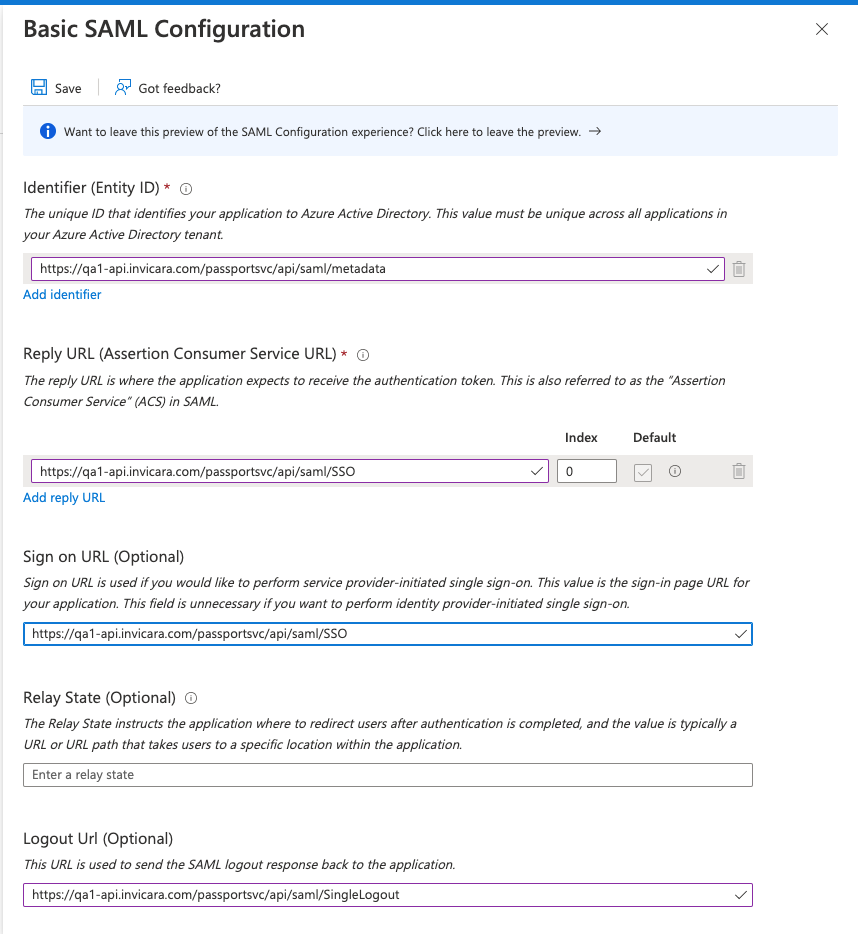
f. Click Save.
g. Copy the content in App Federation Metadata Url for later use when you register an identity provider.
To assign users to the application, complete the following steps: a. From the sidebar, under Manage, click Users and groups, then click Add User.
b. In the Add Assignment pane, click None Selected to open up a list of users. Select the required users, then click Select.
c. To assign the users to the enterprise application, click Assign.
Configuring SCIM in Azure AD#
Get long living access token from the Passport Service with the
_scimClientIdand_scimClientSecretwhen you create a client. For more information, see OAUTH2 client credentials flow.Configure the SCIM, complete the following steps in Azure AD: a. From the sidebar, click Provisioning.
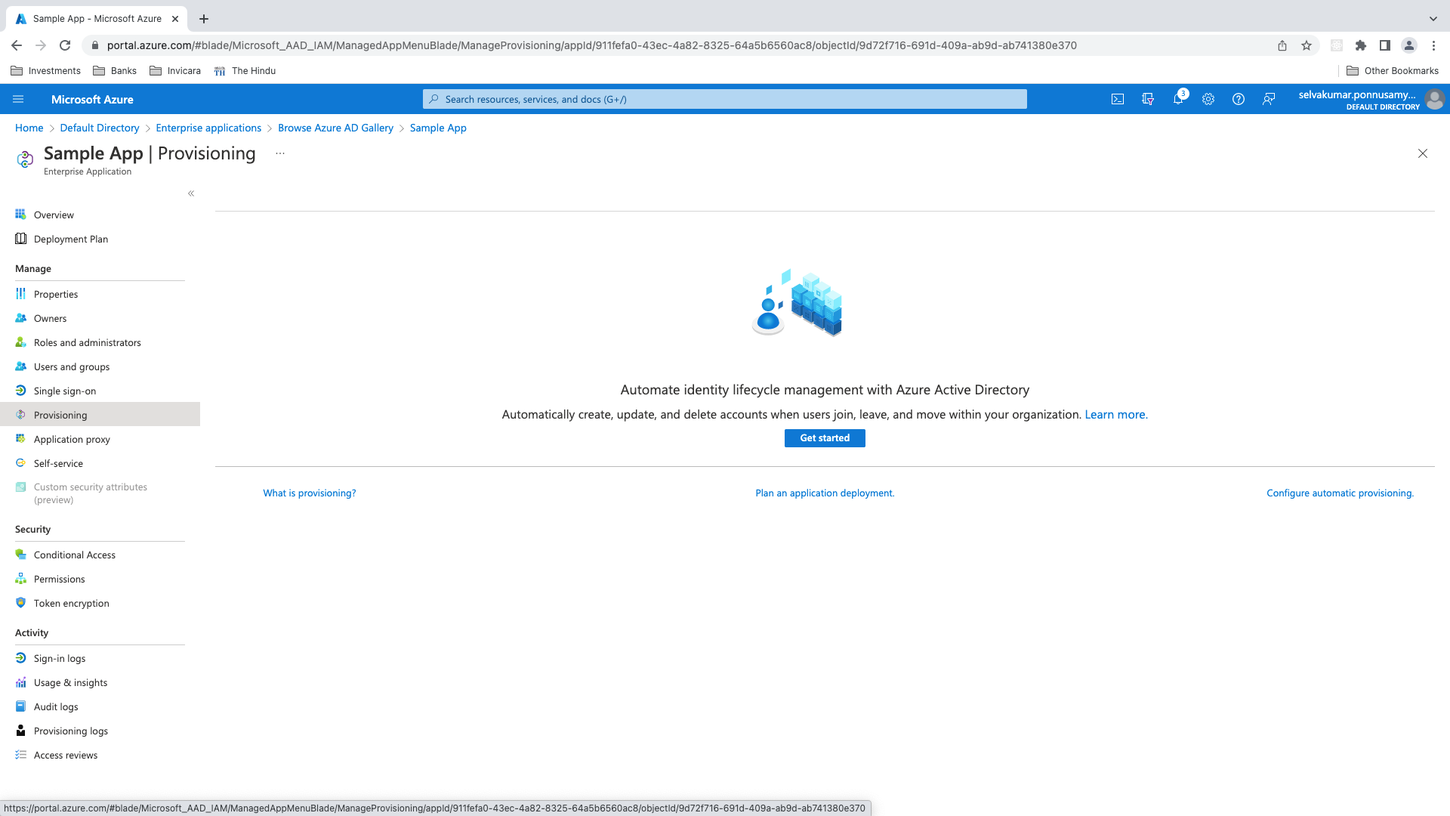
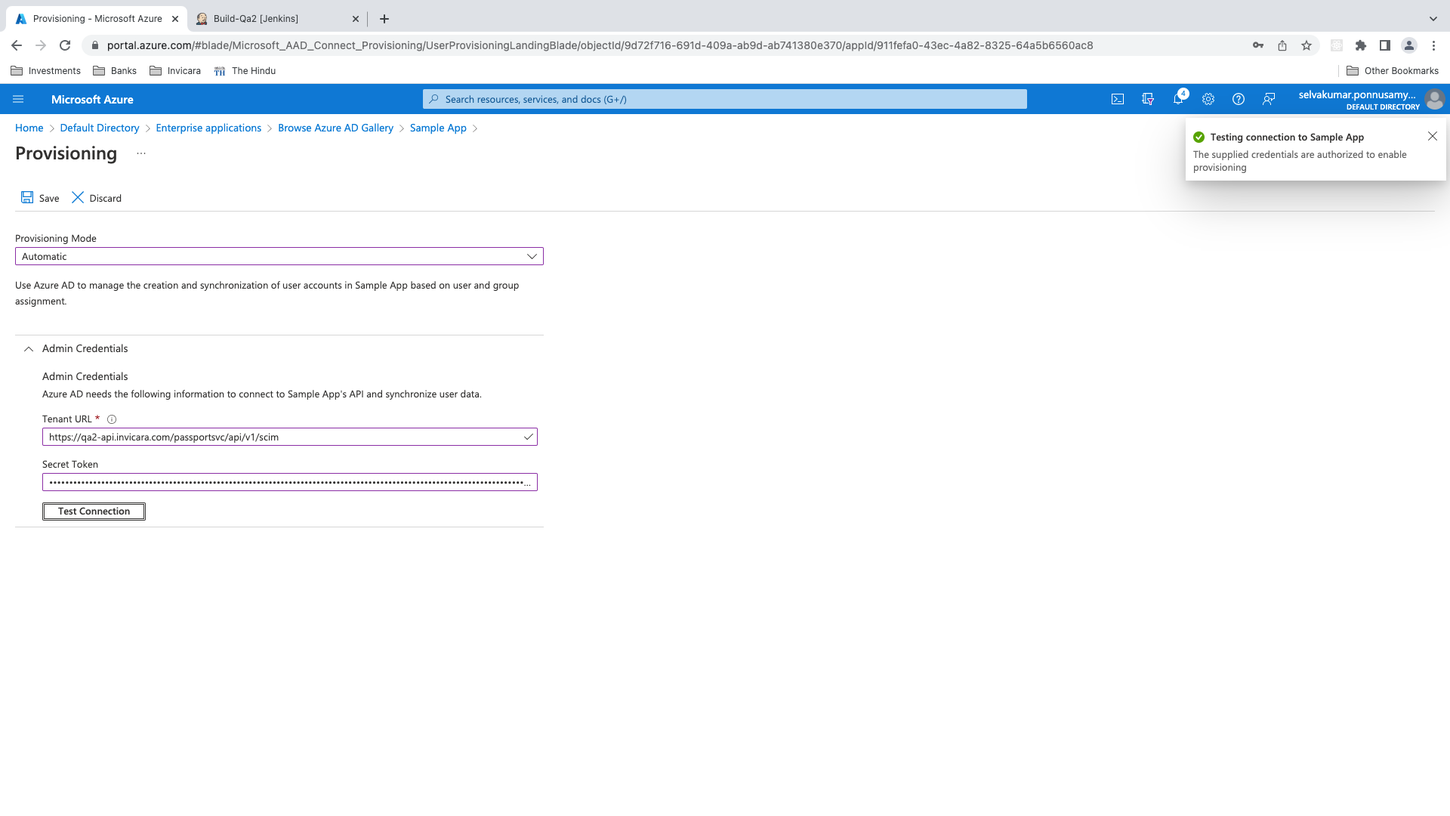
b. From the Provisioning Mode dropdown menu, select Automatic.
c. In the Tenant URL field, enter .
d. In the Secret Token field, enter the token you received in the prerequisite step.
e. To verify the connection, click Test Connection.
f. Click Save.
Sample values#
Name#
Identity ProviderMetadata URL#
https://login.microsoftonline.com/dabcf0b8-726c-4047-9d10-2f31977ee460/federationmetadata/2007-06/federationmetadata.xml?appid=1b6ae89e-4fff-4efc-96de-5cb279c589b5Metadata XML#
<?xml version="1.0" encoding="UTF-8"?><md:EntityDescriptor xmlns:md="urn:oasis:names:tc:SAML:2.0:metadata" xmlns="urn:oasis:names:tc:SAML:2.0:metadata" xmlns:ds="http://www.w3.org/2000/09/xmldsig#" xmlns:saml="urn:oasis:names:tc:SAML:2.0:assertion" entityID="http://localhost:8100/auth/realms/xxxxx.io"> <md:IDPSSODescriptor WantAuthnRequestsSigned="true" protocolSupportEnumeration="urn:oasis:names:tc:SAML:2.0:protocol"> <md:KeyDescriptor use="signing"> <ds:KeyInfo> <ds:KeyName>qIVZaquuYvfHbtU664bwcOUQX5DI7RVca5PDgC-T8nk</ds:KeyName> <ds:X509Data> <ds:X509Certificate>MIICoTCCAYkCBgF//m5kszANBgkqhkiG9w0BAQsFADAUMRIwEAYDVQQDDAl0d2luaXQuaW8wHhcNMjIwNDA2MTAzMDIxWhcNMzIwNDA2MTAzMjAxWjAUMRIwEAYDVQQDDAl0d2luaXQuaW8wggEiMA0GCSqGSIb3DQEBAQUAA4IBDwAwggEKAoIBAQCqDrFGojwunbKdIBSOd3vXHXH0ChtnZdgvX/M6Kdbht8Uicv+6k+mNWoFIdU7u91W0oA8nM6DZUQLS7ntJsT+r0P1ahnTkrY7zsr+02dPmr9gyQkS7sqGPMkzFOB+Nkc2X41IxriA67LtzNB/8+nJSkLYVYjXCB/5WNU24e4LhDEGzCFBXlnagC5oOUcE5GUDgEGvtkCWtpg/vaZAfbySHYzFx4pcQWrx8MhSX2nxpQP3UT+SUix8ieryeIlc+0E2GuMPL4BM7JQyME4kucu9Thjvg0jIaQlIpoq1y+FrQcNhocdH6NZMx3LogCirYIf2BpUck4nGauzFQ/9CtNBMhAgMBAAEwDQYJKoZIhvcNAQELBQADggEBAFssKy1CEHPBf6wnIGP7pGEGwujFl5fvkzVgG8ORK2Roo6IwAJWSctoSmgJ9S6Xi5c1VVGVCY+lqodJ+LXC0rli1B8N4GYyABnHsLM1Lorwn6OMqv+Hig49VcJXFor8Vq95pTcB5IjK3jhO+7EOdbBtwqJc1EgeprmBPzHHKq5n9UXFv1e3cyKDEUDZlNe7zAAiK+YV57tSDXmrOor1pxJB6el5O1KY1LWgykuq+jA77kOj10j6tjJURRm2BLtC04kFarUzZsJwKpVriDGV0Wbopw/6bqqWjuQX6CcenY77v+4HltUKM5lAa5i9zK0Tx9dooNlR9XL1cLNasjVWtaLI=</ds:X509Certificate> </ds:X509Data> </ds:KeyInfo> </md:KeyDescriptor> <md:ArtifactResolutionService Binding="urn:oasis:names:tc:SAML:2.0:bindings:SOAP" Location="http://localhost:8100/auth/realms/xxxxxx.io/protocol/saml/resolve" index="0" /> <md:SingleLogoutService Binding="urn:oasis:names:tc:SAML:2.0:bindings:HTTP-POST" Location="http://localhost:8100/auth/realms/xxxxx.io/protocol/saml" /> <md:SingleLogoutService Binding="urn:oasis:names:tc:SAML:2.0:bindings:HTTP-Redirect" Location="http://localhost:8100/auth/realms/xxxxxx.io/protocol/saml" /> <md:SingleLogoutService Binding="urn:oasis:names:tc:SAML:2.0:bindings:HTTP-Artifact" Location="http://localhost:8100/auth/realms/xxxxxx.io/protocol/saml" /> <md:NameIDFormat>urn:oasis:names:tc:SAML:2.0:nameid-format:persistent</md:NameIDFormat> <md:NameIDFormat>urn:oasis:names:tc:SAML:2.0:nameid-format:transient</md:NameIDFormat> <md:NameIDFormat>urn:oasis:names:tc:SAML:1.1:nameid-format:unspecified</md:NameIDFormat> <md:NameIDFormat>urn:oasis:names:tc:SAML:1.1:nameid-format:emailAddress</md:NameIDFormat> <md:SingleSignOnService Binding="urn:oasis:names:tc:SAML:2.0:bindings:HTTP-POST" Location="http://localhost:8100/auth/realms/xxxxxx.io/protocol/saml" /> <md:SingleSignOnService Binding="urn:oasis:names:tc:SAML:2.0:bindings:HTTP-Redirect" Location="http://localhost:8100/auth/realms/xxxxxx.io/protocol/saml" /> <md:SingleSignOnService Binding="urn:oasis:names:tc:SAML:2.0:bindings:SOAP" Location="http://localhost:8100/auth/realms/xxxxxx.io/protocol/saml" /> <md:SingleSignOnService Binding="urn:oasis:names:tc:SAML:2.0:bindings:HTTP-Artifact" Location="http://localhost:8100/auth/realms/xxxxxx.io/protocol/saml" /> </md:IDPSSODescriptor></md:EntityDescriptor>User Attributes#
- firstName -
http://schemas.xmlsoap.org/ws/2005/05/identity/claims/givenname - lastName-
http://schemas.xmlsoap.org/ws/2005/05/identity/claims/surname - email -
http://schemas.xmlsoap.org/ws/2005/05/identity/claims/emailaddress