Oauth2 Implicit Grant
The implicit grant type is used to obtain access tokens from browser clients. Suitable for Single Page Application, the process carried out on client-side and does not involve secret keys. The access tokens that are issued are short-lived and there are no refresh tokens to extend them when they expire, which is main difference here from the authorization code grant type.
Prerequisites#
- Platform Application(PA) is required, because PA is considered as a OAUTH2 client. redirect_uri should be registered while creating an app. The registered redirect_uri and appId should be specified in authentication process.
- Familiarize with Oauth2 Implicit flow
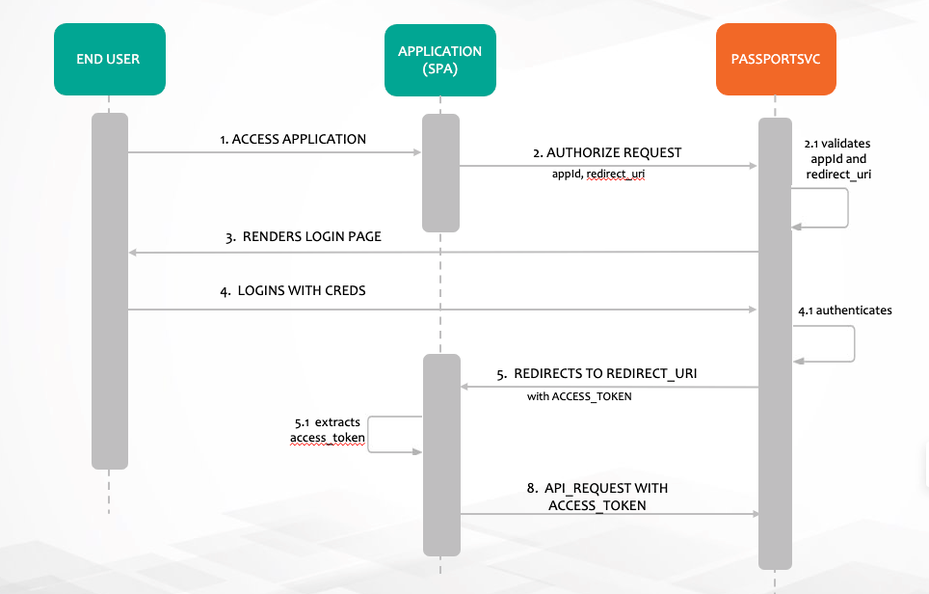
For more info: What is the OAuth 2.0 Implicit Grant Type?
Authentication process#
Single Page Applications that use IAF platform-api please look at the section via JSClient using IAF Platform API. Otherwise follow below process.
STEP 1: Direct the User to the Authorization Web Flow#
Make a HTTP authorize request from browser with redirect_uri and appId as client_id
https://api.company.com/passportsvc/api/v1/oauth/authorize?response_type=token&redirect_uri=https://apps.company.com/digitaltwin/&client_id=0f02c817-8655-423e-9d22-5439187078f9&scope=read writeAll the query params are mandatory here
- - This is the endpoint URI and should be used verbatim.
response_type- Entertoken. This tells the OAuth server that you’re using the Implicit grant type and should be used verbatim.redirect_uri=https://apps.xxxxx.com/oauth2/callback- This is the url you want the user to be redirected after a successful login. Replace the value here with the appropriate URL for your web app. Note that it must be one of the value specified in_redirectUrisin your registered platform applicationclient_id=0f02c817-8655-423e-9d22-5439187078f9Replace the value here with your app’s ID.scope=read write- Keep the scope as read write. Yet to implement authorization based on scope.
Making this request will take the end user to the Sign In page:
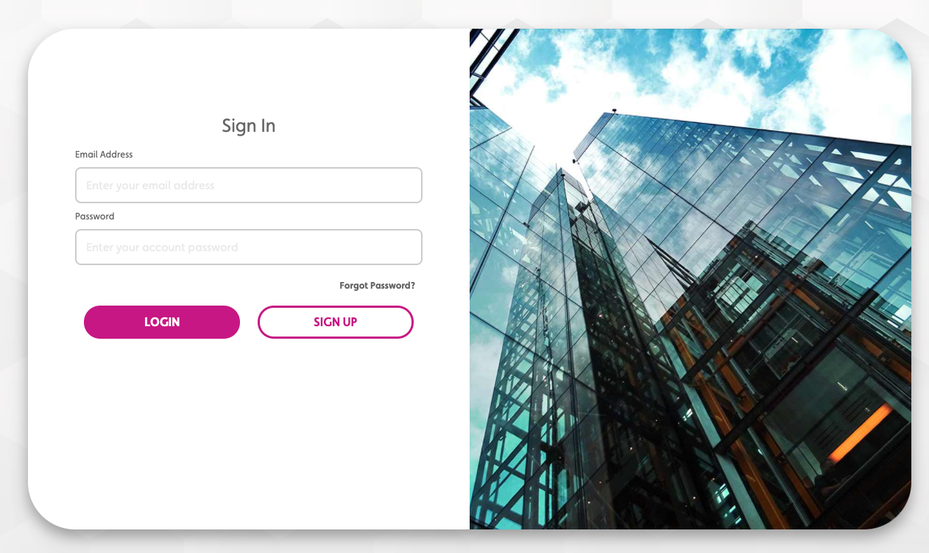
After a successful login, the user will be redirected back to your callback URL (redirect_uri) with the access token included as a fragment of the URL.
STEP 2: Implement Code that Extracts the Access Token#
In this example the user was redirected to
https://apps.xxxxxxxx.com/admin/#access_token=eyJhbGciOiJSUzI1NiIsInR5cCI6IkpXVCJ9.eyJleHAiOjE2MjUxNjY5MTgsInVzZXJfbmFtZSI6ImI3MmNkOTAxLTI3MjYtNGIyOS1iOTU5LWZhYTkzNzliZjZjNyIsImF1dGhvcml0aWVzIjpbIlJPTEVfVVNFUiJdLCJqdGkiOiI5MzM5YzA1YS1lN2NhLTQyOTktYmZkOC1lNGYyZjNlZjNkY2IiLCJjbGllbnRfaWQiOiJpbXBsaWNpdC1jbGllbnQiLCJzY29wZSI6WyJyZWFkIiwid3JpdGUiXX0.fwDbLQ2zYktaq85xXYjQUPxkP-3rFCkuafEASQobhKpc5jFF1rcDkF3RdtksB52dhKaCAyfLWrKeoieRLnTsmoXXqZsRmoz63B1BerEIcorKYUIfVoTuG850rFoIERMnlY6JSV6pJG1-fhUtayVrj6I8LKPxjFHlKrs71f8QogBAy0irTzNdVRIjjXKaGeGFCQjm3gx1aL0EDesbH5rSVFhyKXF0WoYK9zGiMO85uMFocghXITgB2xc850EBm-6AvY_7gP-bWLaBeqKHIAMOyKj8xNa7DbYzRKvyM_oyaTfzGwVSUZNNXnNcKm2SEYWjOPTIt3OEpPsLOmCH-DTgPw&token_type=bearer&expires_in=43199&user_name=b72cd901-2726-4b29-b959-faa9379bf6c7&jti=9339c05a-e7ca-4299-bfd8-e4f2f3ef3dcbThe web app then extracts the fragment access_token and use it in Authorization header to make further requests to platform REST APIs.
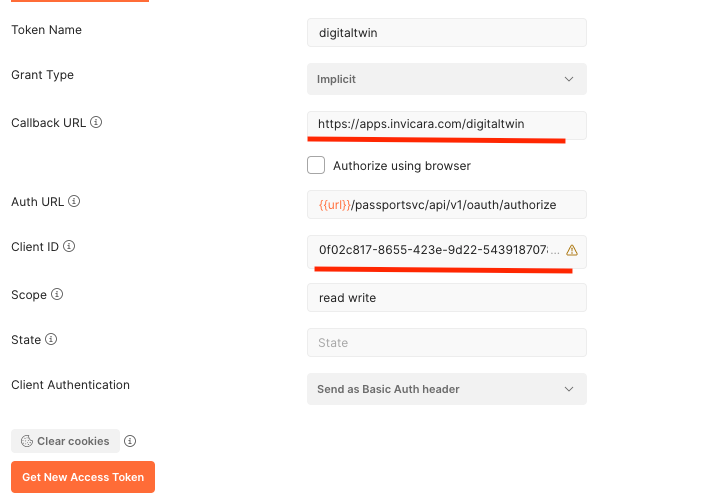
via POSTMAN#
- Goto
Authorizationtab - Choose OAuth2.0
- Fill the appropriate values as below, Please have valid app id as client ID and registered
redirect_uriin callback url. - Click
Get New Access Tokenbutton
via JSClient using IAF Platform API#
JS clients that uses IAF shall pass an additional argument appId to IafSession.getAuthUrl as below get Authorize url in the application.
IafSession.getAuthUrl('https://apps.company.com/digitaltwin', '0f02c817-8655-423e-9d22-5439187078f9')After a successful log in, the access _token is extracted from the fragment and it is used in Autorization header to make further requests to platform REST APIs.