findWithRelatedGraph
findWithRelatedGraph query#
Use the $findWithRelatedGraph query to look up related items across multiple named user collections, hopping from related item to related item by relationship.
You can query a graph data structure in the following ways:
- Hop from parent to child related items
- Inversely hop from child to parent related items
These directions of travel enable you to query anywhere in a relationship hierarchy as far as the path of relationships exists.
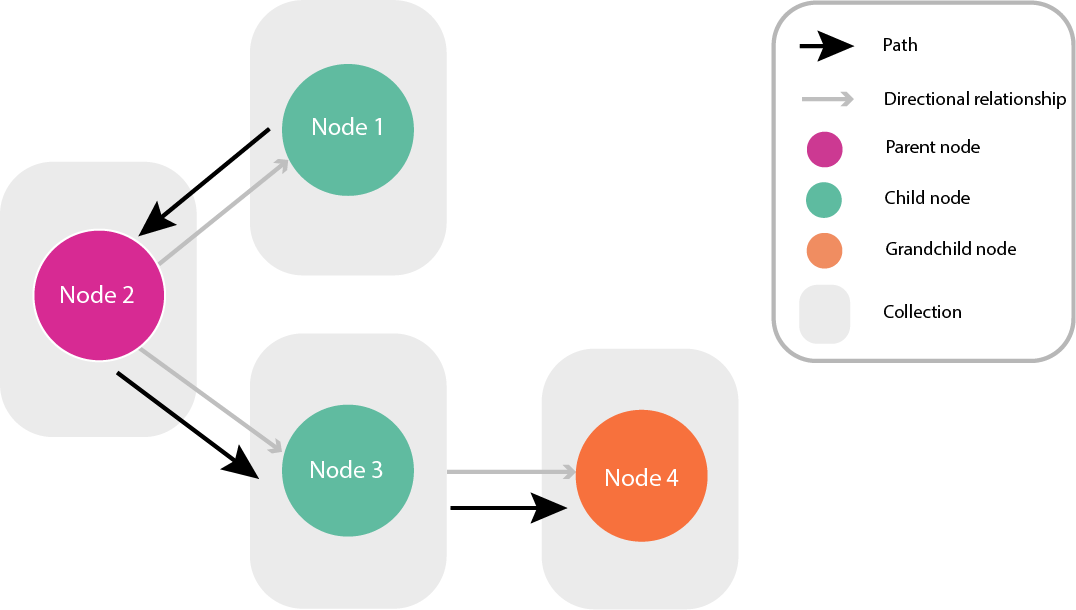
The following figure shows this flexibility: the path inversely travels from a child related item to a parent related item. The path then continues to a different child related item of the parent, and continues to that related item’s child item.
Figure: Path traversing against and with a directional relationship
findWithRelatedGraph use cases#
You can use the $findWithRelatedGraph query in the two following use cases:
- Discover or retrieve the nodes in a path to a certain depth of node hops. For more information, see Discover paths between related items.
- Build a path to query a destination node. For more information, see Building a path of hops between related items.
In both use cases, in your query, you can define the information you require on any node in the path.
findWithRelatedGraph request structure and fields#
For more information on how to structure a $findWithRelatedGraph query request, see the following example code structure with reference to Table 1.
Your use case determines the request properties you use. For more information, see the following request types:
{ "$findWithRelatedGraph": { "start": { "collectionDesc": { "<property to identify start node collection by>": "<value>" }, "query": { "_id": "<start node id value>" }, "options": { "page": { "_offSet": 0 "_pageSize": 25 }, "project": { "<start node property you want to appear in response>": 1 }, "sort": { "<start node property you want to sort>": 1 } } }, "to": { "segments": [ { "relatedDesc": { "<RelatedItem property to identify it by>": "<value>" }, "from": "<name of a previous hop>", //for path building only "as": "<give this path segment a name>", "minDepth": 1, //for path discovery only "maxDepth": 1, //for path discovery only "options": { "project": { "<relatedItem property to appear in response>": 1 }, } } ], "as": "<property name for the path query results in the response>", "response": "path", "options": { "page": { "_offSet": 0 "_pageSize": 25 }, } } }}
Table 1: findWithRelatedGraph fields table
| Field | Type | Required | Description |
|---|---|---|---|
start | Required | Object | Pass an object with the following look up criteria for the start node collections and related items to this object: "collectionDesc", "collectionProject", "query", "options" |
start.collectionDesc | Required | Object | Add a property and value to identify the named user collection, such as an id, user item id, or user type property. |
start.collectionDesc._versions.all | Optional | Boolean | Set to true to query all named user collection versions. If you do not add this property, only the tip version is queried. |
start.collectionDesc._versions | Object | Optional | Enter a valid query to filter properties by version. start.collectionDesc._versions.all must be set to true when using this filter. |
start.collectionProject | Optional | Object | Enable or disable the named user collection fields in the response with simple query projection. |
start.query | No | Object | Add the start node id property and value. |
start.options | No | Object | Add projection and page options for the collection response. |
start.options.page | No | Object | Set the response pagination options, such as _offset and _pageSize. The default value for _offset is 0 and for _pageSize is 25. |
start.options.project | No | Object | Enable or disable the related items fields in the response with simple query projection. To enable a field, enter the field as a property and the value as 1. |
start.options.sort | No | Object | Sort the results in the response based on the related items fields with a simple query sort. |
to | Required | Object | Add the look up criteria for the path, from the start node to the end node. |
to.segments | Required | Array | Add an array of criteria objects with one object for each hop. |
to.segments[n] | Required | Object | In a node criteria object, you can include the following parameters: "relatedDesc", "query", "from", "as", "minDepth", "maxDepth", "options" |
to.segments[n].relatedDesc | Optional | Object | Add your relationship query as a valid simple query object. |
to.segments[n].query | Optional | Object | For this hop, enter a valid simple query to evaluate the to related items in related.relatedDesc. |
to.segments[n].from | Required | String | Enter the as name value from the previous segment. Only use this property for path building. For more information, see Building a path of hops between related items. |
to.segments[n].as | Required | String | Name the segment so that other segments can reference it. |
to.segments[n].minDepth | Optional | Integer | The minimum number of hops you want to travel. The default value is 1. Only use this property for path discovery. For more information, see Discover paths between related items. |
to.segments[n].maxDepth | Optional | Integer | The maximum number of hops you want to travel. The default value is 1. Only use this property for path discovery. For more information, see Discover paths between related items. |
to.segments[n].options | Optional | Object | Add projection options for the segment response. |
to.segments[n].options.project | Optional | Object | The simple query projection you want in the response for the related items that match this segment query. |
to.as | Required | String | Name the property that contains the path query results in the response. |
to.response | Required | String | Enter “path”. |
to.options | Optional | Object | Add page options for the path response. |
to.options.page | Optional | Object | Set the response pagination options, such as _offset and _pageSize. The default value for _offset is 0 and for _pageSize is 25. |