Single sign-on
Single sign-on (SSO) authentication securely authenticates multiple applications and websites with one set of user credentials. The platform uses the SAML protocol for its platform services.
SAML protocol
Security Assertion Markup Language (SAML) is a protocol that integrates SSO authentication between the following two providers:
- Identity provider (IDP): Authenticates and passes the user's identity and authorization level to the service provider
- Service provider (SP): Trusts the IDP and authorizes the user to access the requested application or website
SAML is a markup language, based on XML, that uses security tokens which contain assertions. The tokens pass information about a user between an IDP and an SP. This enables cross domain SSO, increases security and enhances the user experience.
SAML SSO authorization workflow
The following diagram maps the SAML SSO authorization workflow between the browser, SP, and IDP:
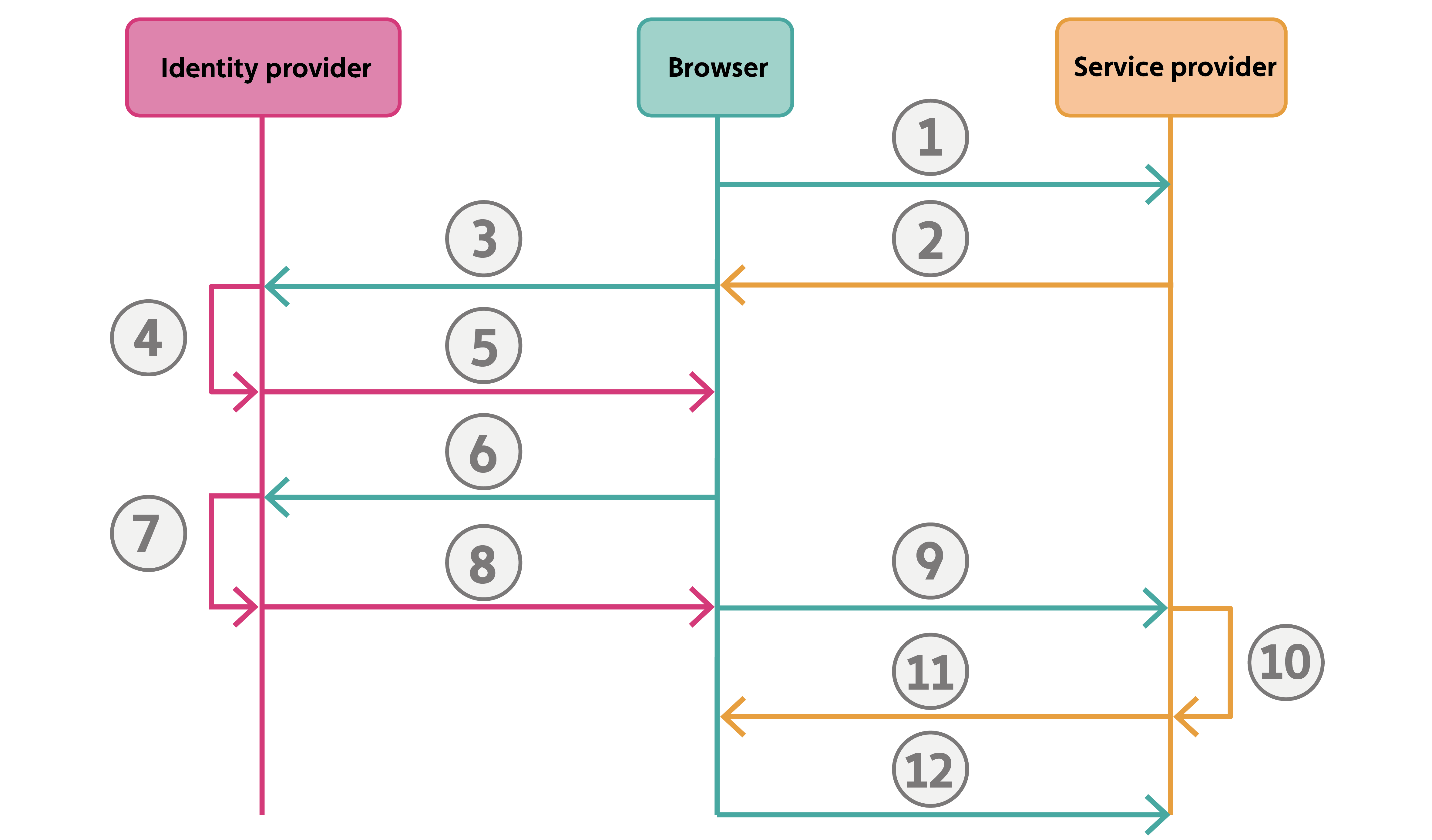
Figure: SAML SSO authorization workflow between the browser, SP, and IDP
| Sequence | Process |
|---|---|
| 1 | The user tries to access a protected source using a web browser. |
| 2 | The SP sends a SAML Authentication Request that redirects the browser to the IDP for authentication. |
| 3 | The browser accesses the IDP’s SSO endpoint. |
| 4 | The IDP validates the SAML request. |
| 5 | In the browser, a login form is presented to the user. |
| 6 | The user enters the correct credentials. The browser sends the user’s credentials to the IDP. |
| 7 | The IDP validates the credentials and generates a SAML response. |
| 8 | The IDP signals the browser to post the SAML response to the SP. |
| 9 | The browser posts the SAML response to the SP. The response post contains the authentication and attribute statements and sends them to the SP’s Assertion Consumer Service (ACS) URL endpoint. |
| 10 | The SP validates the response and extracts the relevant information. |
| 11 | The SP sends a set-cookie response to the browser. |
| 12 | The authenticated user can access the protected source with the browser. |