AI Service overview
Overview#
The AI Service introduces a range of advanced AI features to the platform. This new service was introduced in Platform version 5.0 and offers a collection of AI components which facilitate a more natural human-language type interaction with platform data.
The AI Service enables application developers to define and configure intelligent agents which can process user prompts, retrieve real-time data and return intelligent, context-aware responses.
AI Service features#
The AI Service introduces the following features:
- Users can seamlessly execute AI agents.
- Several agents can collaborate to handle tasks in multi-agent workflows.
- Agents can auto-select the most appropriate tools for each task.
- AI Teams group multiple agents in a team to interact sequentially to achieve a goal.
- Project administrators can securely configure Large Language Model (LLM) API keys for the AI Service to use.
- You can assign preferred LLMs to each agent. Currently, the platform supports all OpenAI models.
- Deploy your own custom agents and tools
Note: For a good understanding of basic AI concepts refer to the AI Concepts page.
AI Service resources#
The AI Service provides the following first-class resources that are owned by a namespace. Users can create these resources and share them with other users with the platform permissions model.
Note: All platform users can access tool and agent resources.
The relationship between AI service resources is as follows:
- A conversation recruits a team
- A team manages agents
- Agents use tools and reference knowledgebases
For more information, see the following AI Service resources:
- Agent: An AI-powered component that understands input, can invoke tools, and then responds based on its assigned role. You can configure agents to process user prompts and retrieve real-time data.
- Team: A group of agents configured to work together sequentially to solve a task.
- Tool: A utility or API integration that helps agents retrieve or process platform data. It can be either a custom tool you create or a system tool.
- KnowledgeBase: A collection of helpful information that the LLM can search through in order to answer questions more accurately.
- Conversation: The interactive session that maintains context between the user and the team across multiple turns.
Sample data flow between Agents, Teams, and APIs#
Figure: Data flow within AI Service
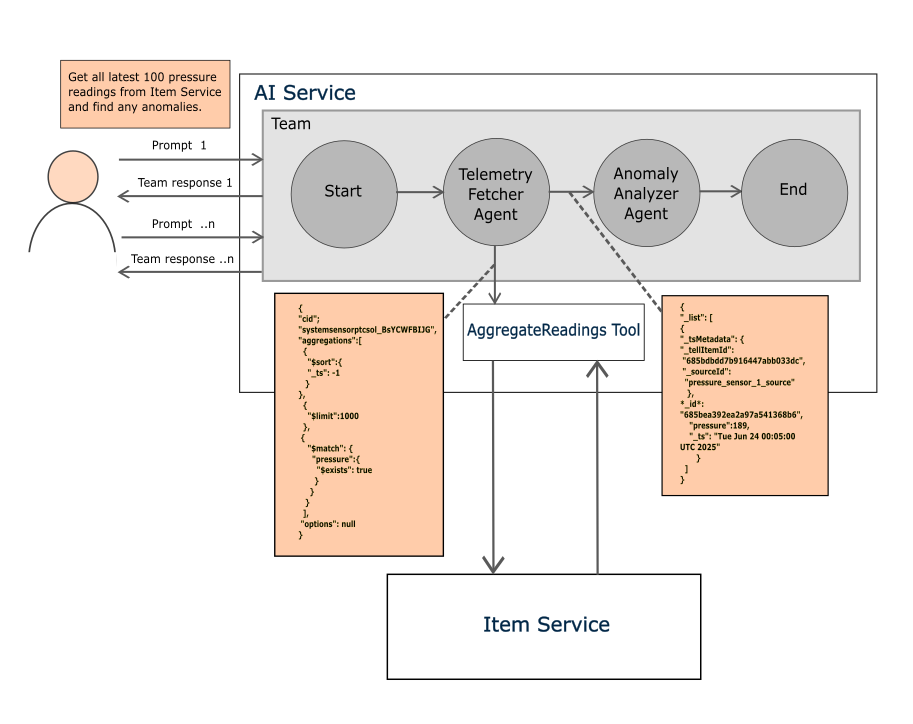
AI Service API key#
Project administrators must store the OPENAI_API_KEY to enable the AI Service. The OPENAI_API_KEY is maintained separately for each namespace.
The key is encrypted both at test and in transit. Trusted clients such as the AI Service can securely retrieve the decrypted secret.