Versions and drafts
Versions
An ontology's schema belongs to a version. The schema is its classes, relationships, rules, constraints, collection mappings, state machines, actions, and class MCP configurations. Each version has a number, starting at 1.
A version moves through these statuses:
- Draft: You can change its schema.
- Published: Its schema is frozen. You can promote it.
- Promoted: It has been made live. A version that was live keeps this status after another version replaces it.
Individuals, their relationships, and state transition history aren't versioned. They always use the live version.
Figure: Ontology version lifecycle
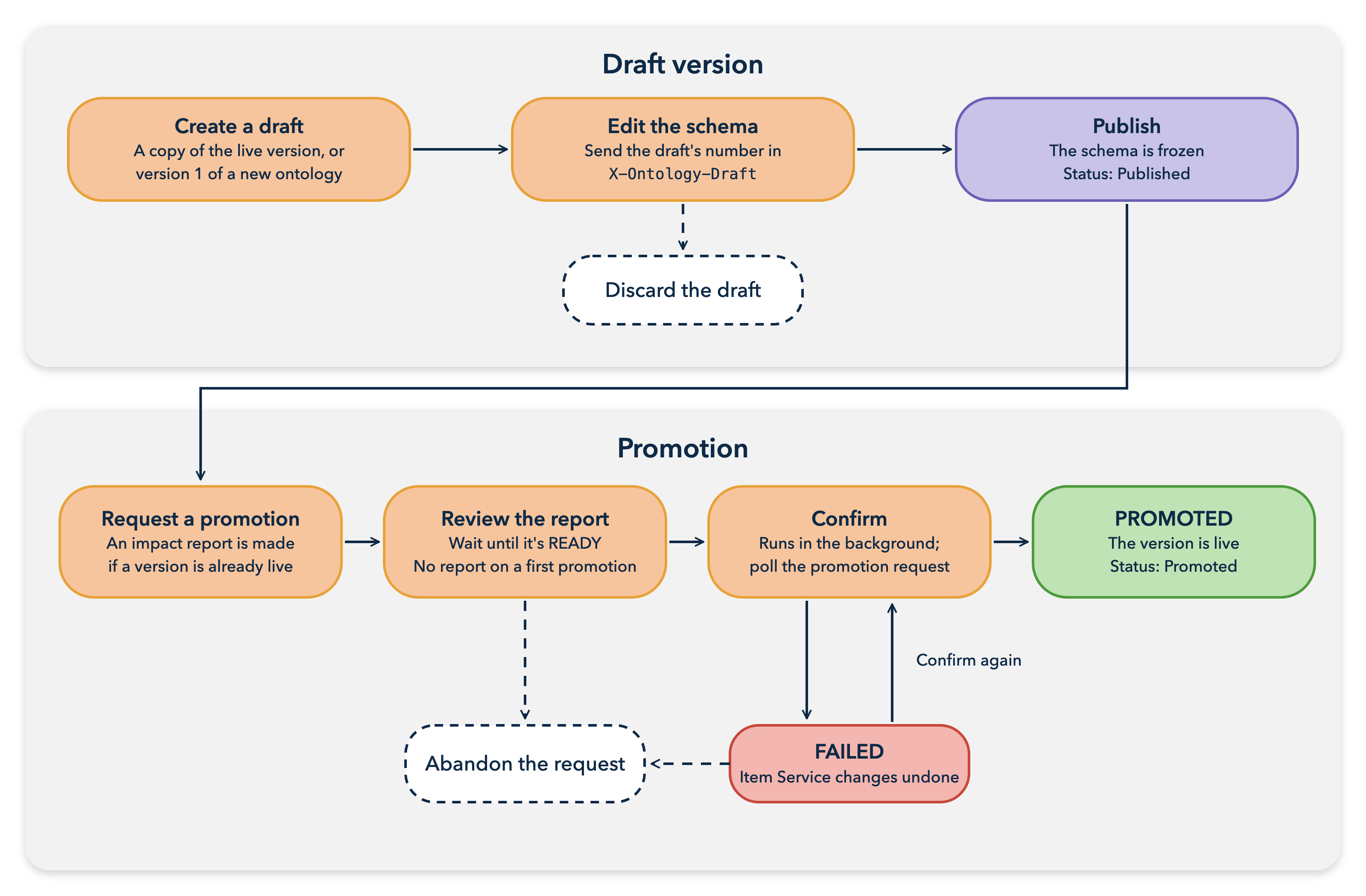
Note: To list the versions of an ontology, refer to the List versions Rest API section.
Drafts
A draft is a version you can change. A new ontology starts with version 1 as a draft. To change an ontology after that, create a new draft. By default, the new draft is a copy of the live version. You can copy another published or promoted version instead.
Drafts are independent of each other. Changes in one draft don't reach another, and drafts aren't merged.
When the draft is ready, publish it to freeze its schema. Publishing doesn't run any checks. To drop a draft you no longer need, discard it.
Note: For more information, refer to the Create a draft, Publish a version, and Discard a draft Rest API sections.
Live version
The live version is the promoted version that the ontology uses now. Only one version is live at a time. Until you promote the first version, nothing is live.
Individuals, imports, telemetry readings, and state machine events always use the live version. For more information, see Individuals.
Version selection with the X-Ontology-Draft header
To choose which version a schema call uses, send its number in the X-Ontology-Draft header:
- Schema reads use the live version by default. To read another version, send its number. If nothing is live and you don't send the header, reads return empty results.
- Schema writes must name a draft. A write without the header, or one that names a published or promoted version, returns
409. - A version that doesn't exist returns
404, for reads and writes alike. - Calls on individuals don't take the header. They always use the live version.
Promotion
Promotion makes a published version live. It takes two steps:
- You request a promotion of a published version. If a version is already live, the service also requests an impact report that compares your version with the live one.
- You review the report, then confirm the promotion with the report's ID. A first promotion has no report.
The confirmed promotion runs in the background. It registers the version's item types in the Item Service and creates the collections that your mappings ask for by name. It then makes the version live. Poll the promotion request until it's PROMOTED or FAILED.
Promotion is additive. It never removes an item type or deletes data it didn't create. If it fails, it undoes its Item Service changes and leaves the live version as it was. You can confirm a failed request again to retry, or abandon it.
When a promotion replaces a live version, the service then updates the class permissions in the Item Service to match the new version. Until that update finishes, access granted for the previous version's classes and mappings can remain.
You can create a draft from a published version before you promote that version. The draft's mappings then use the collections that the promotion creates. Promoting the draft later doesn't create them again, unless you changed a mapping's collection name in the draft.
An ontology can have only one open promotion request. To promote a different version, abandon the open request first. If the live version changes after you request a promotion, the confirmation fails.
To request or confirm a promotion, you need EDIT permission on the ontology. The background task runs as the person who confirms, so that person also needs Item Service permissions to read and register item types and to create and update the mapped collections. For the list, see Confirm a promotion.
Note: For more information, refer to the Request a promotion, Confirm a promotion, Get a promotion request, and Abandon a promotion request Rest API sections.
Impact reports
An impact report shows what would change if a version replaced the live version. It lists each added, removed, or changed item, such as a class, relationship, mapping, or state machine, and gives each change a severity. The report also totals the changes of each severity. When several rules apply to one change, the highest one wins:
| Severity | Meaning |
|---|---|
SAFE | The change can't affect existing data or callers. For example, a new class that's already mapped, a removed rule, or a cosmetic change such as a description. |
ATTENTION | The change might affect how existing data or callers behave. Review it before you promote. A change that another definition still refers to, or that changes the meaning of a permission grant, is at least ATTENTION. |
BREAKING | Promoting the change strands or loses existing data. For example, removing a class that still has individuals. |
If the service can't count the records a change affects, it treats them as affected. A report might say BREAKING when nothing breaks, but it doesn't say SAFE when something breaks.
A change entry also shows how many stored records and links the change affects, and which permission grants change meaning. A missing count means the count is unknown, not zero. A change that can't affect data, such as a new description, is marked as cosmetic.
The service produces a report in the background. Poll it until its status is READY. You can't confirm a promotion until its report is READY. You can also request a report for any draft or published version without promoting it.
Note: For more information, refer to the Request an impact report and Get an impact report Rest API sections.
Edit lock
The edit lock stops two people from changing an ontology's schema at the same time. It's off by default. To turn it on for an ontology, set a lease length in seconds in _editLockTimeoutSeconds.
When the edit lock is on, you must hold the lock to change the ontology or its classes, class relationships, rules, constraints, actions, and state machines. Only one user holds it at a time. There's no queue: if someone else holds it, your request fails. The lease runs from your last change, and each schema change extends it. A user with SHARE permission on the ontology can break another user's lock.
Collection mappings, class MCP configurations, individuals, and other data never need the lock.
Note: For more information, refer to the Get the edit lock, Acquire the edit lock, Extend the edit lock, and Release the edit lock Rest API sections.
Ontology revisions
Each schema change increases the ontology's revision number, _revision. Schema reads return it in the ETag header. To make a schema write fail if someone else changed the ontology after you read it, send that value in an If-Match header. A stale value returns 412.
Promotion request statuses
| Status | Description |
|---|---|
REPORT_READY | The request is waiting for you to confirm it. |
CONFIRMING | The promotion is running in the background. |
PROMOTED | The version is live. |
FAILED | The promotion failed, and the live version didn't change. Confirm the request again to retry, or abandon it. |
ABANDONED | The request was closed without promoting. |