UserConfig
A UserConfig is a configuration file that describes how the interface appears to users of a given UserGroup. For example, users in a project admin user group may see a different user interface to users in a file contributer user group.
User config configurations#
A UserConfig file contains configurations for page handlers and user interface actions for the home page and the navigation view and its drawer.
For a detailed examination of a UserConfig example, see the Reference App's Project Admin user config breakdown.
User interface elements#
The following table describes the user interface elements that a user config defines:
Figure:Home page and navigation view
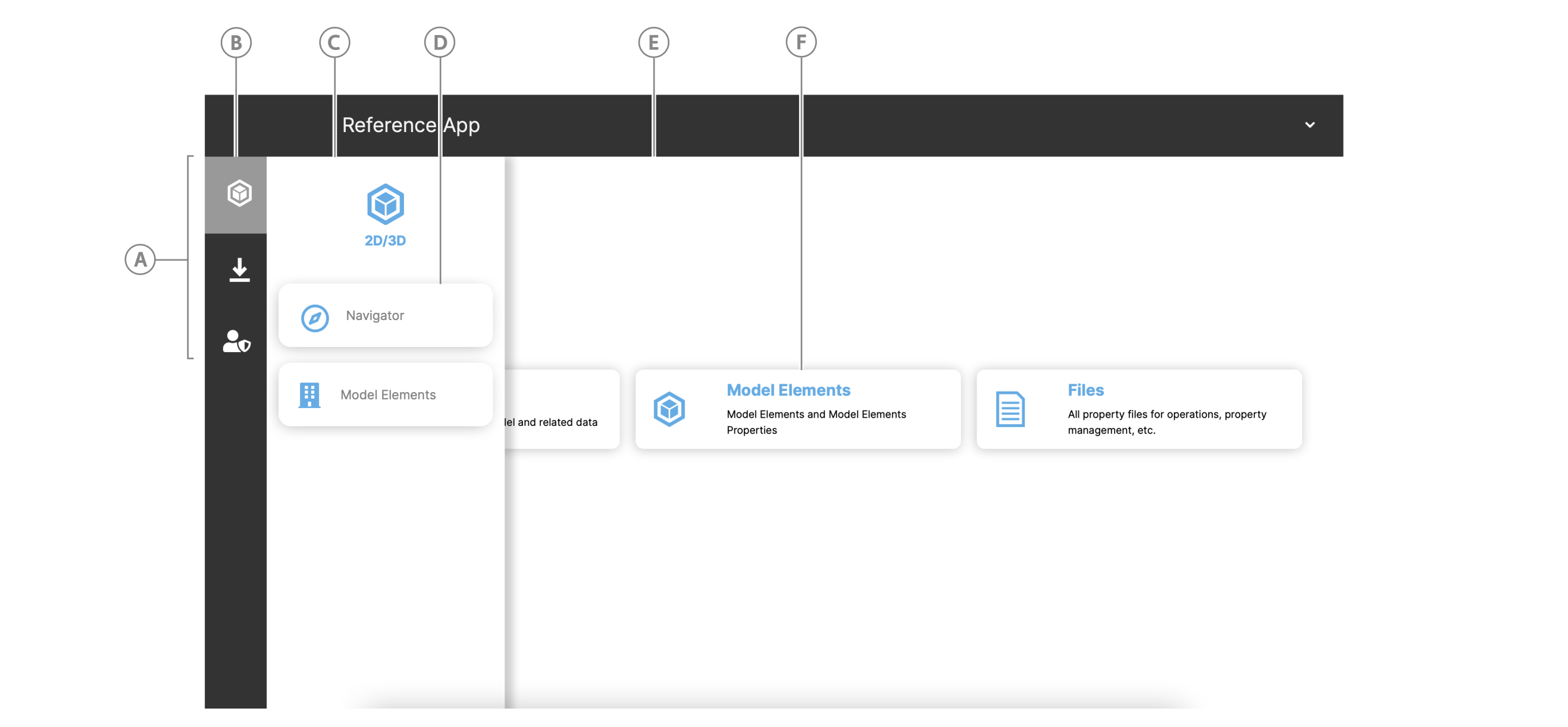
Table: UI elements that the user config configures
| Callout | Element | Description |
|---|---|---|
| A | Navigation view | Contains page group icons |
| B | Navigation view icon | Icon that represents a page group. Click to open the drawer and view the page buttons. |
| C | Navigation view drawer | Displays the page buttons in a page group when you click a navigation view icon |
| D | Grouped page | Button with handler that opens the page |
| E | Home page layout | You can define the home page layout type, such as a grid layout, and how it is composed. |
| E | Panel button | Each button uses the same component but has a different action handler that handles the content and click event. |