Third-party API token configs for IafViewer
The IafViewer has features that rely on third-party services which requires access tokens. The Reference App currently supports two such token configs:
- Mapbox: View your building model on a GIS map
- Autodesk Platform Services (APS): Load APS content in the viewer
The setup that stores secrets and requests tokens is the same for each provider, so you can add more providers later without building a new form, service, or architecture. For more information, see Adding a new third-party API.
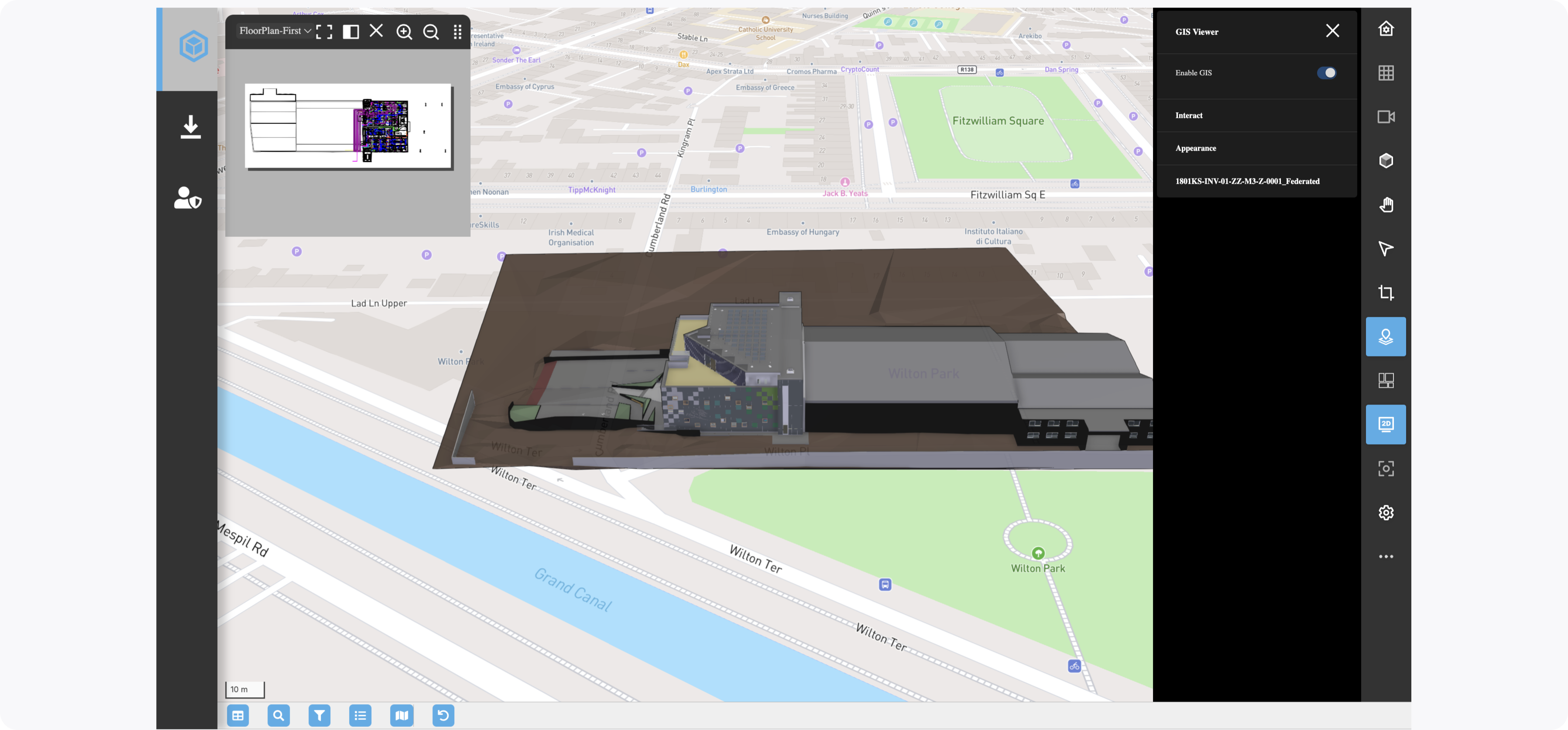
Figure: Enable GIS
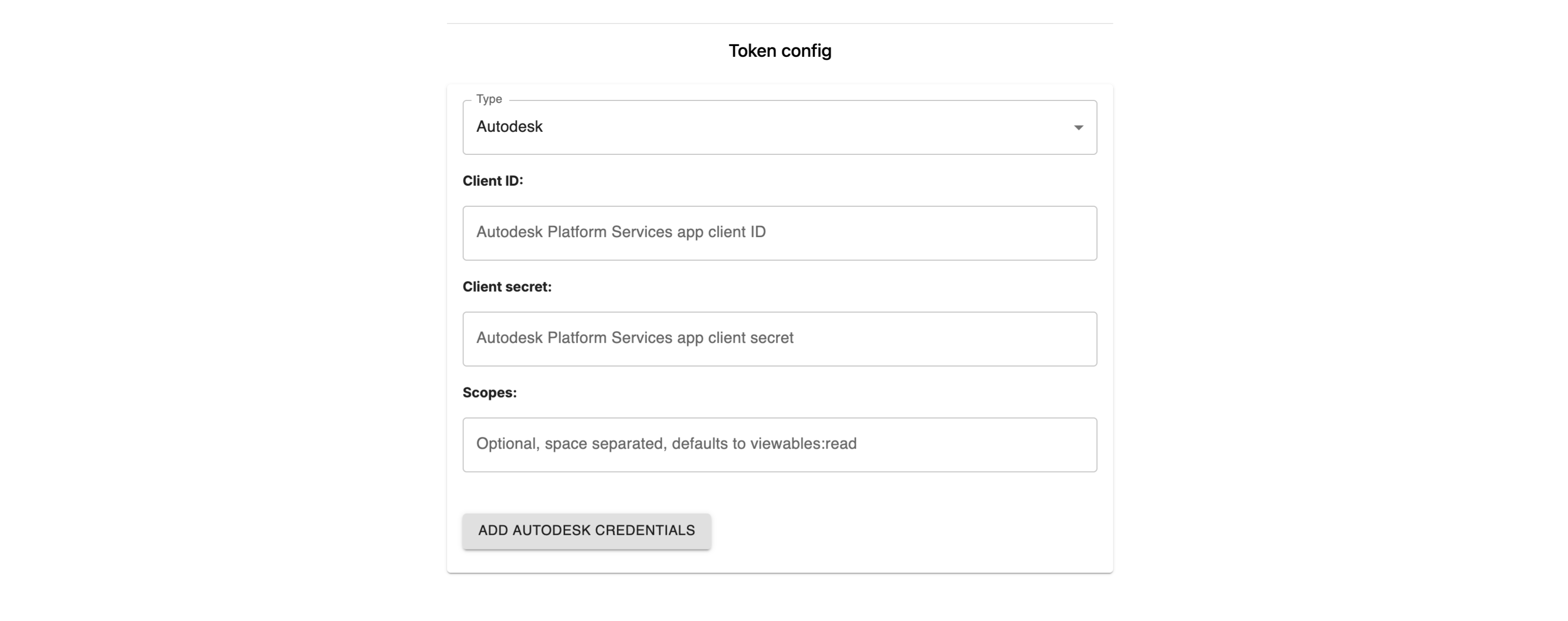
Token config submission form
The token config submission form supports multiple token configs. Select the config from the drop-down menu so that config's fields, labels, regex rules, default values and onSubmit functionality load appropriately.
Figure: Token Config submission form
Token configs file
An accompanying config file, secretSubmitConfig.js, contains the configs for each third-party API service and its token requirements. Any additional token configs added to the array appear in the submission form.
import tokenService from '../../services/tokenService';

export const SECRET_SUBMIT_CONFIGS = {
  mapbox: {
    label: 'Mapbox',
    storageKey: 'mapboxKey',
    submitText: 'Add temp token config',
    pendingStatus: 'Adding Mapbox temp token config',
    successStatus: 'Mapbox temp token config uploaded',
    fields: [
      {
        key: 'username',
        label: 'Username',
        placeholder: 'Pass your Mapbox account username'
      },
      {
        key: 'scopes',
        label: 'Scopes',
        placeholder: 'Defaults to ["styles:read", "datasets:read", "map:read", "fonts:read"]',
        defaultValue: '["styles:read", "datasets:read", "map:read", "fonts:read"]',
        parse: (value) => {
          const scopes = JSON.parse(value);
          if (!Array.isArray(scopes)) throw new Error('Scopes must be a JSON array');
          return scopes;
        }
      },
      {
        key: 'secret',
        label: 'Secret token',
        placeholder: 'Mapbox secret token for current model',
        type: 'password'
      }
    ],
    onSubmit: async ({ username, scopes, secret }, { PlatformApi, ctx, project, storageKey }) => {
      return await tokenService.saveTokenConfig(
        { api: 'mapbox', storageKey },
        project,
        {
          _username: username,
          _scopes: scopes,
          '._secret': secret
        },
        PlatformApi,
        ctx
      );
    }
  },
  aps: {
    label: 'Autodesk',
    storageKey: 'apsKey',
    submitText: 'Add Autodesk credentials',
    pendingStatus: 'Adding Autodesk credentials',
    successStatus: 'Autodesk credentials uploaded',
    fields: [
      {
        key: 'clientId',
        label: 'Client ID',
        placeholder: 'Autodesk Platform Services app client ID'
      },
      {
        key: 'clientSecret',
        label: 'Client secret',
        placeholder: 'Autodesk Platform Services app client secret',
        type: 'password'
      },
      {
        key: 'scopes',
        label: 'Scopes',
        placeholder: 'Optional, space separated, defaults to viewables:read',
        required: false
      }
    ],
    onSubmit: async ({ clientId, clientSecret, scopes }, { PlatformApi, ctx, project, storageKey }) => {
      return await tokenService.saveTokenConfig(
        { api: 'aps', storageKey },
        project,
        {
          _clientId: clientId,
          ...(scopes.trim() && { _scopes: scopes.trim() }),
          '._secret': clientSecret
        },
        PlatformApi,
        ctx
      );
    }
  }
};
Secure third-party API secret storage and temp token request architecture
The IafViewer needs a short-lived token to load content from a third-party API. A provider's secret, such as a Mapbox secret token or an APS client secret, must never be exposed in the browser. As a result, it is best practice to complete the following:
-
Third-party API secret secure storage:
-
The admin user can get credentials from the provider and store the secret as an encrypted field in a RelatedItem of a NamedUserCollection in the Item Service
-
The Reference App UI provides a single reusable form for this data submission. Select the provider from a Type dropdown, and the form shows that provider's fields as well as its underlying rules and onSubmit function.
-
The project object stores a record of the providers for which a secret token is submitted so the app only requests tokens for providers with an existing secret token.
-
For more information, see Third-party API secret secure storage
Figure: Third-party API token config setup architecture
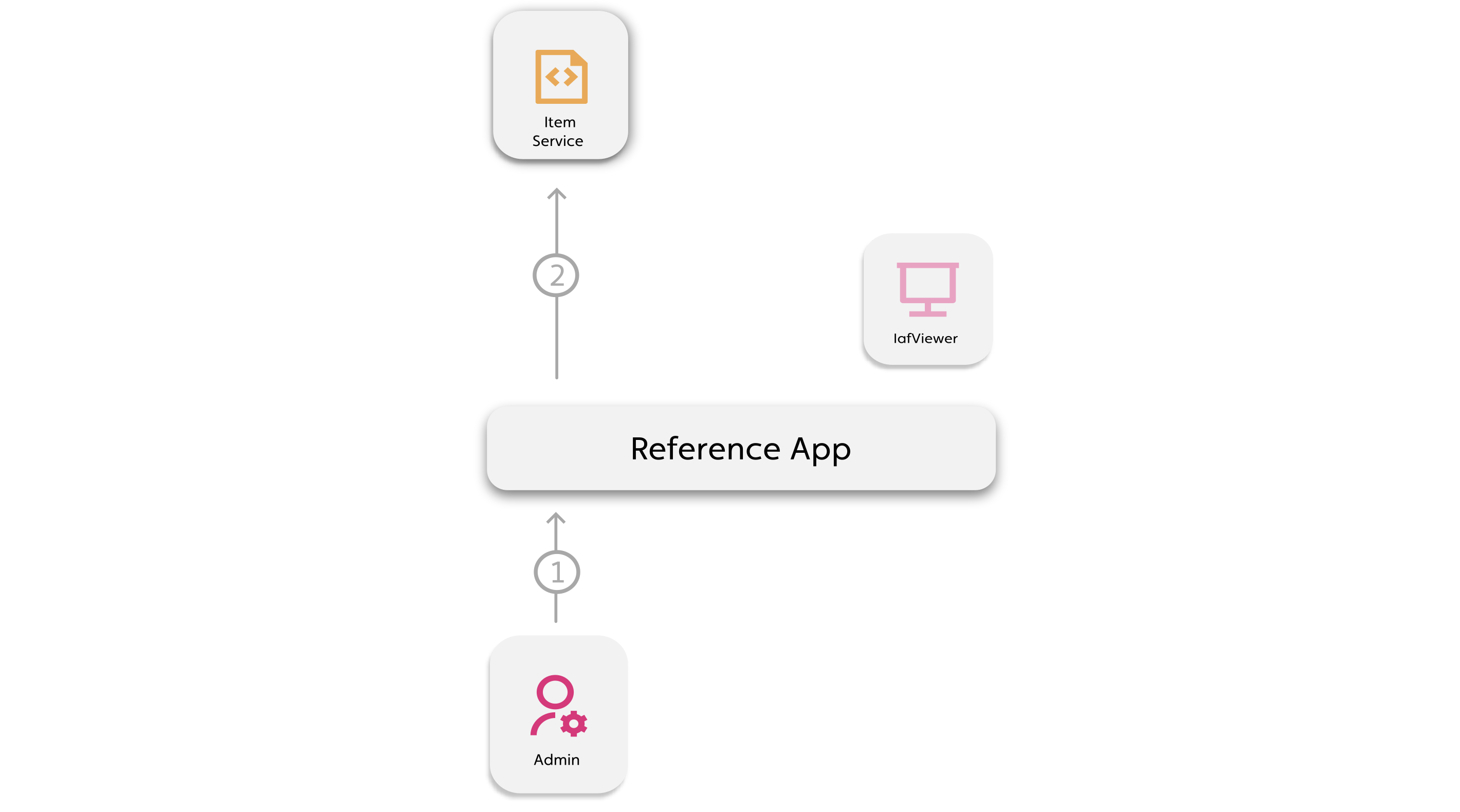
Callout Description 1 The admin user selects a provider and enters its secret and token config information. 2 The token config stores as a RelatedItem in the token config NamedUserCollection in the Item Service, with the secret as an encrypted field and an _apifield naming the provider. The provider is also added to the project'sapiTokenConfigsuser attribute.
-
-
Third-party API temp token secure request:
-
When non-admin users open the viewer, the stored secret is used to get a temporary token from each configured provider
-
To read the secret and call the provider's API securely, use a Workflow and its Script, which runs in the back-end Script Execution Service. One Workflow and one Script serve every provider. The provider name is passed as the
apiinput -
Tokens are cached in session storage and refreshed before they expire, so long sessions don't lose their map or APS content
-
For more information, see Secure third-party API temp token request
Figure: Third-party API temp token request architecture
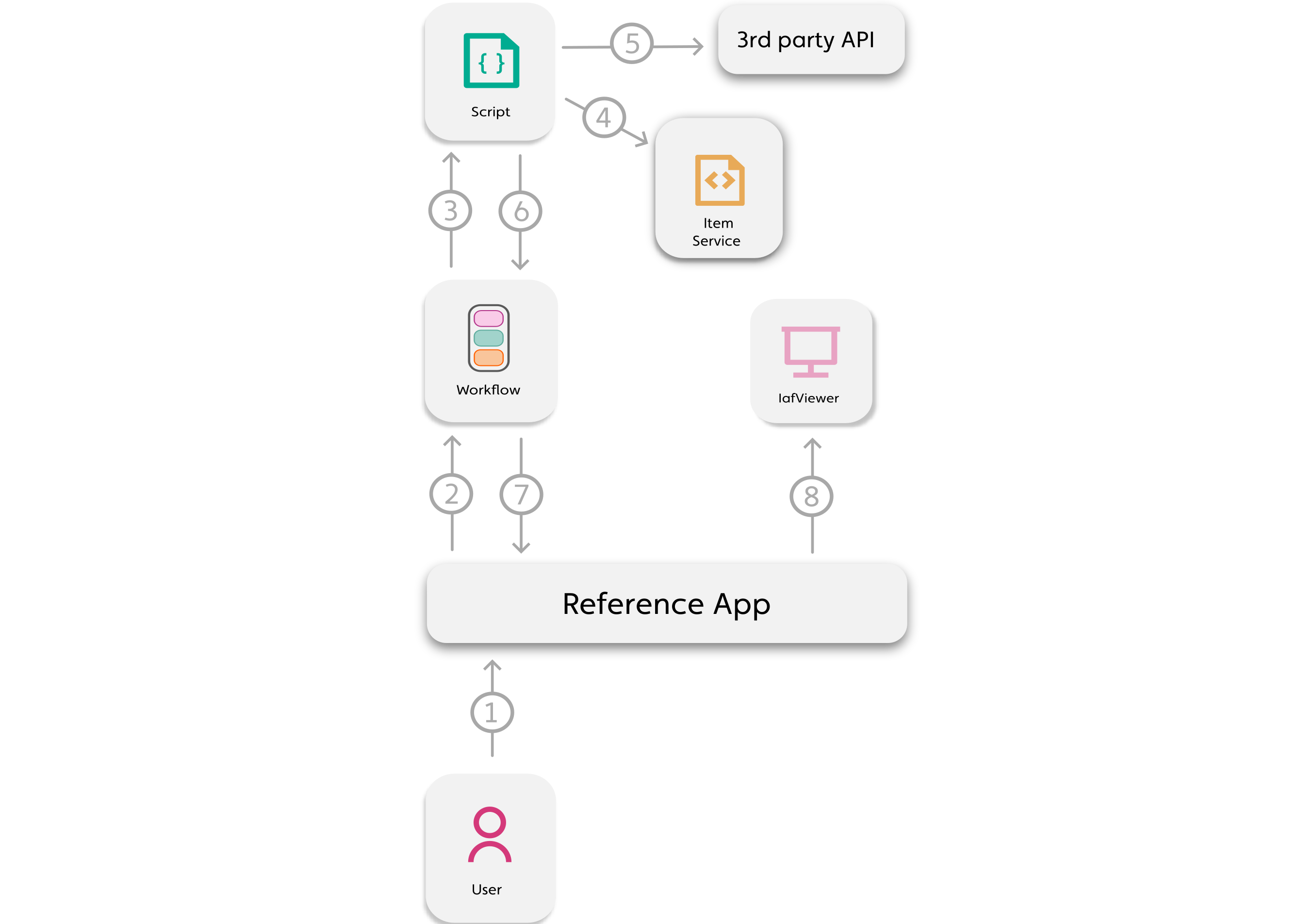
Callout Description 1 Non-admin user opens the 3D model in the viewer. The token manager starts a request for each provider in the project's apiTokenConfigs2 The token Workflow runs with a permission profile that lets the script read the token config collection and the scripts it loads from Item Service 3 The Workflow runs the iaf_tokenscript with the requestedapi4 The script reads the latest config for that provider and project from Item Service 5 The script uses the secret to request a temp token from the provider's API 6 Script returns { token, expiresAt, tokenType }7 Workflow returns the token and its expiry 8 Token passed to IafViewer, cached in session storage, and refreshed before it expires
-
Reference App file reference
For a deeper dive, refer to the following files in the Reference App:
Note: The following files are refactors of MapboxSecretSubmit.jsx, iaf_map_box.js, and iaf_mapbox.js which handled a single token for Mapbox.
-
components/Input/SecretSubmitForm.jsx: A reusable form for every provider's token config data -
components/Input/secretSubmitConfig.js: Configs which contain form fields, labels, regex rules, and a submit handler for each provider -
ModelImportView.jsx: ShowsSecretSubmitFormunder a Token config heading -
services/tokenService.js: Local API file with token functions and the token manager -
services/__tests__/tokenService.test.js: Unit tests for the token service and token manager -
scripts/NextScriptEngine/scripts/js/iaf_token.js: Script uploaded to Item Service with a request definition for each provider, which is run by the Workflow and requests a token using the stored encrypted secret -
NavigatorView.jsx: Starts the token manager on mount, stops it on unmount, and keeps tokens in state by provider -
EnhancedIafViewer.jsx,IafViewer.light.client.jsx: Pass the Mapbox token togis.tokenand the APS token toaps.config.accessToken
Third-party API secret secure storage
To securely store a third-party API secrets, the Reference App has the following resources and architecture:
- NamedUserCollection for token configs
- Collect the token config data with a form
- Create a RelatedItem with the token config data and an
_apifield naming the provider, making sure to store the secret as an encrypted field - Record the provider on the project so the app knows to request a token for it
For more information, see the following walkthrough of the setup in the Reference App:
Walkthrough: Securely storing a third-party API secret
-
Get credentials from the provider:
-
Mapbox: Create a Mapbox account and create a new token, ensuring it has at least the following scopes: TOKENS:WRITE, STYLES:READ, DATASETS:READ, MAP:READ, FONTS:READ.
Note: You cannot use the default Mapbox token, you must create a new one.
-
APS: Create an application in the Autodesk Platform Services developer portal and copy its client ID and client secret.
-
-
The
SecretSubmitForm.jsxcomponent has a Type dropdown. Each option comes fromSECRET_SUBMIT_CONFIGSinsecretSubmitConfig.js, and the selected option decides which fields the form shows:- Mapbox
- Mapbox account username
- The scopes you want to apply to the temp token from the secret token scopes, in a valid JSON array. Defaults to the read-only scopes, as the temp token is sent to the browser:
["styles:read", "datasets:read", "map:read", "fonts:read"] - Secret token
- Autodesk
- Client ID
- Client secret
- Scopes, optional and separated by spaces. Defaults to
viewables:read
The form checks required fields and runs each field's
parsefunction before submitting. Secret fields are password inputs.Figure: Token config data form
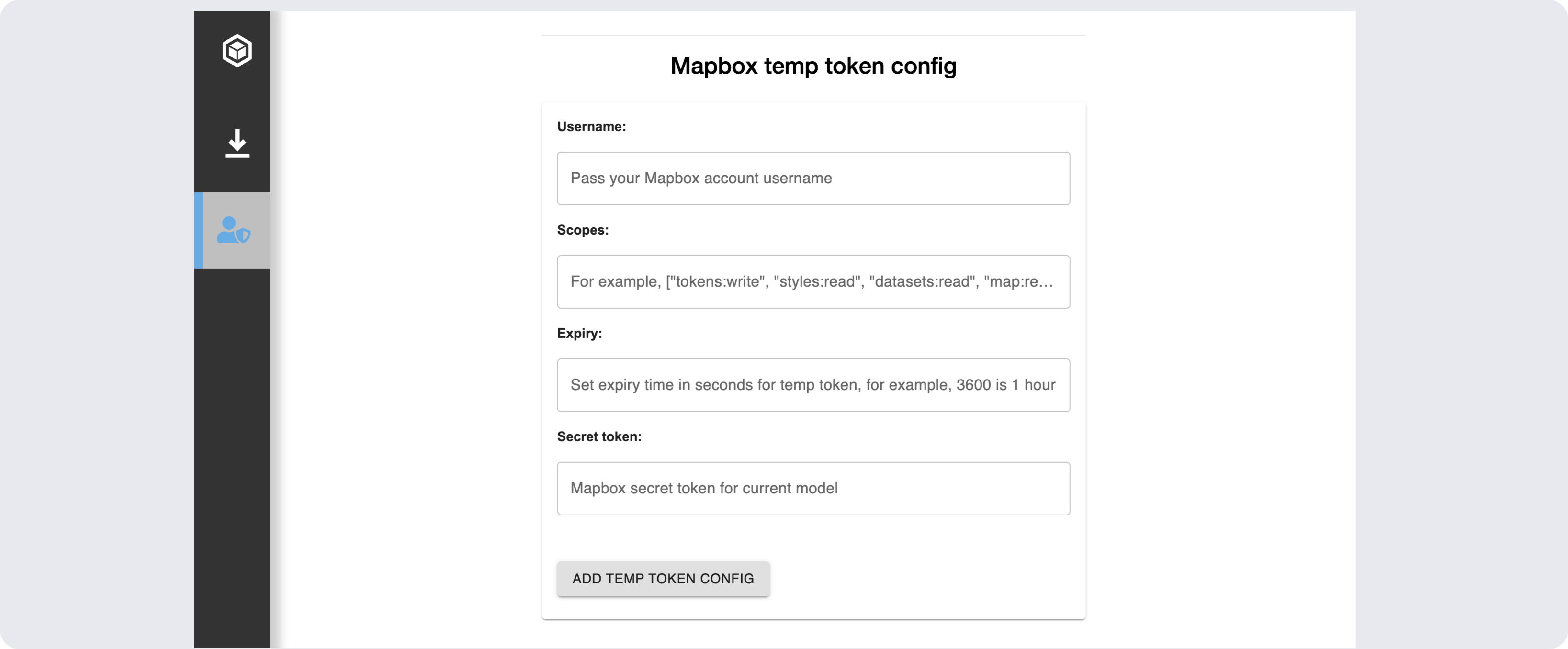
Each provider's config defines its fields and an
onSubmithandler. For example, the Mapbox entry:export const SECRET_SUBMIT_CONFIGS = {mapbox: {label: 'Mapbox',storageKey: 'mapboxKey',submitText: 'Add temp token config',fields: [{ key: 'username', label: 'Username', placeholder: 'Pass your Mapbox account username' },{key: 'scopes',label: 'Scopes',defaultValue: '["styles:read", "datasets:read", "map:read", "fonts:read"]',parse: (value) => {const scopes = JSON.parse(value);if (!Array.isArray(scopes)) throw new Error('Scopes must be a JSON array');return scopes;}},{ key: 'secret', label: 'Secret token', type: 'password' }],onSubmit: async ({ username, scopes, secret }, { PlatformApi, ctx, project, storageKey }) => {return await tokenService.saveTokenConfig({ api: 'mapbox', storageKey },project,{_username: username,_scopes: scopes,'._secret': secret // '.' prefix for Item Service encryption},PlatformApi,ctx);}},aps: { ... }}; - Mapbox
-
On form submit, the selected provider's
onSubmitcallssaveTokenConfig()intokenService.js. It adds the token config RelatedItem, then records the provider on the project's Workspace object:async saveTokenConfig({ api, storageKey }, project, fields, PlatformApi, ctx) {await this.addSecretToTokenColl(api, project._id, fields, null, PlatformApi, ctx);return await this.addApiTokenConfigToProject({ api, storageKey }, project, PlatformApi, ctx);},The
checkForTokenColl()function checks if a token config collection already exists:async checkForTokenColl(PlatformApi, ctx) {const { IafItemSvc } = PlatformApi;const tokenCollRes = await IafItemSvc.getNamedUserItems({ query: { _userType: "token_config_coll" } },ctx,{});if (tokenCollRes._list.length) {return tokenCollRes._list[0];}return await this.createTokenColl(PlatformApi, ctx);},If not, it creates the NamedUserCollection with the
_encryptionEnabledparameter to later encrypt the secret field in the token config RelatedItem. One collection holds the configs for every provider:async createTokenColl(PlatformApi, ctx) {const { IafItemSvc } = PlatformApi;const tokenCollDef = {_name: "Token Configs Collection",_shortName: "token_config_coll",_description: "Named User Collection for third party API token configs",_namespaces: ctx._namespaces,_userType: "token_config_coll",_encryptionEnabled: true};const tokenColl = await IafItemSvc.createNamedUserItems([tokenCollDef],"NamedUserCollection",ctx);return tokenColl._list[0];},The
addSecretToTokenColl()function defines the token config RelatedItem from the form fields. It adds_apiand_projIdso the script can find the latest config for a provider and project. Prefix encrypted field names with., for example'._secret':async addSecretToTokenColl(api, projId, fields, coll, PlatformApi, ctx) {const { IafItemSvc } = PlatformApi;const tokenColl = coll || await this.checkForTokenColl(PlatformApi, ctx);const tokenRelItems = [{...fields, // e.g. { _username, _scopes, '._secret' }_api: api,_projId: projId}];...},Then it uses
IafItemSvc.createRelatedItemsto add the item to the collection as a RelatedItem:...const tokenItems = await IafItemSvc.createRelatedItems(tokenColl._id,tokenRelItems,ctx);return tokenItems; -
addApiTokenConfigToProject()adds{ api, storageKey }to the project'sapiTokenConfigsuser attribute.storageKeynames the session storage entry the token is cached in. The token manager only requests tokens for providers listed here:async addApiTokenConfigToProject({ api, storageKey }, project, PlatformApi, ctx) {const { IafProj, IafSession } = PlatformApi;const apiTokenConfigs = this.getApiTokenConfigs(project);const existing = apiTokenConfigs.find(config => config.api === api);if (existing?.storageKey === storageKey) return project;const updatedProjectDef = {...project,_userAttributes: {...project._userAttributes,apiTokenConfigs: [...apiTokenConfigs.filter(config => config.api !== api),{ api, storageKey }]}};const updatedProject = await IafProj.update(updatedProjectDef, ctx);IafSession.setSessionStorage("project", updatedProject);return updatedProject;},The form sets the returned project as the selected project, so the app sees the change without a reload.
Secure third-party API temp token request
To securely request third-party API temp tokens in the Reference App, the following resources are created:
- Create a permission profile
- Create a script that reads the encrypted secret and requests a temp token from the provider
- Create a Workflow that references the permission profile and script
- In the component that contains the IafViewer component, start a token manager that loads each provider's token into state and refreshes it before it expires
The Reference App creates the collection, scripts, permission profile and Workflow the first time a token is requested.
For more information, see the following walkthrough of the setup in the Reference App:
Walkthrough: Securely requesting a third-party API temp token
-
When
NavigatorView.jsxmounts, it creates a token manager withcreateApiTokenManager()and starts it. The manager callssetApiToken()each time a token is loaded or refreshed. On unmount, the manager is stopped so no refreshes run after the page closes:async componentDidMount() {...this.tokenManager = createApiTokenManager({ project, PlatformApi, onToken: this.setApiToken });this.tokenManager.start();}componentWillUnmount() {this.isUnmounted = true;this.tokenManager?.stop();}setApiToken(api, token) {this.setState(prevState => ({apiTokens: { ...prevState.apiTokens, [api]: token }}));}start()reads the providers from the project'sapiTokenConfigsand checks each one in parallel. If none are configured, it doesn't run the Workflow:async start() {const apiTokenConfigs = tokenService.getApiTokenConfigs(project);if (!apiTokenConfigs.length) return;await Promise.all(apiTokenConfigs.map(apiTokenConfig => checkToken(apiTokenConfig)));},checkToken()looks for a fresh token in session storage. The cache key includes the project namespace, because projects can use different accounts or scopes. Session storage means the token doesn't outlive the browser tab:async function checkToken(apiTokenConfig, { skipCache = false } = {}) {const { api, storageKey } = apiTokenConfig;const cacheKey = `${storageKey}_${project._namespaces[0]}`;try {const cached = !skipCache && readCachedToken(cacheKey);if (cached && tokenService.checkTokenFreshness(cached.token, cached.expiresAt)) {onToken(api, cached.token);scheduleRefresh(apiTokenConfig, cached.token, cached.expiresAt);return;}const ctx = { _namespaces: project._namespaces };const { token, expiresAt } = await tokenService.getTokenWithExpiry(api, project, PlatformApi, ctx, { loggerConfig });if (stopped) return;if (!token) throw new Error(`no ${api} token returned`);onToken(api, token);sessionStorage.setItem(cacheKey, JSON.stringify({ token, expiresAt }));scheduleRefresh(apiTokenConfig, token, expiresAt);} catch (e) {// A failed refresh leaves the current token in place, so keep retrying until it succeedsif (skipCache && !stopped) {setRefreshTimer(apiTokenConfig, TOKEN_REFRESH_RETRY_MS);}}}If there is a cached token,
checkTokenFreshness()checks its expiry. It uses the expiry the provider returned if there is one, because not every provider's token can be decoded. Otherwise it decodes the token's JWTexpclaim. Tokens within 60 seconds of expiry, or with an unknown expiry, count as stale:getTokenExpiry(token, expiresAt) {const expiresAtMs = expiresAt ? Date.parse(expiresAt) : NaN;if (!Number.isNaN(expiresAtMs)) return expiresAtMs;try {const payload = token.split(".")[1].replace(/-/g, "+").replace(/_/g, "/");const decodedToken = JSON.parse(atob(payload));return typeof decodedToken.exp === "number" ? decodedToken.exp * 1000 : null;} catch (e) {return null;}},checkTokenFreshness(token, expiresAt, skewSeconds = 60) {const expiry = this.getTokenExpiry(token, expiresAt);return expiry !== null && expiry - skewSeconds * 1000 > Date.now();}If there is no token or the token is stale, a token request is required.
-
Once a token is loaded,
scheduleRefresh()sets a timer to fetch a new one 5 minutes before it expires. Tokens with less time left refresh at half their remaining time, and never sooner than 10 seconds. If a refresh fails, the current token stays in use and the refresh retries every 60 seconds:function scheduleRefresh(apiTokenConfig, token, expiresAt) {const expiry = tokenService.getTokenExpiry(token, expiresAt);if (expiry === null) return;const remaining = Math.max(expiry - Date.now(), 0);const delay = Math.max(remaining - TOKEN_REFRESH_LEAD_MS, remaining / 2, TOKEN_REFRESH_MIN_MS);setRefreshTimer(apiTokenConfig, delay);} -
The
getTokenWithExpiry()function first prepares the token Workflow, creating anything that is missing, then runs it and reads the token and expiry from its output. Setup runs one at a time per namespace, so parallel requests for different providers don't create duplicate resources:async getTokenWithExpiry(api, project, PlatformApi, ctx, options = {}) {const apiConfig = this.getApiConfig(api, options.apiConfig);const workflowDef = await this.withSetupLock(ctx._namespaces[0], () =>this.prepareTokenWorkflow(api, apiConfig, project, PlatformApi, ctx));const workflowResult = await this.runTokenWorkflow(api,workflowDef,project._id,PlatformApi,ctx,options);const token = workflowResult?._output?.scriptOutput?.token;const expiresAt = workflowResult?._output?.scriptOutput?.expiresAt;return { token, expiresAt };},prepareTokenWorkflow()checks for the token config collection and theiaf_tokenscript. If the script is missing, it uploads it from its source file in the repo, imported as text with the webpack?rawrule:async prepareTokenWorkflow(api, apiConfig, project, PlatformApi, ctx) {await this.checkForTokenColl(PlatformApi, ctx);const { scriptUserType } = apiConfig.workflow;const scriptExists = await this.checkTokenScriptExists(scriptUserType, PlatformApi, ctx);if (!scriptExists && scriptUserType === "iaf_token") {await this.addTokenScript(PlatformApi, ctx);} else if (!scriptExists) {throw new Error(`tokenService: script '${scriptUserType}' not found for api '${api}'`);}await this.ensureLogHandlerScript(PlatformApi, ctx);return await this.checkTokenWorkflow(apiConfig, project._id, PlatformApi, ctx);}, -
The
checkTokenWorkflow()function makes sure the permission profile exists and has every permission the Workflow needs, then creates the Workflow if it doesn't already exist. The permission profile gives access to data that the logged-in user doesn't have permissions for:async checkTokenWorkflow(apiConfig, projId, PlatformApi, ctx) {// Checked on every run so the profile picks up re-uploaded script idsconst permProfile = await this.ensureTokenPermProfile(apiConfig.workflow.scriptUserType,projId,PlatformApi,ctx);let workflowDef = await this.findTokenWorkflow(apiConfig, PlatformApi, ctx);if (!workflowDef) {workflowDef = await this.createTokenWorkflow(apiConfig, permProfile, PlatformApi, ctx);} else if (workflowDef._permissionProfileId !== permProfile._id) {workflowDef = await this.addPermProfileId(workflowDef, permProfile, PlatformApi, ctx);}return workflowDef;},getTokenPermissions()lists the permissions the profile needs: the project workspace, the token config collection, and theiaf_tokenscript:async getTokenPermissions(scriptUserType, projId, PlatformApi, ctx) {const namespace = ctx._namespaces[0];const readPermission = (irn) => ({_actions: ["READ"],_namespace: namespace,_resourceDesc: { _irn: irn },});const coll = await this.checkForTokenColl(PlatformApi, ctx);const scriptPermissions = [];for (const userType of [scriptUserType, "log_handler"]) {const script = await this.getScriptByUserType(userType, PlatformApi, ctx);scriptPermissions.push(readPermission(`itemsvc:nameduseritem:${script._id}`));}return [{_actions: ["READ", "SHARE"],_namespace: namespace,_resourceDesc: { _irn: `passportsvc:workspace:${projId}` },},readPermission(`itemsvc:nameduseritem:${coll._id}`), // platform resource indicator for collection...scriptPermissions];},ensureTokenPermProfile()creates thetoken_service_permpermission profile with these permissions. If the profile already exists, it adds any permissions it is missing, for example after a script is re-uploaded with a new id.When creating the Workflow, the permission profile's id is passed in the
_permissionProfileIdfield. The Workflow takes the provider as itsapiinput and passes it to the script:async createTokenWorkflow(apiConfig, permProfile, PlatformApi, ctx) {const { IafWorkflowSvc } = PlatformApi;const { name, description, userType, scriptUserType, scriptName, inputParams = {} } = apiConfig.workflow;const wfInputParams = {api: { type: "string", value: "", encrypt: "false" },projId: { type: "string", value: "", encrypt: "false" },project: { type: "object", value: {}, encrypt: "false" },loggerConfig: { type: "object", value: {}, encrypt: "false" },...inputParams};...const tokenWf = await IafWorkflowSvc.createWorkflowDef({_name: name, // "Request_Api_Token"_description: description,_namespaces: ctx._namespaces,_userType: userType, // "api_token_wf"_permissionProfileId: permProfile._id,_retryCount: 0,_taskDefs: [{_name: "default_script_target",_type: "SCRIPT_EXECUTION",_inputParams: {...taskInputParams,_userType: scriptUserType, // "iaf_token"_scriptName: scriptName // "requestToken"},_sequenceno: 1,},],_inputParams: wfInputParams,},ctx);return tokenWf;},runTokenWorkflow()runs the Workflow with the provider and project, then checks its status every 3 seconds. It stops after 5 minutes, or if the Workflow ends withFAILED,TERMINATEDorTIMED_OUT. -
The Workflow's script,
requestToken, iniaf_token.js, looks up the provider inTOKEN_PROVIDERS, then finds the latest token config RelatedItem for that provider and project using afindWithRelatedquery on the token config collection:async function requestToken(input, libraries, ctx) {const { IafScriptEngine, PlatformApi } = libraries;const { api, projId, loggerConfig } = input.actualParams;...const provider = TOKEN_PROVIDERS[api];if (!provider) return null;const config = await getLatestTokenConfig(api, projId, IafScriptEngine, ctx);if (!config) return null;return await fetchToken(api, provider, config);}async function getLatestTokenConfig(api, projId, IafScriptEngine, ctx) {const tokenConfigQuery = {parent: {collectionDesc: {_userType: "token_config_coll"},options: {page: {getAllItems: true},sort: {"_metadata._createdAt": -1}},query: {_api: api,_projId: projId}}};const tokenConfigs = await IafScriptEngine.findWithRelated(tokenConfigQuery, ctx);return tokenConfigs?._list?.[0];}Each provider in
TOKEN_PROVIDERShas two functions:buildRequest(config)builds the token request from the config item, andparseResponse(body, request)reads{ token, expiresAt, tokenType }from the response. Encrypted fields are read with their._prefix:const TOKEN_PROVIDERS = {// config: { '._secret', _username, _scopes?, _expiry? (seconds) }mapbox: {buildRequest(config) {const expiresInSeconds = config._expiry || 3600;const expires = new Date(Date.now() + expiresInSeconds * 1000).toISOString();return {url: `https://api.mapbox.com/tokens/v2/${config._username}`,method: "POST",headers: {Authorization: `Bearer ${config["._secret"]}`,"Content-Type": "application/json"},body: JSON.stringify({expires,// Read only, as the token is sent to the browserscopes: config._scopes || [MapboxScopes.STYLES_READ,MapboxScopes.DATASETS_READ,MapboxScopes.MAP_READ,MapboxScopes.FONTS_READ],note: "Temporary token for IafViewer session"}),expiresAt: expires};},parseResponse(body, request) {return { token: body?.token, expiresAt: request.expiresAt, tokenType: "Bearer" };}},// Two legged client credentials token, lifetime is fixed by APS at ~1 hour// config: { _clientId, '._secret', _scopes? }aps: {buildRequest(config) {const scopes = toArray(config._scopes || [ApsScopes.VIEWABLES_READ]);return {url: "https://developer.api.autodesk.com/authentication/v2/token",method: "POST",headers: {Authorization: `Basic ${encodeBase64(`${config._clientId}:${config["._secret"]}`)}`,"Content-Type": "application/x-www-form-urlencoded",Accept: "application/json"},body: `grant_type=client_credentials&scope=${encodeURIComponent(scopes.join(" "))}`};},parseResponse(body) {return {token: body?.access_token,expiresAt: body?.expires_in? new Date(Date.now() + body.expires_in * 1000).toISOString(): undefined,tokenType: body?.token_type};}}};The
fetchToken()function sends the request and parses the response the same way for every provider. It returnsnullif the request fails or the response has no token:async function fetchToken(api, provider, config) {try {const request = provider.buildRequest(config);const res = await fetch(request.url, {method: request.method,headers: request.headers,body: request.body});const body = await readBody(res);const result = provider.parseResponse(body, request);if (!result?.token) return null;return result;} catch (err) {logHandler.error(`${api} token Error:`, logHandler.stringifyData(err));return null;}} -
Each token is kept in
state.apiTokensby provider and passed to the IafViewer. The Mapbox token goes togis.tokenand the APS token goes toaps.config.accessToken:<EnhancedIafViewer...mapboxToken={this.state.apiTokens.mapbox}apsToken={this.state.apiTokens.aps}/><IafViewerDBM...gis={{...this.state.gis,token: this.props.mapboxToken,onIafMapReady: (map) => this.props.enableGisDrawer?.(map)}}aps={{...this.props.aps,config: {...this.props.aps?.config,// Left undefined, the viewer fetches its own token from GraphicsServiceaccessToken: this.props.apsToken || undefined,},}}/>Note: The viewer reads
gis.tokenonly once, when the GIS component first loads.aps.config.accessTokenis re-applied whenever it changes, so refreshed APS tokens take effect straight away.
Adding a new third-party API
To add another provider, use the same key in each of the following places. The key is the _api value stored on the token config:
- In
iaf_token.js, add an entry toTOKEN_PROVIDERSwithbuildRequest(config)andparseResponse(body, request). Read encrypted fields with their._prefix, for exampleconfig['._secret']. - In
tokenService.js, add an entry toTOKEN_API_CONFIGS. In most cases, this uses the shared Workflow:export const TOKEN_API_CONFIGS = {mapbox: { workflow: GENERIC_TOKEN_WORKFLOW },aps: { workflow: GENERIC_TOKEN_WORKFLOW },myApi: { workflow: GENERIC_TOKEN_WORKFLOW }}; - In
secretSubmitConfig.js, add an entry toSECRET_SUBMIT_CONFIGSwith alabel, astorageKey, thefieldsand anonSubmitthat callstokenService.saveTokenConfig(). The new provider then appears in the form's Type dropdown. - In
NavigatorView.jsx, passthis.state.apiTokens.<key>to the component that needs the token.
The token manager picks up the new provider automatically once a config has been submitted for the project.
API token manager
The token manager loads a short-lived token for each third-party API (provider) that has a token config for the current project. It keeps each token current while the page is open. It is created with createApiTokenManager() in tokenService.js. NavigatorView.jsx uses it to pass Mapbox and APS tokens to the IafViewer.
Walkthrough
-
In
NavigatorView.jsx, a tokenManager is created:import { createApiTokenManager } from "../../services/tokenService.js";componentDidMount() {// ...after the models have loadedif (this.isUnmounted) return;this.tokenManager = createApiTokenManager({ project, PlatformApi, onToken: this.setApiToken });} -
The tokenManager starts:
this.tokenManager.start(); -
Checks run to make sure the required resources exist. If not, the first-time setup creates the required NamedUserCollection, Script, Permission Profile and Workflow for the secret submit and token request.
-
For each provider in the project's
apiTokenConfigsuser attribute, the token manager:a. Uses the cached token from session storage if it is still fresh.
b. Otherwise, runs the token workflow through
tokenService.getTokenWithExpiry()to get a new token.c. Passes the token to the
onToken(api, token)callback.d. Caches the token and its expiry in session storage.
e. Schedules a refresh before the token expires.
-
On unmount, such as leaving the page,
tokenManager.stop()calls and cancels every scheduled refresh and marks the manager as stopped. A request that is already running whenstop()is called finishes, but its result is thrown away:onTokenis not called, the token is not cached, and no further refresh is scheduled. Always callstop()when the page using the tokens goes away.
componentWillUnmount() {
  this.isUnmounted = true;
  this.tokenManager?.stop();
}
Caching
Tokens are cached in session storage, so a token does not outlive the browser tab. For example, the next person to use a shared computer does not get the previous user's token.
The cache key is <storageKey>_<namespace>:
storageKeycomes from the provider's entry inapiTokenConfigs. It is set by the submit form config insecretSubmitConfig.js, for examplemapboxKeyorapsKey.namespaceisproject._namespaces[0]. Different projects can use different accounts or scopes, so each project has its own cache entry.
Each entry is stored as JSON in the form { token, expiresAt }. An entry that is a plain token string, from before the expiry was cached, is still read. Its expiry then comes from the token itself, if possible.
A cached token is used only if tokenService.checkTokenFreshness() says it has more than 60 seconds left. A token whose expiry is unknown is treated as stale, so a new one is fetched.
Expiry and refresh
The expiry is worked out by tokenService.getTokenExpiry(token, expiresAt):
- It uses the provider's
expiresAt(an ISO date string returned by theiaf_tokenscript), if there is one. - Otherwise, it uses the
expclaim of a JWT-style token. - Otherwise, the expiry is unknown (
null).
When a token is loaded, the next refresh is scheduled after:
max(timeLeft - 5 minutes, timeLeft / 2, 10 seconds)
| Token lifetime left | Refresh after |
|---|---|
| 60 minutes | 55 minutes |
| 6 minutes | 3 minutes |
| 10 seconds | 10 seconds |
A token with an unknown expiry is not refreshed.