Mapbox temp tokens for IafViewer GIS
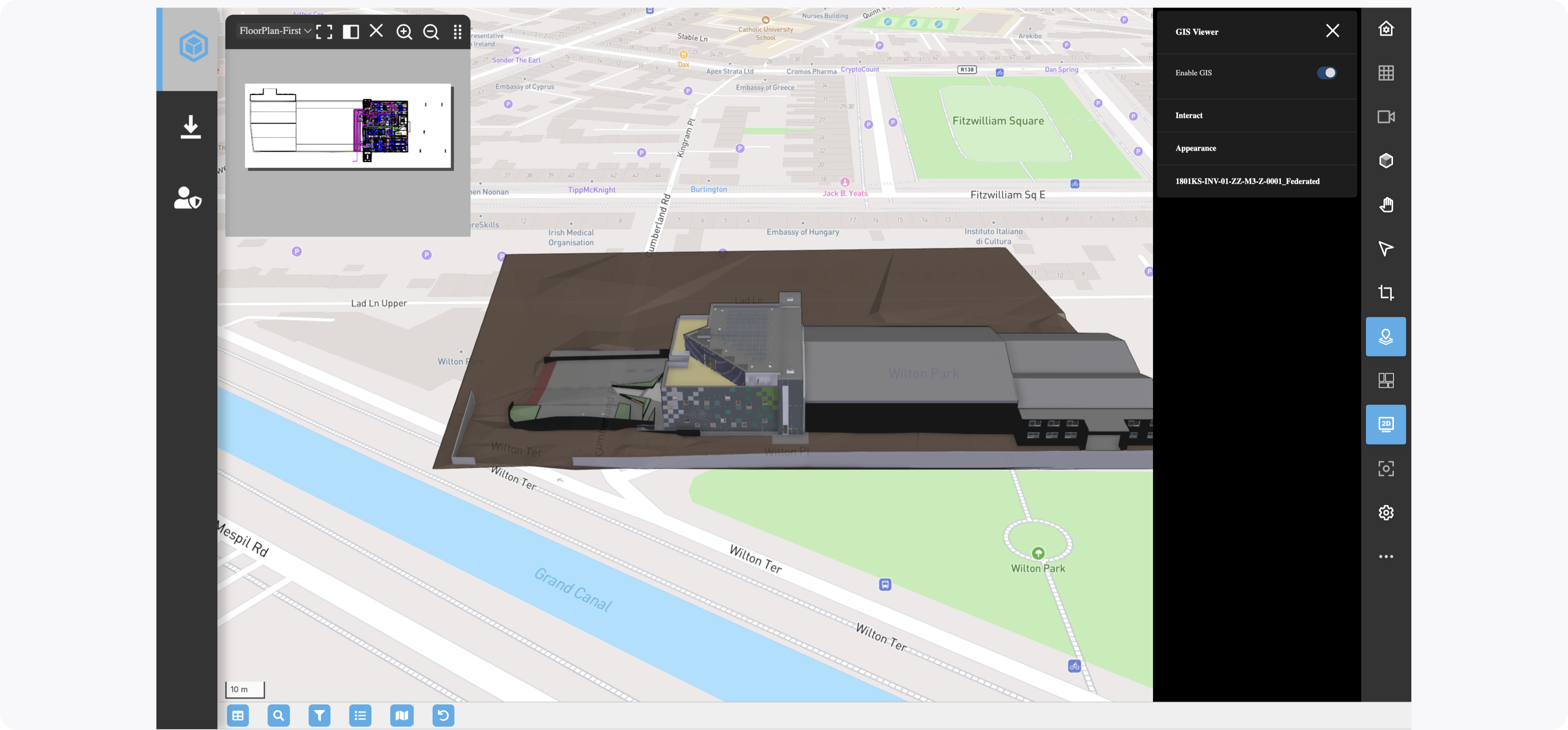
In the IafViewer, you can view your building model on a GIS map, using Mapbox.
Figure: Enable GIS
Secure Mapbox secret storage and temp token request architecture#
The IafViewer requires a temporary Mapbox token to load maps. Mapbox does not allow client-side requests for temp tokens for security purposes. As a result, it is best practice to complete the following:
Mapbox secret token secure storage:
The admin user can aquire a Mapbox license and store the Mapbox secret token as an encrypted parameter in the Item Service
The Reference App UI provides a form to intake this data
For more information, see Mapbox secret token secure storage
Figure: Mapbox temp token config setup architecture
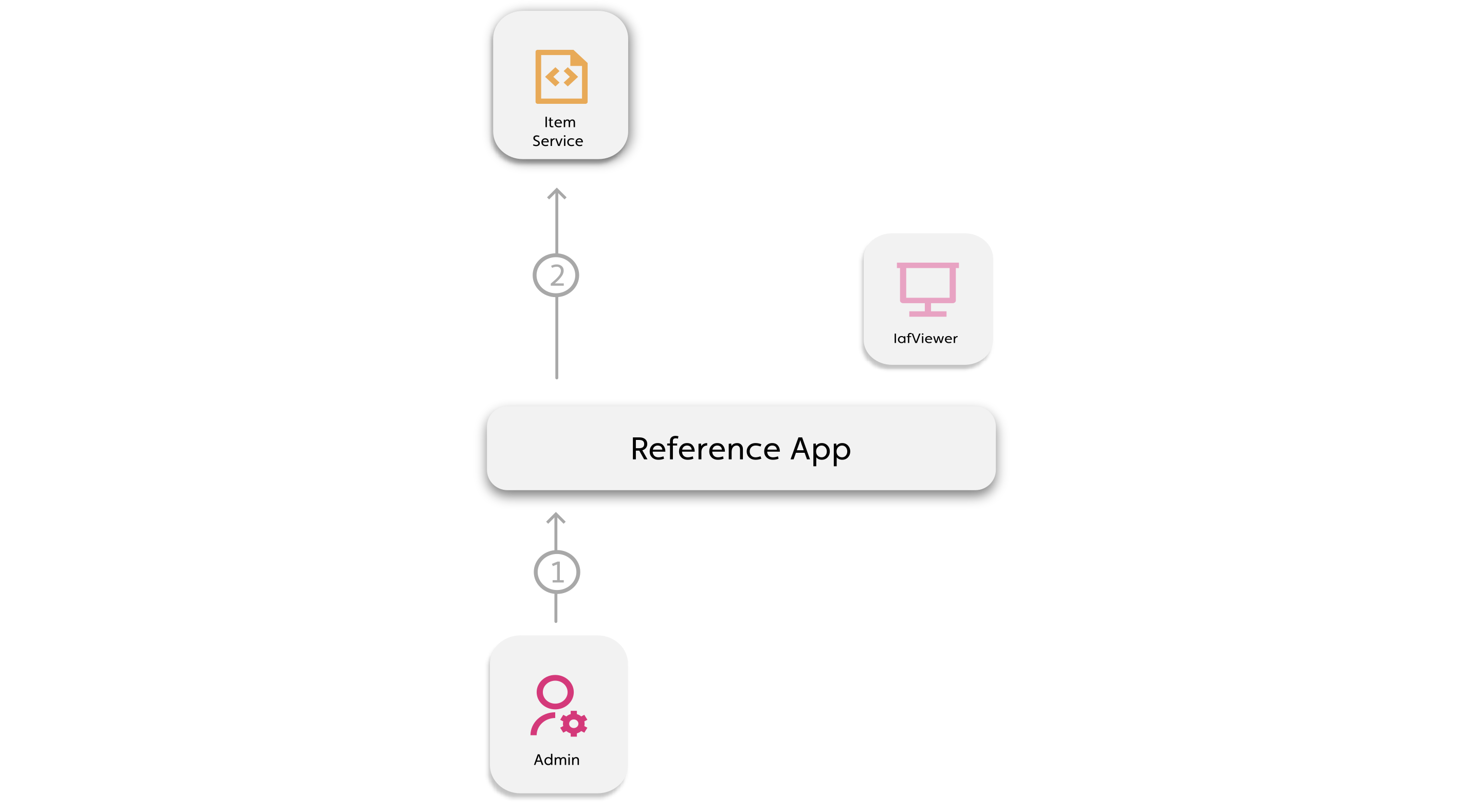
Callout Description 1 Admin user enters Mapbox secret and temp token config information 2 Stores token config as RelatedItem to a Mapbox token config NamedUserCollection in Item Service with the secret as an encrypted field
Mapbox temp token secure request:
When non-admin users enable GIS, the secret token is used to generate a temporary token from Mapbox so that the map loads
To securely retrieve the secret token make an API request to Mapbox for a temp token, use an Orchestrator and its Script, which executes in the back-end Script Execution Service
For more information, see Secure Mapbox temp token storage
Figure: Mapbox temp token config setup architecture
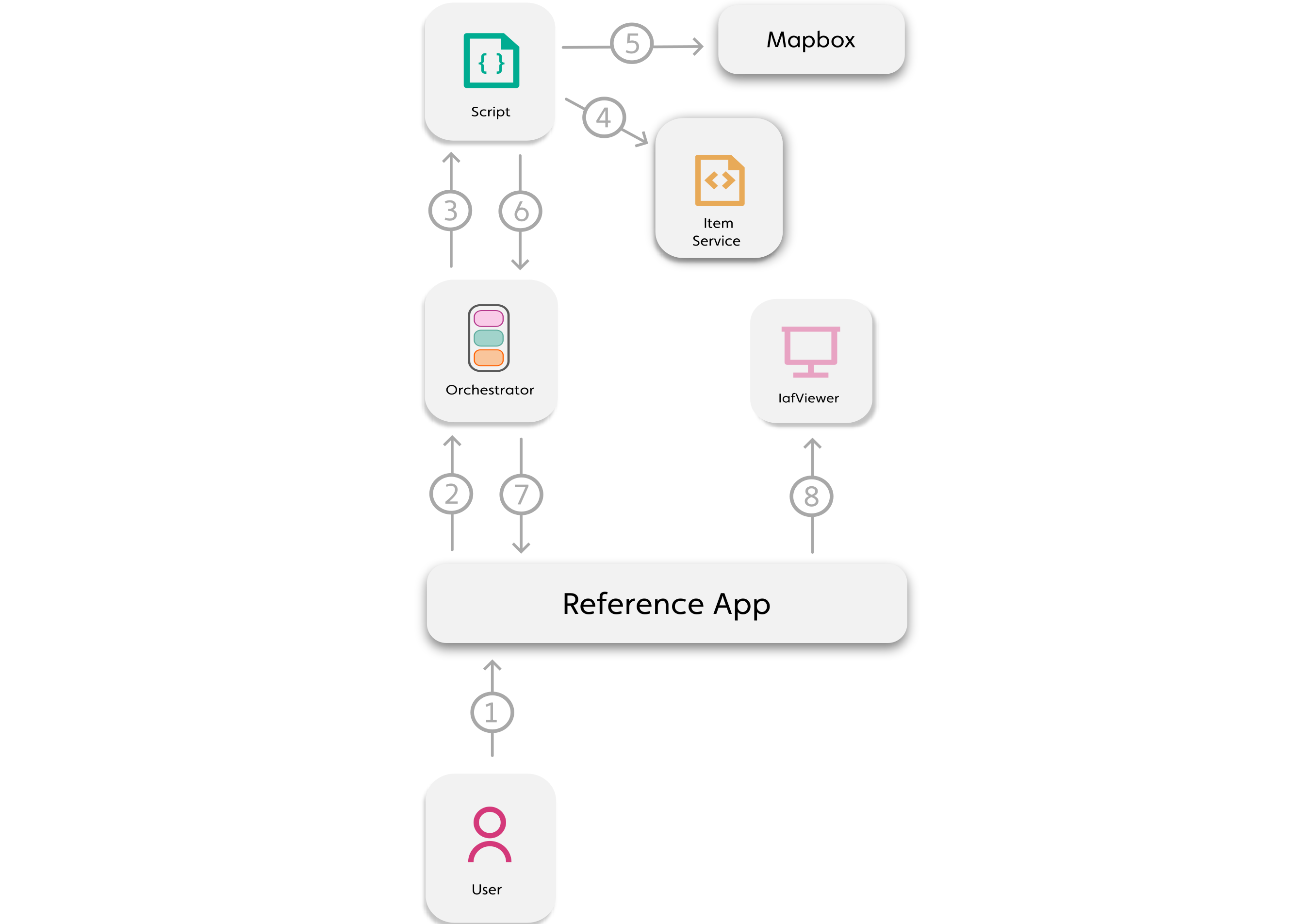
Callout Description 1 Non-admin user requests to view 3D model with Mapbox 2 Temp Mapbox token Orchestrator runs with permission profile, which permits the script read the mapbox secret from Item Service. 3 The Orchestrator runs the required script 4 The script reads the Mapbox secret from Item Service 5 The script uses the Mapbox secret to generate a temp token via the Mapbox API 6 Script returns temp token 7 Orchestrator returns temp token 8 Temp token passed to IafViewer and stored in session storage
New and updated files in Reference App for feature:#
- New:
MapboxSecretSubmit.jsx: Form to intake token config dataiaf_map_box.js: Local API file with Mapbox related functionsiaf_mapbox.js: Script uploaded to Item Service containing Mapbox functions for Orchestrator
- Updated:
NavigatorView.jsx: Added function to get temp token and store in statecreateOtherColls.js: Adds permission profile for Mapbox orchestrator in project setup
Mapbox secret token secure storage#
To securely store a Mapbox secret token from your app, complete the following:
- Create a NamedUserCollection for Mapbox temp token configs
- Intake the temporary token config data via a form
- Create a RelatedItem consisting of the temporary token config data, making sure to store the secret token as an encrypted field
For more information, see the following walkthrough of the setup in the Reference App:
Walkthrough: Securely storing a Mapbox secret token#
Create a Mapbox account and create a new token, ensuring it has at least the following scopes: TOKENS:WRITE, STYLES:READ, DATASETS:READ, MAP:READ, FONTS:READ.
Note: You cannot use the default Mapbox token, you must create a new one.
The form in the
MapboxSecretSubmit.jsxcomponent takes the following required data:
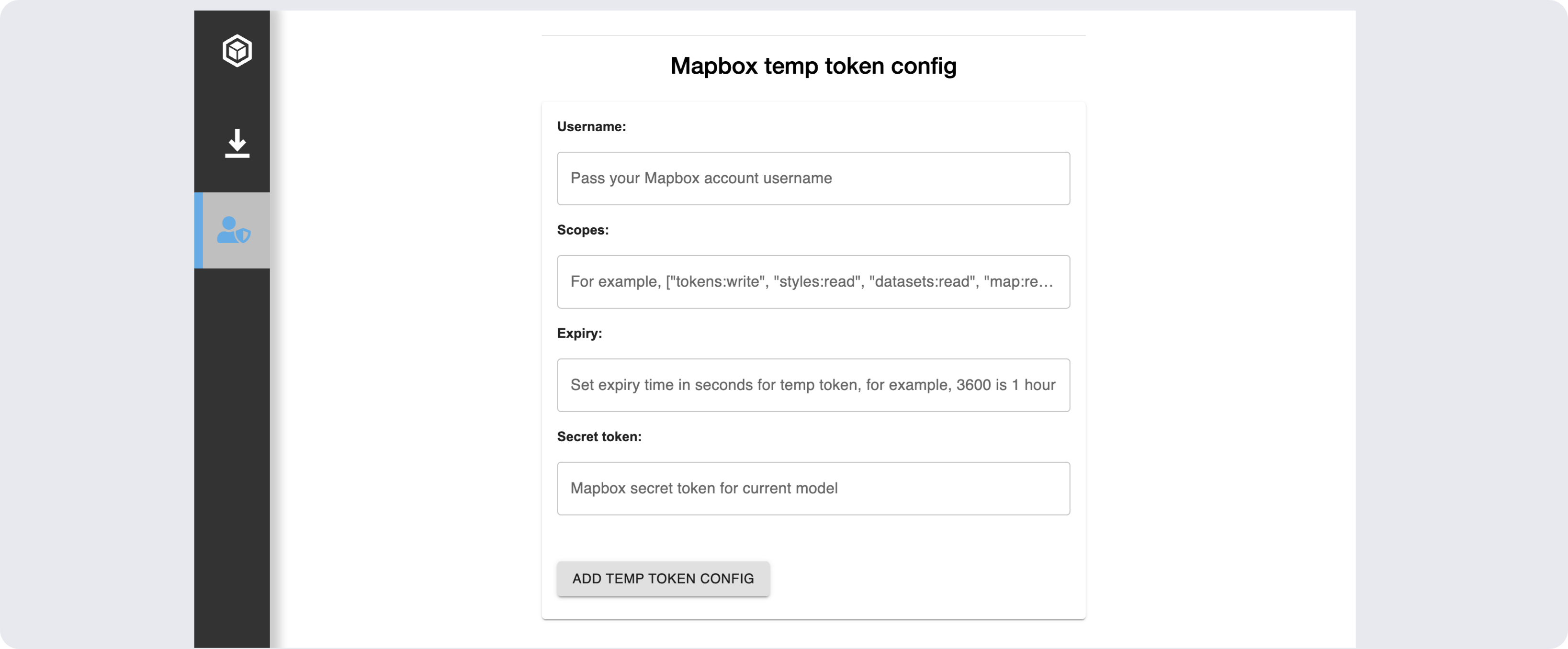
Mapbox account username
Token expiry time in seconds
The scopes you want to apply to the temp token from the secret token scopes, in a valid JSON array:
["tokens:write", "styles:read", "datasets:read", "map:read", "fonts:read"]Secret token
Figure: Temp token config data form
- On form submit,
addMapConfig()creates the Mapbox temp token configuration collection, then adds the form token config data as a RelatedItem:Theconst addMapConfig = async () => { setStatus('Adding Mapbox temp token config') const mapboxColl = await mapBox.checkForMapconfigColl(PlatformApi, ctx); await mapBox.addSecretToMapboxColl( username, JSON.parse(scopes), expiry, secret, mapboxColl, appContext.selectedItems.selectedProject._id, PlatformApi, ctx ); ... }checkForMapconfigColl()function iniaf_map_box.jschecks if a mapbox temp token configuration collection already exists:If not, it creates the NamedUserCollection with theasync checkForMapconfigColl(PlatformApi, ctx) { const { IafItemSvc } = PlatformApi; let mapboxCollRes = await IafItemSvc.getNamedUserItems( { "query": { _userType: 'mapbox_config_coll' } }, ctx, {} ); ... },_encryptionEnabledparameter to later encrypt the secret token field in the Mapbox token config RelatedItem:Theasync createMapboxConfigColl(PlatformApi, ctx) { const { IafItemSvc } = PlatformApi; const mapBoxCollDef = { _name: `MapBox Configs Collection`, _shortName: "mapbox_config_coll", _description: "Named User Collection to store sensor and points data", _namespaces: ctx._namespaces, _userType: "mapbox_config_coll", _encryptionEnabled: true }; let mapBoxConfigColl = await IafItemSvc.createNamedUserItems( [mapBoxCollDef], 'NamedUserCollection', ctx ); },addSecretToMapboxColl()function defines the Mapbox token config RelatedItem based in the form input. For the secret field, prefix.to the field name to encrypt its value:Then it usesasync addSecretToMapboxColl(username, scopes, expiry, secret, coll, projId, PlatformApi, ctx) { const { IafItemSvc } = PlatformApi; const mapboxRelItems = [ { '_projId': projId, '_username': username, '_scopes': scopes, '_expiry': expiry, '._secret': secret // '.' prefix for Item Service encryption } ]; ... }IafItemSvc.createRelatedItemsto add the item to the collection as a RelatedItem:... const mapboxItems = await IafItemSvc.createRelatedItems( coll._id, mapboxRelItems, ctx ); return mapboxItems;
Secure Mapbox temp token request#
To securely request a Mapbox temp token from your app, complete the following:
- Create a permission profile
- Create script that gets the encrypted secret token and sends a request to mapbox for a temp token
- Create an orchestrator with reference to the permission profile and script
- In your component that contains the IafViewer component, add a function that handles the temp token in state
For more information, see the following walkthrough of the setup in the Reference App:
Walkthrough: Securely requesting a Mapbox temp token#
When
NavigatorView.jsxmounts, thecheckMapboxToken()function checks if there is a fresh Mapbox temp token in session storage and if not, it requests one, then updates the state:async checkMapboxToken() { const sessionToken = IafSession.getSessionStorage('mapboxToken'); const proj = this.props.selectedItems.selectedProject; const ctx = { _namespaces: proj._namespaces } const token = sessionToken && mapBox.checkTokenFreshness(sessionToken) ? sessionToken : await mapBox.getMapboxToken( proj, PlatformApi, IafScriptEngine, ctx ); this.setState({ mapboxToken: token }); }If there is a token,
checkTokenFreshness()decodes it and checks if it has expired:checkTokenFreshness(token) { try { const tokenBase64 = token.split('.')[1]; const decodedToken = JSON.parse(atob(tokenBase64)); const exp = decodedToken.exp; const now = Math.floor(Date.now() / 1000); if (exp < now) { console.log("Token has expired. Requesting a new one..."); return false; } else { console.log("Mapbox token valid"); return true; } } catch (e) { console.error('Error decoding token:', e); return false; }}If there is no token or the token is stale, a token request is required.
The function
getMapboxToken()first checks if the Mapbox orchestrator exists and if not, creates one, then runs it:async getMapboxToken(project, PlatformApi, IafScriptEngine, ctx) { const orchCheck = await this.checkMapboxOrch(PlatformApi); !orchCheck && await this.createMapboxOrch(PlatformApi, ctx); const orchRes = await this.runMapboxOrch( project._id, PlatformApi, IafScriptEngine, ctx ); return orchRes._result.token; },The
createMapboxOrch()function creates a permission profile if it doesn't already exist. The permission profile provides access to data that the logged in user doesn't have permissions for:async createMapboxOrch(PlatformApi, ctx) { const { IafDataSource, IafProj } = PlatformApi; const project = IafProj.getCurrent(); let permProfile; let permCheck = await this.checkPermProfile(PlatformApi, ctx); console.log('permCheck', permCheck) if (permCheck) { permProfile = permCheck; } else { permProfile = await this.createMapboxPermProfile(project, PlatformApi); } console.log('permProfile', permProfile) ...}createMapboxPermProfile()creates a permission profile to access the Mapbox temp token NamedUserCollection:async createMapboxPermProfile(project, coll, PlatformApi) { const { IafPassSvc } = PlatformApi; const workspaceId = project._id; const irnValue = "passportsvc:workspace:" + workspaceId; console.log('running createMapboxPermProfile'); const ctx = { _namespaces: project._namespaces }; const permProfile = await IafPassSvc.createPermissionProfiles( [ { _name: "Mapbox token orchestrator perms", _userType: "mapbox_token_perm", _namespaces: [project._namespaces[0]], _permissions: [ { _actions: ["READ", "SHARE"], _namespace: project._namespaces[0], _resourceDesc: { _irn: irnValue, }, }, { _actions: ["READ"], _namespace: project._namespaces[0], _resourceDesc: { _irn: `itemsvc:nameduseritem:${coll._id}`, // platform resource indicator for collection }, } ] } ], ctx ); console.log("permProfile", permProfile) return permProfile;},When creating the orchestrator, the permission profile's id is passed via the
_permissionprofileidfield:async createMapboxOrch(PlatformApi, ctx) { ... const mapboxTokenDsResult = await IafDataSource.createOrchestrator( { _name: "Request MapBox Token", _description: "Requests a MapBox token for a user", _namespaces: project._namespaces, _userType: "mapbox_temp_token_orch_1", _schemaversion: "2.0", _instant: true, _permissionprofileid: permProfile._id, _params: { tasks: [ { name: "default_script_target", _actualparams: { userType: "iaf_mapbox", _scriptName: "requestMapboxToken" }, _sequenceno: 1, }, ], }, }, ctx ); return mapboxTokenDsResult },The Orchestrator's script,
requestMapboxToken, iniaf_mapbox.js, first finds the Mapbox temp token config RelatedItem using afindWithRelatedquery, querying items related to the Mapbox config collection:async function requestMapboxToken(input, libraries, ctx) { const { IafScriptEngine } = libraries; const mapboxConfigQuery = { parent: { collectionDesc: { _userType: "mapbox_config_coll", }, options: { page: { getAllItems: true, }, sort: { '_metadata._createdAt': -1 } }, query: { _projId: input.actualParams.projId }, }, }; const mapboxConfigs = await IafScriptEngine.findWithRelated( mapboxConfigQuery, ctx ); ...}From the RelatedItem, the secret token, scopes, expiry, and username are extracted and passed to the
generateTemporaryMapboxToken()function:{ ... const latestConfig = mapboxConfigs._list[0]; const secret = latestConfig['._secret']; const username = latestConfig._username; const expiry = latestConfig._expiry; const scopes = latestConfig._scopes; return await generateTemporaryMapboxToken( secret, scopes, expiry, username ); }The
generateTemporaryMapboxToken()function constructs and sends a fetch request to the Mapbox API with the required information:async function generateTemporaryMapboxToken( secret, scopes = [ MapboxScopes.STYLES_READ, MapboxScopes.DATASETS_READ, MapboxScopes.MAP_READ, MapboxScopes.FONTS_READ, MapboxScopes.TOKENS_WRITE ], expiresInSeconds = 3600, username) { const MAPBOX_SECRET_TOKEN = secret; const MAPBOX_USERNAME = username; const url = `https://api.mapbox.com/tokens/v2/${MAPBOX_USERNAME}`; const expires = new Date(new Date().getTime() + expiresInSeconds * 1000).toISOString(); const requestBody = { expires, scopes, note: "Temporary token for IafViewer session" }; const headers = { Authorization: `Bearer ${MAPBOX_SECRET_TOKEN}`, "Content-Type": "application/json" }; try { return await fetch(url, { method: "POST", headers: headers, body: JSON.stringify(requestBody) }); } catch (err) { console.error("Temp token Error:", JSON.stringify(err)); return null; }}This token is set in state and passed as a parameter to the IafViewer:
<div> <IafViewerDBM ... gis={{ enabled: true, // Enables GIS features token: this.props.mapboxToken, onIafMapReady: (map) => this.props.enableGisDrawer?.(map) }} /> </div>