Telemetry graph
Displaying graph data#
Users can view the readings data on a graph. The X-axis displays the time values and the Y-axis displays the last 10 values for the reading category selected from the reading category dropdown menu.
Use the react package date-time picker to select a date and time to get readings for. The last 10 readings up to that time load and map on the graph's X and Y axes.
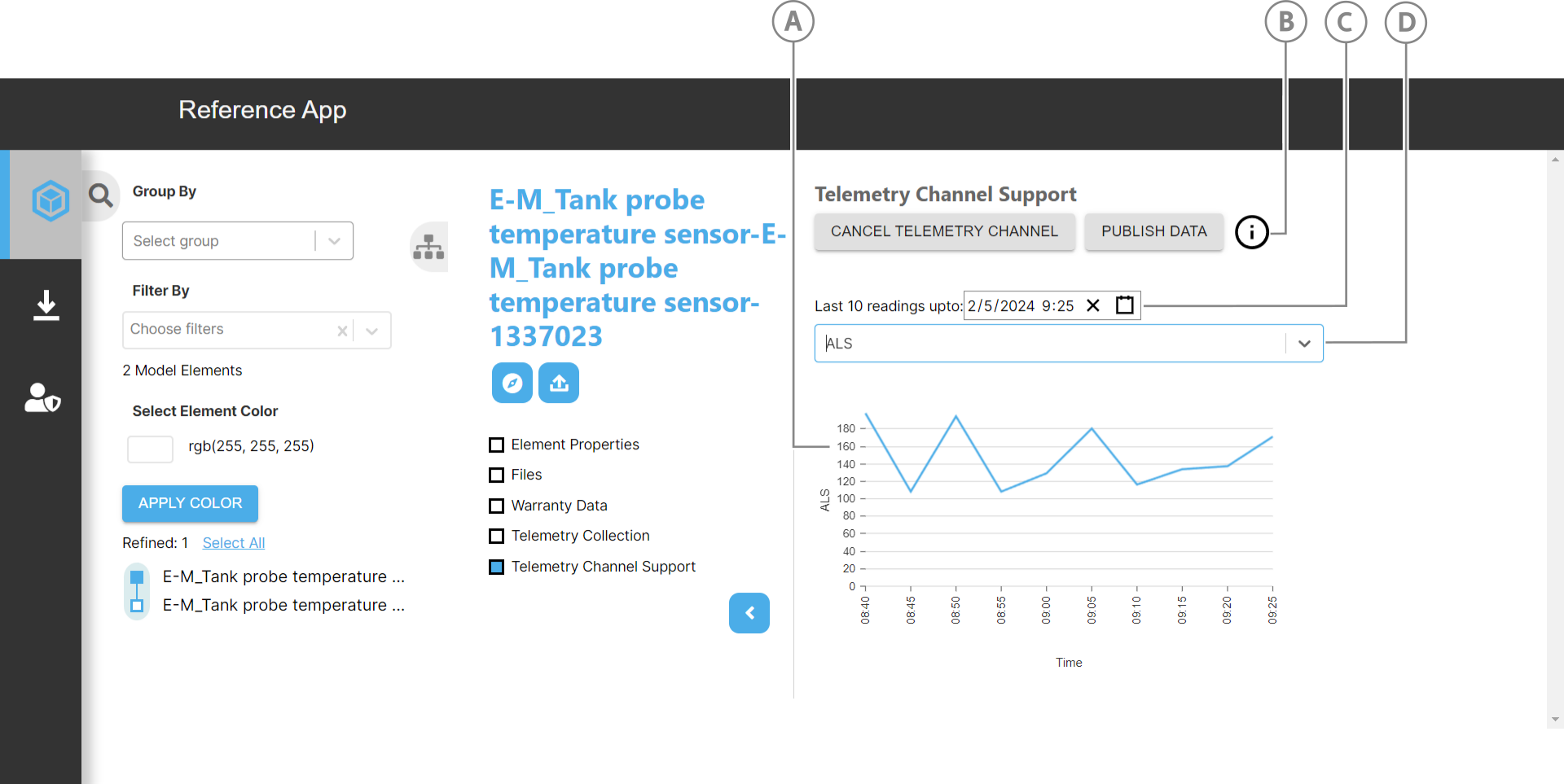
| Callout | Element | Description |
|---|---|---|
| A | Graph | Mapped readings on graph |
| B | Info icon | Click to view relative information |
| C | Date-time picker | Pick a date and time to generate the last 10 readings up to that point in time. |
| D | Reading value dropdown | Select a reading type to map. |
Getting and displaying readings on a graph#
To display the readings data on a graph, TelemetryChannel.jsx imports and uses the ResponsiveLine library from nivo/line package.
The following code gets all the named user items and filters them for the "ref_app_iot_collection" telemetry collection:
let namedItemsAll = await IafItemSvc.getNamedUserItems();
let telCollections = namedItemsAll._list.find(  (item) => item._userType === "ref_app_iot_collection");
IafItemSvc.getRelatedReadingItems gets the "ref_app_iot_collection" telemetry collection's related readings:
let getRelatedReading = await IafItemSvc.getRelatedReadingItems( telCollections._id, undefined, ctx, undefined);
setGraphdata maps the readings and their data:
const setGraphdata = () => {  // Define data for the line chart  const data = [    {      id: "data",      data: relatedReading?._list?.slice(-10).map((x, index) => {        const date = new Date(x._ts);        const hours = date.getHours().toString().padStart(2, "0");        const minutes = date.getMinutes().toString().padStart(2, "0");        const formattedDate = date.toLocaleString();
        return {          x: `${hours}:${minutes}`,          y: getYAxisData()[index],          [selectedYAxis.value]: getYAxisData()[index],          z: formattedDate,        };      }),    },  ];  console.log("data", data)  setGraphData(data);};
The X-axis contains the hour and minute values and getYAxisData gets and maps the data to the graph's Y-axis:
const getYAxisData = () => {  const mapYAxisToValues = (yAxis) => {    return (      relatedReading?._list?.slice(-10).map((entry) => entry[yAxis]) || [        0, 0, 0,      ]    );  };
  switch (selectedYAxis.value) {    case "co2":      return mapYAxisToValues("CO2");    case "temperature":      return mapYAxisToValues("Temperature");    case "humidity":      return mapYAxisToValues("Humidity");    case "als":      return mapYAxisToValues("ALS");    case "pm1.0":      return mapYAxisToValues("PM1.0");    case "pm2.5":      return mapYAxisToValues("PM2.5");    case "pm10":      return mapYAxisToValues("PM10");    case "voc":      return mapYAxisToValues("VOC");    default:      return [];  }};