Importing individuals
Importing individuals
An import creates or updates individuals of many classes in one request, and sets the relationships between them. Use it to load data from a source system, such as an asset register. To create a few individuals of one class, see Individuals instead.
The request body is a flat JSON array of individuals. Each element names its class in _classId and has the same fields as an individual you create one at a time. The order of the elements doesn't matter. The service groups them by class and writes one class group at a time.
Every class you import into needs a collection mapping with a collection in the live version. For more information, see Collection mapping.
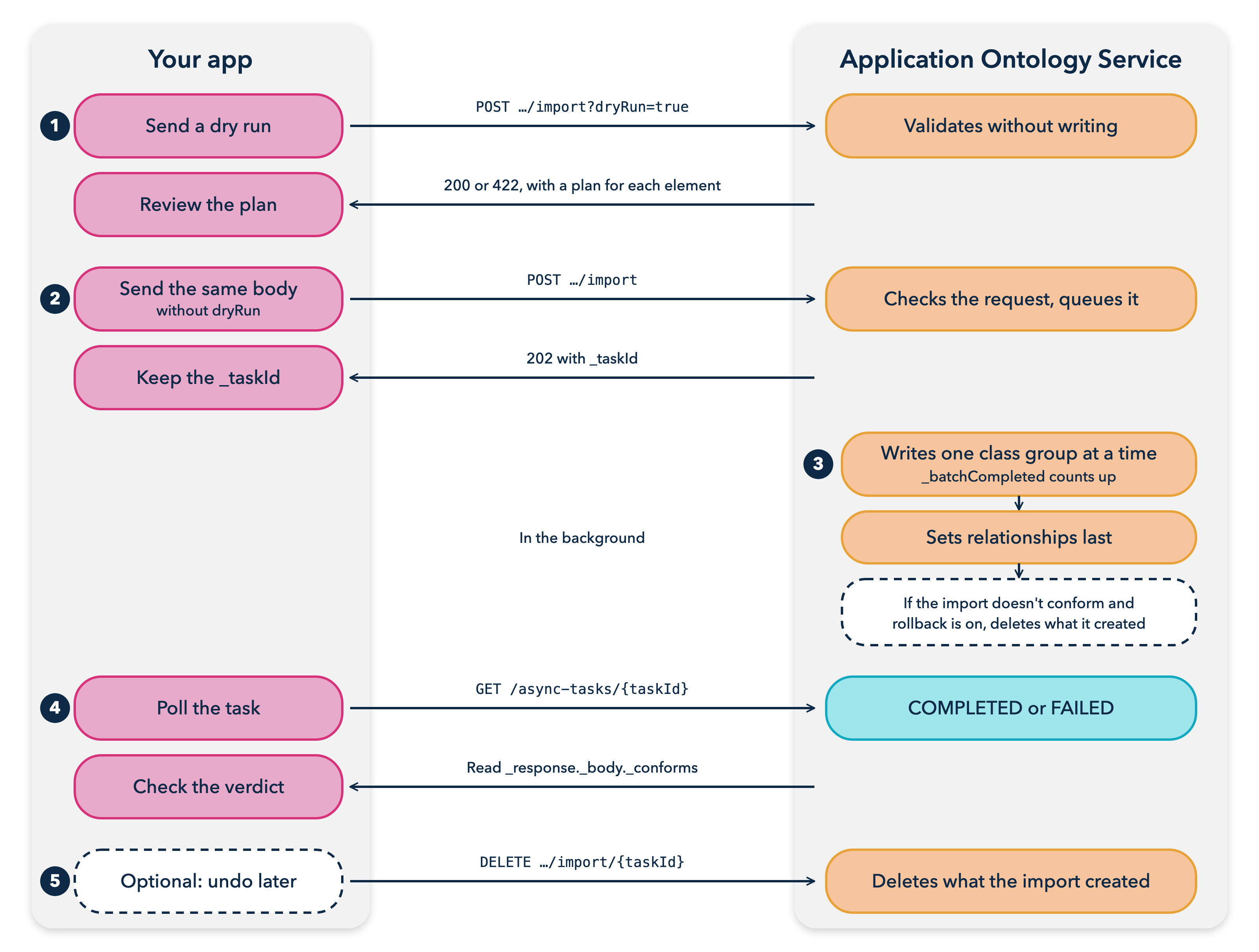
Figure: Import flow
Dry runs and queued imports
An import runs in one of two ways:
- Dry run. Set
dryRun=trueto validate the data without writing anything. The service answers at once, with200if the data conforms or422if it doesn't. Only a dry run returns the plan for each element, which shows whether the element would be created, updated, skipped, or in conflict, and why. - Queued import. Without
dryRun, the service queues the import and returns202with a task ID. A202means the service stored the request and will run it, not that the data conforms. To get the outcome, poll the task.
Run a dry run first. The result of a queued import has counts only, so a dry run is the way to see conflict reasons and validation violations.
For more information, see Import individuals.
Import modes
The mode parameter decides what happens to individuals that already exist:
UPSERT, the default, matches each element to an existing individual by its external key. A match is updated, or skipped if nothing changed. An element with no match is created. Every class needs external key fields, sent on the elements or declared on the class. If you send the same data twice, the second import changes nothing.CREATE_ONLYalways creates new individuals. If you send the same data twice, you get duplicates.
Under UPSERT, an element is a conflict if its key is blank, appears twice in the request, or matches more than one existing individual. The service doesn't write a conflicting element, and the import doesn't conform. For more information on keys, see External keys.
Validation facets
The facets parameter decides how strictly the service checks property values:
ENFORCE, the default, rejects value failures, such as a wrong datatype or a value out of range.REPORTturns value failures into warnings.
Count checks, such as a required property, are enforced either way.
Rollback
If an import doesn't conform, the service by default deletes the individuals that the import created. To keep them, set rollback=false. You can still remove them later by undoing the import.
A rollback doesn't restore relationships that the import removed. For more information, see Relationships in an import.
Relationships in an import
An element's _relationships array can use two forms:
- Native form uses
_userTypeand_relatedToIds, as when you create an individual. The targets must already exist. On an existing individual, the entries replace its stored relationships of each type you send, even if the individual itself is skipped. - Import form uses
_propertyNameand names the source and targets by individual ID or by external key. The targets can be individuals created by the same request.
The service sets import-form relationships after it writes all the classes. For each source and property, the relationships become exactly the targets you name. If you name one target for an existing individual, its other relationships of that type are removed. Send the complete set of targets. To remove all of them, send an empty _childExternalKeys. A dry run doesn't run this step.
An import-form relationship with at least one target counts toward a required relationship of its source. So you can import an individual and its required relationship in the same request.
Checks made before queueing
Some faults return a status code before the service queues anything, so you don't need to poll to find them:
400if the body isn't a non-empty JSON array, an element has no_classId,_externalKeyFieldsisn't a non-empty array of field names,_relationshipsisn't an array of objects, or a relationship is malformed.403if you're missingINDIVIDUALS_CREATEon a class, orINDIVIDUALS_EDITon a class whose elements carry import-form relationships.404if a class isn't in the live version or has no collection mapping.409if the ontology has no live version, or a class's mapping has no collection yet.413if the body is over 10 MB. Split the data into several imports. Each import runs on its own, so you manage consistency between them.503if the service couldn't store the request. Nothing was queued, so retry.
Async tasks
A queued job, such as an import, has a task that you poll by its ID. You can't cancel a task or delete it. Once queued, a job runs until it ends.
_status tells you whether the job is still running, not whether the data was accepted. A job that rejects its data still ends COMPLETED. For an import, read the verdict in _response._body._conforms. If a job ends FAILED, the job itself couldn't run, and _detailedStatus gives the reason.
While an import runs, _batchCompleted counts the class groups it has finished. If the job is interrupted, its status becomes RESET, and it continues from the next class group when it runs again.
Completed tasks are kept for a limited time, seven days by default. Read the result soon after the task ends.
For more information, see Get an async task.
Undoing an import
Undoing an import deletes the individuals that the import created. Deleting an individual also deletes its relationships.
The service finds the individuals by the import's task ID, which it stamps on each individual it creates at properties._provenance.asyncTaskId. This has the following effects:
- Individuals that the import only updated aren't deleted.
- Individuals that the import created are deleted, even if they were updated later.
- A task ID that matches nothing deletes nothing.
- The undo doesn't restore the classes'
_externalKeyFields.
The service searches only the classes that the import wrote to. If the service no longer has the import's task, it searches every class of the ontology. You need INDIVIDUALS_DELETE on every class it searches. The deletes run in the background in the Item Service. The response lists the deletes that the service sent, not their outcome.
For more information, see Undo an import.
Bulk relationships
A bulk relationship load adds many relationships from individuals of one class in a single request. Unlike replacing relationships for many individuals, it adds to the stored relationships and doesn't replace them. Relationships that already exist aren't written again.
The service queues the load and returns 202 with a task ID. It validates the whole batch in the background. If any entry fails, nothing is written. To get the outcome, poll the bulk relationship task and read _accepted:
_accepted: falsemeans the batch was refused._issueslists the faults, up to 100._accepted: truemeans the batch passed validation and went to the Item Service. When_statusisCOMPLETED, the relationships are written.
For more information, see Add relationships in bulk and Get a bulk relationship task.
Import parameters
Send the import options as query parameters.
| Parameter | Values | Default |
|---|---|---|
dryRun | true validates without writing. false queues the import. | false |
mode | UPSERT or CREATE_ONLY | UPSERT |
facets | ENFORCE or REPORT | ENFORCE |
rollback | true deletes what a non-conforming import created. false keeps it. | true |
modelRevision | The ontology revision to validate against | The current revision |
Async task statuses
_status | Meaning |
|---|---|
CREATED, QUEUED, IN_PROGRESS | The job is waiting or running. Keep polling. |
RESET | The job was interrupted and queued again. Keep polling. |
COMPLETED | The job finished. Read the verdict in _response._body. |
FAILED | The job couldn't run. Read the reason in _detailedStatus. |