Individual relationships
Individual relationships
A relationship joins a source individual to one or more target individuals, such as a pump that is locatedAt a room. Every relationship follows a class relationship that the ontology declares. For more information on declaring class relationships, see Relationships and rules.
A relationship has the following parts:
_userType, the name of the declared relationship, such aslocatedAt._relatedToIds, the IDs of the target individuals._customAttributes, an optional flat map of key-value pairs about the relationship. Values are scalars or arrays of scalars, not objects.
The service stores relationships as separate Item Service relationship records, not as fields on the individual. A read of an individual doesn't include its relationships. To read them, see List the relationships of an individual.
Relationship validation
The service checks every relationship before it writes it:
- The relationship must be declared on the source individual's class or one of its ancestors.
- Each target must exist and be an individual of the declared target class or one of its subclasses. If the relationship is declared to several target classes, a target of any of them is accepted.
- A functional relationship can have only one target, counting the relationships already stored.
If a check fails, the service writes nothing and returns 400 or 422.
Relationships on create and update
To set relationships when you create an individual, add a _relationships array to the body. Each entry is an object with _userType, _relatedToIds, and optional _customAttributes. Any other value for _relationships returns 400. If a class has a required relationship, this is the only way to satisfy it, because the service validates the individual on its first write.
The service validates the relationships before it stores the individual, but writes them after. If that write fails, the individual is stored without its relationships. Before you retry, list the individual's relationships to check what was stored.
On an update, _relationships replaces all of the individual's outgoing relationships:
- To replace them, send the complete set you want.
- To remove them all, send
[]. - To keep them unchanged, leave
_relationshipsout.
For more information, see Create individuals and Update an individual.
Adding, removing, and replacing relationships
To change relationships without updating the individual, use the relationship calls:
- Add. Adds relationships of one type from an individual to targets that already exist. The service skips targets the individual is already related to by that type. For more information, see Add relationships from an individual.
- Remove. Removes one relationship from an individual to one target. If no such relationship exists, the call returns
404, so removing the same relationship twice fails the second time. For more information, see Remove a relationship. - Replace for many individuals. Sets the relationships of many source individuals of a class in one call. For each source and relationship type you name, the relationships become exactly the targets you send. An empty target list removes them. Types you don't name stay unchanged. If any entry is invalid, nothing is written. For more information, see Replace relationships for many individuals.
To add a large number of relationships, use a bulk relationship load, which runs in the background. For more information, see Importing individuals.
When you delete an individual, the service also deletes every relationship it takes part in, as a source or as a target.
Traversal
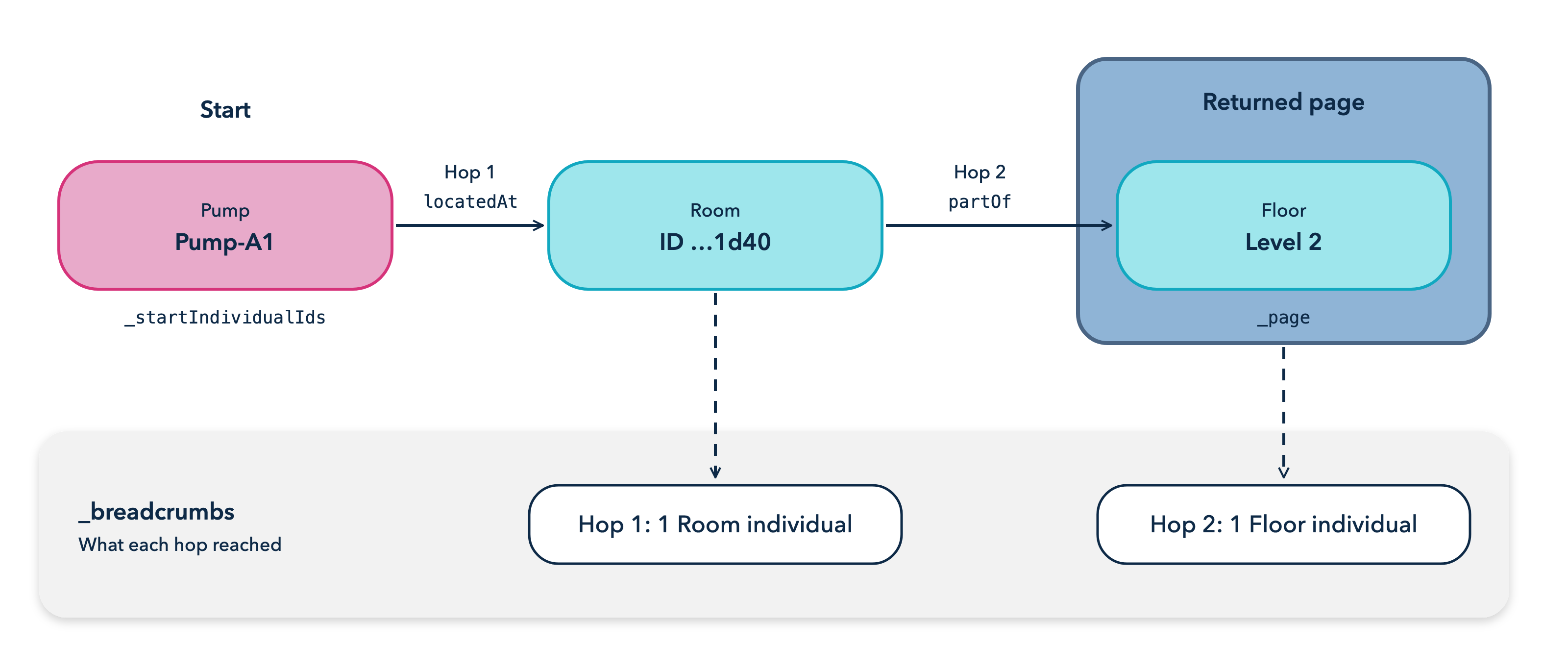
Traversal selects individuals by what they're related to. You start from one or more individuals of a class and name an ordered list of hops. Each hop follows one declared relationship from the individuals that the previous hop reached. If the relationship is declared to several target classes, the hop follows all of them. The response is a page of the individuals that the last hop reaches, which you can filter, sort, and project like a search.
The response also has breadcrumbs, with the individuals each hop reached. If the page is empty, the breadcrumbs show which hop found nothing.
A traversal starts from up to 1000 individuals. If a hop reaches more than 1000 individuals, the call returns 413. For more information, see Traverse relationships between individuals.
Figure: Relationship traversal
Permissions
Reading relationships needs INDIVIDUALS_READ on the source individual's class or an ancestor. Adding, removing, or replacing relationships needs INDIVIDUALS_EDIT and INDIVIDUALS_READ, because the service looks up the individuals before it writes. Removing a relationship also needs permission to delete the relationship record in the Item Service. For more information, see Permissions.