OMAPI node
Overview#
Use the OMAPI node to add OMAPI endpoints configurations.
Extended edit options#
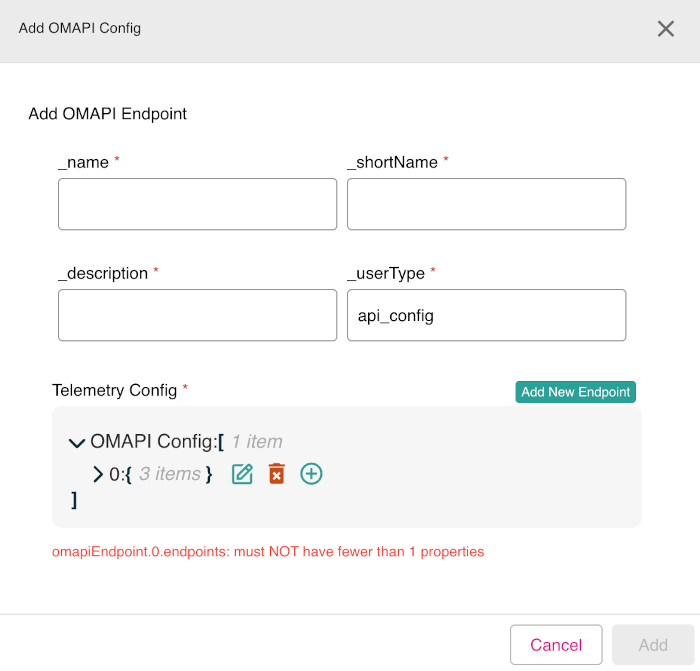
Right-click on the OMAPI node to access these extended edit options:
- Add OMAPI Config
- Show current node relationships
- Show all nodes
Figure: OMAPI node - extended edit options
Adding OMAPI endpoint configuration#
To use the OMAPI node to add a new OMAPI endpoint configuration, do the following:
- In edit mode, right-click the OMAPI node.
- Click the option Add OMAPI Config.
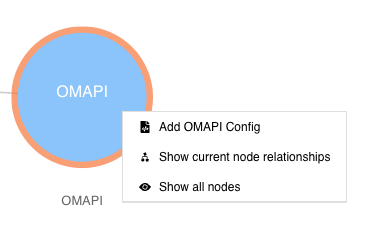
- The Add OMAPI Config dialog appears. In the section Add OMAPI Endpoint, enter the mandatory fields: _name, _shortName, _description, and _userType (by default, set to api_config).
- At this point, you can click Add New Endpoint to add the newly defined endpoint or you can also proceed to the Telemetry Config section to enter the details of the OMAPI endpoint configuration.
- In the Telemetry Config section, you can edit every line of the configuration template shown. To edit a line, click on the line and then select the edit icon (indicated by a pencil graphic) which is shown. There are also icons to delete an entry (indicated by a trash can graphic) and an icon to add a new line entry (indicated by a plus sign graphic).
- When done, click Add to add the new OMAPI configuration.
Figure: OMAPI node - Add OMAPI Config dialog showing edit icons