Ontologies node
Overview#
Use the Ontologies nodes to import, view, and manage ontologies.
Extended edit options#
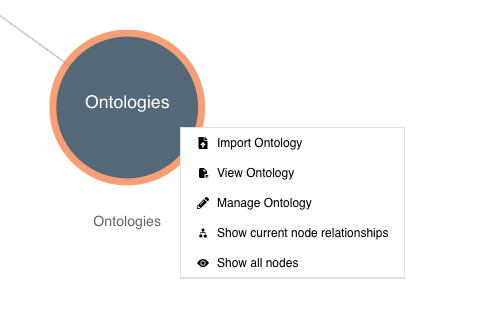
Right-click on the Ontologies node to access these extended edit options:
- Import Ontology
- View Ontology
- Manage Ontology
- Show current node relationships
- Show all nodes
Figure: Ontologies node - extended edit options
Refer to the sections below for an explanation of each option.
Import Ontology#
To import an ontology file, do the following:
- Right-click on the Ontologies node to reveal the extended edit options.
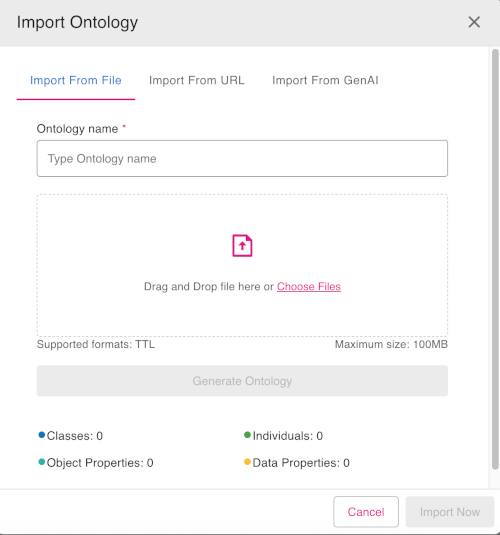
- Click Import Ontology. The Import Ontology dialog appears. This dialog has tabs for each of the main import methods available:
- Import from File
- Import from URL
- Import from GenAI
Select the import tab which is most appropriate to your needs, and fill in the fields.
For example, in the Import from File tab, you first need to enter an Ontology name. Then drag and drop the ontology file into the upload area in the dialog or select Choose Files to upload the ontology file.
When all necessary information has been entered, click the button Import Now at the bottom of the dialog. The ontology file will then be imported.
Figure: Import Ontology dialog
View Ontology#
To view an ontology file, do the following:
- Right-click on the Ontologies node to reveal the extended edit options.
- Click the View Ontology option
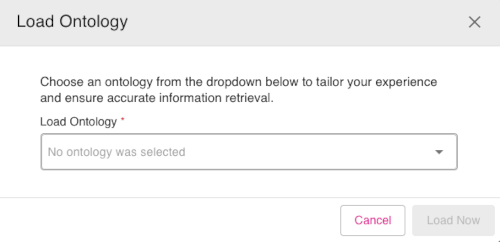
- The Load Ontology dialog appears. From the Load Ontology drop-down, select an ontology file to view.
- Once an ontology file is selected, click the button Load Now to load and view the selected ontology.
Figure: Load Ontology dialog
Manage Ontology#
Click the Manage Ontology option to rename or delete ontology files.
To rename or delete an ontology file, do the following:
- Right-click on the Ontologies node to reveal the extended edit options.
- Click the Manage Ontology option.
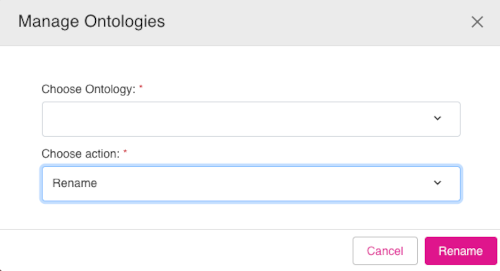
- In the Manage Ontologies dialog, first select an ontology file from the Choose Ontology drop-down.
- Then in the Chose action drop-down, select either the Rename or Delete options. The button in the bottom of the dialog will be labelled Rename or Delete depending on your selection.
- Click the action button at the buttom of the dialog to rename or delete the ontology file.
Figure: Manage Ontologies dialog