Notification Service overview
Overview#
The Notification Service allows users with the correct permissions to create rules for how application level events are transformed into notifications. It also allows other application users to register interest in topics so that they receive notifications on their devices.
Currently only email notifications are supported but other forms of notifications will be supported in the future, such as push notifications and webhooks.
Understanding notifications#
There are some concepts that are worth understanding when using the Notification Service. Refer to the table below.
| Term | Description |
|---|---|
| Trigger | A trigger is a rule that determines when a notification is sent. For more information, see Triggers. |
| Event filtering | Once a trigger is activated, you can apply filtering based on the type of event so only very specific notifications are sent. For more information, see Notification Service events. |
| Template | This is an outline of the email notification which is sent out to invite people to subscribe to a group. This is similar to how templates are used in the Passport Service. For more information, see Templates. |
| Senders | Senders are used to represent the 'from' identity for email notifications. For more information, see Senders. |
| Device | A device represents a target for notifications. For more information, see Devices. |
| Notification group | A notification group is a collection of devices which are interested in some set of notifications. For example, a group could be created for some set of notifications that relate to a specific action in a given application, and all devices subscribed to that group can have the same set of notifications distributed to them. For more information, see Notification groups. |
| Subscription | A subscription associates a device with a group. For more information, see Subscriptions. |
How the Notification Service Works#
The main purpose of the Notification Service is that users, including external users, can define their own application notifications based on their application and project level criteria.
The Notification Service works as follows:
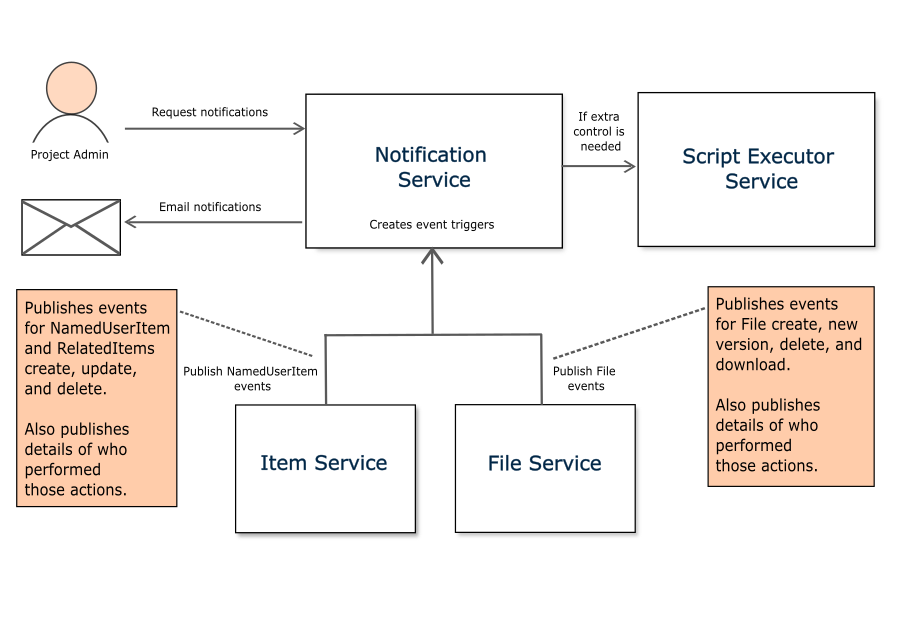
A project administrator makes a request to the Notification Service to receive notifications about a particular application.
An event trigger is set up and the event trigger listens to events and determines when to send a notification. For a list of supported events, see Notification Service events. A trigger may also have a script associated with it. See below for more details.
In this example, the Item Service begins publishing events to the Notification Service whenever certain NamedUserItem or RelatedItems are created, updated, or deleted. The Item Service also publishes details of who performed those actions. Similarly, the File Service informs the Notification Service of any file-related events such as a new file version, or a file being created, deleted or downloaded.
If the Notification Services requires more control over events, then a trigger may have a script associated with it. The Notification Service can execute the script using the Script Executor Service. The event can be passed to the script and that script can determine whether a notification is sent. For more information on scripts, see Custom Scripts.
Finally, the Notification Services processes the event information and publishes notifications as emails to the group who are interested in these notifications.
Note: In this example, the Item Service and File Service are shown emitting events but the following services also emit events:
- Passport Service
- Object Model API Service
- Datasources Service
- Workflow Service
Refer to the diagram below for a summary of how the Notification Service works.
Figure: Notification Service Data Flow
Notification Service API#
The Notification Service offers a REST API. For more information on this refer to the Notification Service API section.
How to set up a notification#
For a quick guide to setting up a new notification, see the How to set up a notification page.