Platform roles in the Console app
With the introduction of Platform version 4.5, the Console app now supports four main types of Platform roles, namely
Note: Prior to Platform version 4.4, instead of Platform roles, the Console App referred to these roles as usergroups. Only one type of usergroup was supported which would be the equivalent of the current Application developer platform role. For more information, refer to UserGroups.
Figure: Hierarchy of platform roles
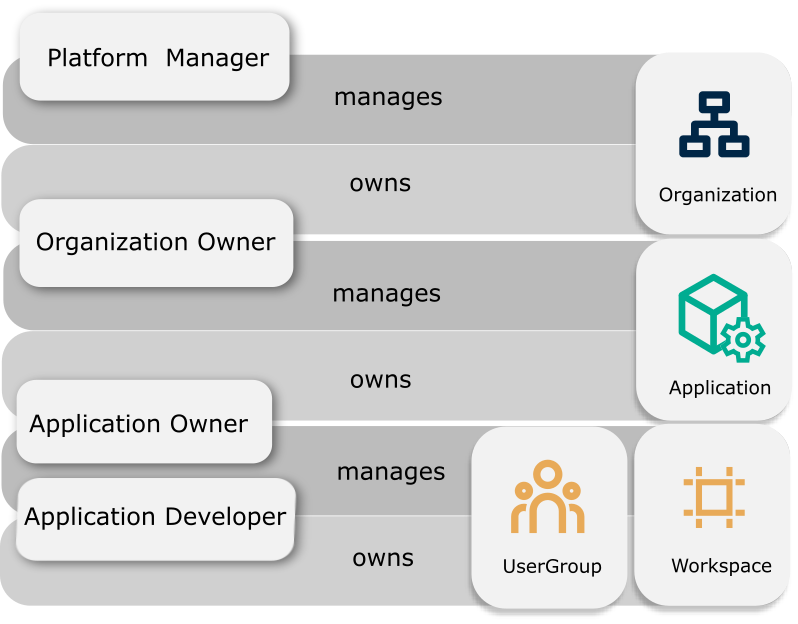
Each of the four platform roles have different features which are described below.
Organization Owner#
An Organization sits at the top of the system hierarchy and directly or indirectly aggregates all resources under it. An Organization could include one or more applications and provides Platform Managers with ownership of multiple applications. This allows Platform Managers to have a complete view of resource usage for every application they own. An application can exist within only one Organization.
The Organization Owner can onboard applications but an Organization itself must be onboarded by a Platform Manager. An application can exist within only one Organization.
The Organization Owner role has the following characteristics:
- The Organization Owner can create and manage applications.
- A usergroup belongs to an organization and it is possible to have one or more users.
- By default, a user will be assigned as Organization Owner and can then invite other users to the group as Organization Owners.
Platform Manager#
The Platform Manager role owns a platform, and onboards and manages applications. The Platform Manager also onboards Organizations. The Platform Manager role is specific to the Console App only.
Note: Platform Managers are only identified in the Console App. If the same user logs in via a different app, they are considered to be just normal users and authorization is executed based on the permission model.
The Platform Manager role has the following characteristics:
- This usergroup belongs to the Console app and can have multiple users.
- The Platform Manager can create applications.
- In future releases, they will have privileges to perform administrative actions such as Single Sign-On (SSO) set-up and managing users.
Application Owner#
The Application Owner role owns an application and manages its resources.
The Application Owner role has the following characteristics:
- This usergroup belongs to an application and can have multiple application owners.
- They are able to manage applications and invite app developers to create WorkSpaces and UserGroups.
- They are able to manage WorkSpaces and UserGroups.
Application Developer#
The Application Developer role accesses application resources based on its permission set.
The Application Developer role has the following characteristics:
- The Application Developer role wil be available for every application.
- An Application Owner would invite users to be Application Developers.
- They can create WorkSpaces and UserGroups for an application.
Application User#
Along with the four roles, previously described, there is also the role of an application user. This is simply the end-user of a Platform application. They are separate to the four main roles and they can only do one thing which is use/read the application. They also do not have access to the entire Console App.
Permissions and operations for platform roles#
The API permissions and the corresponding API operations available for each platform role are summarized in the table below.
| Organization Owner | Platform Manager | Application Owner | Application Developer | Application Users | |
|---|---|---|---|---|---|
| Create Organization | No | Yes | No | No | No |
| Read Organization | Yes | Yes | Yes | Yes | Yes |
| Read Organization (with ID) | Yes | Yes | Yes | Yes | Yes |
| Update Organization (with ID) | Yes | Yes | No | No | No |
| Delete Organization (with ID) | Yes | Yes | No | No | No |
| Read Organization users | Yes | Yes | Yes (if organization user) | Yes (if organization user) | Yes (if organization user) |
| Manage Organization Configs | No | Yes | No | No | No |
| Create application | Yes | Yes | No | No | No |
| Create usergroups | Based on permission | Based on permission | Yes (see note below) | Yes | No |
| Create workspaces | Based on permission | Based on permission | Yes (see note below) | Yes | No |
| Read applications | Yes | Yes | Yes | Yes | Yes |
| Manage Application Configs | Yes | Yes | Yes | No | No |
| Read workspaces | Based on persmission | Based on permission | Yes (see note below) | Based on permission | Based on permission |
| Read usergroups | Based on permission | Based on permission | Yes (see note below) | Based on permission | Based on permission |
| Update application | Yes | Yes | Yes | No | No |
| Update workspaces | Based on permission | Based on permission | Yes (see note below) | Based on permission | Based on permission |
| Delete application | Yes | Yes | Yes | No | No |
| Update usergroups | Based on permission | Based on permission | Yes (see note below) | Based on permission | Based on permission |
| Delete workspaces | Based on permission | Based on permission | Yes (see note below) | Based on permission | Based on permission |
| Delete usergroups | Based on permission | Based on permission | Yes ( see note below) | Based on permission | Based on permission |
| Create notification templates | Yes (organization templates only) | Based on permission | Yes (application templates only, see note below) | No | No |
| Read notification templates | Yes (organization templates only, see note below) | Based on permission | Yes (application templates only, see note below) | No | No |
| Update notification templates | Yes (organization templates only) | Based on permission | Yes (applicstion templates only, see note below) | No | No |
| Invite users to application usergroup | Based on permission | Based on permission | Yes (see note below) | Based on permission | No |
| All other APIs | Based on the permissions to the namespace | Based on the permissions to the namespace | Based on permission | Based on the permissions to the namespace | Based on the permissions to the namespace |
Note: You can only perform this API operation via the Console App. Otherwise you require explicit permission.