Create a Custom API
In this module you will learn about the benefits of using the Object Model API to provide custom APIs for your application and your application's data. You will create and deploy API endpoints that will enable you to interact with the Space and Assets you created in the previous modules through a REST API.
Object Model API Introduction
In the Item Service Basics module we accessed our Assets and Rooms via the Twinit API. All of the queries were in the language of Twinit. We referred to collections of data and identified the collections we needed by their _userType. We also referred to RelatedItems, and queried them by known property names and property structure, and even included queries regarding relations.
By using an Object Model API, you can configure and script an API that removes the need for the application, or an integrating application, to know the language of the Twinit platform. You can put all the logic that interacts with Twinit behind a custom endpoint that reflects the language of your application and your data model.
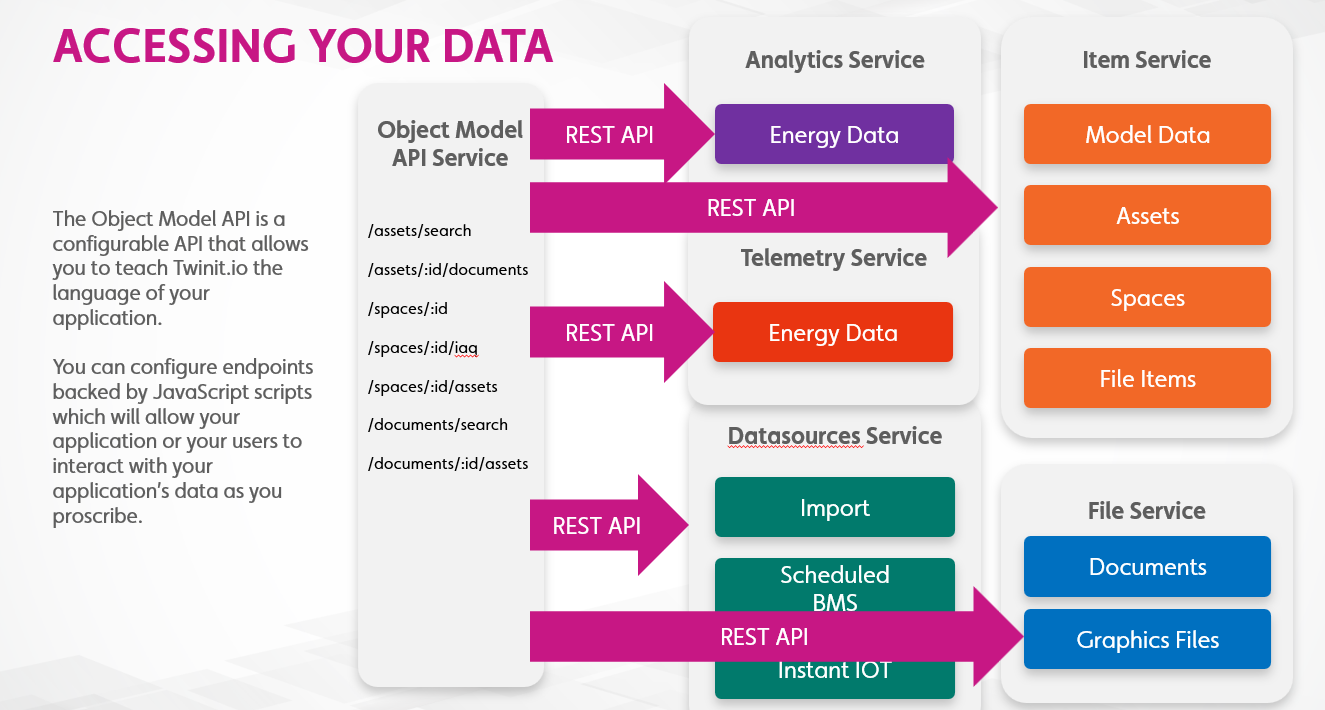
To do so we need two things:
- A JSON API config that defines our endpoints and supported methods
- Scripts to back each endpoint with the logic executed when the endpoint is called by a client
Understanding the API Config
Your custom Object Model API is configured using JSON saved and deployed on Twinit.
Here is an example of an API config and the one you will be using in the next step.
{
  "endpoints": {
    "status": {
      "paths": [
        {
          "path":"/status",
          "method": "OPTIONS",
          "script":{
            "_userType": "omapi_back",
            "_scriptName": "returnStatus"
          }
        },
        {
          "path":"/status",
          "method": "GET",
          "script":{
            "_userType": "omapi_back",
            "_scriptName": "returnStatus"
          }
        }
      ]
    }
  },
  "schema_version": 2,
  "settings": {
    "apiConfig": true
  }
}
The endpoints property specifies the custom resource endpoints you wish to create. In this case we are starting with a simple /status endpoint which will support the GET method. When GET /status is called the returnStatus script will be executed. If any query parameters were included in the request, those will also be passed to the returnStatus script.
You can include as many resource types in the endpoints as you wish, and in the next step you will be adding asset and space endpoints to this config.
Hands On
In the hands on steps you will:
- Create an API configuration file
- Add the API config as a NamedUserItem in the Item Service
- Deploy the API config to the Object Model API Service which will create your custom endpoints
- Add the scripts necessary to back those endpoints
- And then test your endpoints to make sure that they are functioning
- Download the B04 - Object Model API Basics.zip and extract the files
- Open the file in Visual Studio Code
- Follow the steps in the file