Using the REST Connector
In this module you will learn how to use the DataSource Services REST Connector orchestrator component to create Orchestrators which connect to and communicate with external APIs.
Why Use The REST Connector?
One of the advantages of the DataSource Service is that it allows you to connect Twinit to other systems and to offload the interaction with those systems, processing of the data going to and from those systems, and the persisting of any data as a result, to Twinit. You do this by using Orchestrators in the DataSource Service.
However, for security reasons, scripts which are run by orchestrators are run in an isolated environment. The scripts have access to the Twinit javascript PlatformAPI libraries and can communicate with the Twinit APIs, but they cannot make any API requests outside of Twinit. Scripts run by an orchestrator cannot use 'fetch', for instance, to make any requests to systems other than Twinit, say a facilities management system or IOT API.
To enable communication with external systems the DataSource Service provides the REST Connector. This special component can be used as an orchestrator step to enable communication with external APIs.
What is the REST Connector?
The REST Connector is an orchestrator component that can be used as a step in an orchestrator just as any other component you have seen. Just as you can use an orchestrator step configured as 'default_script_target' to execute a script you provide, you can use the REST Connector component to make API calls. And just as any other component, the result of the REST Connector can be handed to the next step in the orchestrator or returned as the result of an orchestrator.
You also have the same flexibility when configuring the REST Connector component as you do with any other Orchestrator Component. This means you can define the component's parameters (such as the Auth type and URL to which to send the request) at the time you create the orchestrator or you can provide or even override those parameters at run time.
Ways of Using the REST Connector
There are many different ways to use the REST Connector to accomplish many different tasks.
Client Initiated Async Request to External API
There may be times you want your client application to make an API call to an external system, but you don't want your client application to have access to the credentials needed to make the API call.
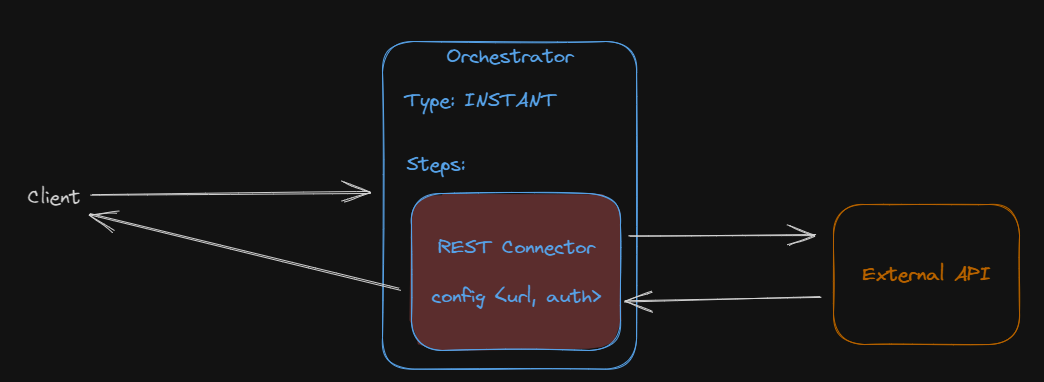
In this case you can create an INSTANT Orchestrator where the REST Connector is the only step. You would provide the URL and auth configuration needed to make the call to the external API when you create the INSTANT Orchestrator. The client then simply runs the orchestrator and waits for the response. Since the credentials are provided in the orchestrator config, the client never has possession of the credentials, but is able to utilize the external API.
Syncing Data from an External API to Twinit
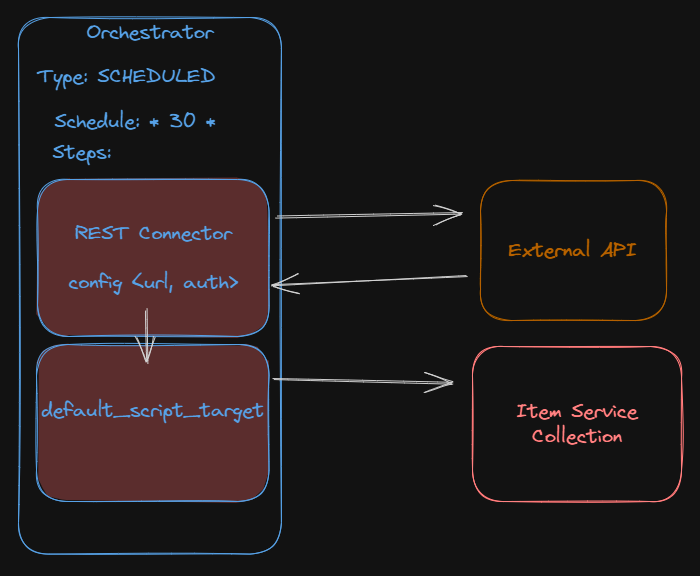
Perhaps you'd like to set up a scheduled transfer of data from an external API to the Item Service. In this case you could create a SCHEDULED Orchestrator configured to execute every 30 minutes. The first step in the orchestrator could be a REST Connector configured with the authentication info and URL. The REST Connector could then pass the result to a second step which executes a script that writes the fetched data to an Item Service collection.
Using a REST Connector as a Replacement for fetch()
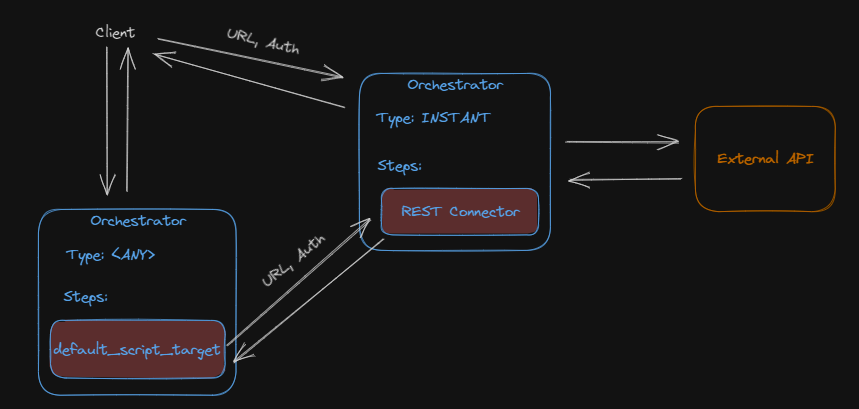
The most flexible way to use the REST Connector is to create an INSTANT Orchestrator with an unconfigured REST Connector as its single step. This allows you to use the orchestrator as you would the Javascript fetch() method. When you need to make an API call, you simply run the INSTANT Orchestrator, passing to it the configuration it needs to make the API call, very much like what you would pass to fetch().
This INSTANT Orchestrator could be executed by a client or even another orchestrator to communicate with external APIs.
This implementation is so useful, that the IafDatasource Javascript library includes a couple methods to make implementing and using the INSTANT Orchestrator very easy.
Hands On
- Download INT09 - REST Connector.zip and open it in your IDE
- Follow the steps in the file