Twinit AI Tools
What are the System Tools?
System Tools are pre-built tools provided by the Twinit platform that give Agents access to commonly needed, platform-level capabilities. They are designed to work out of the box and can be easily attached to Agents without additional configuration. System Tools typically handle standard operations such as querying platform services, retrieving or transforming data, and supporting retrieval-augmented generation (RAG). By using System Tools, developers can quickly enable powerful, reliable functionality within their Agents while relying on consistent, well-tested behavior managed by the platform.
- Platform API Tools: Provide read-only access to platform APIs for retrieving data.
- Query Tools: Generate Item Service queries for collections and their related items based on schemas defined in the namespace and user input.
- RelatedQueryTool
- GraphQueryTool
- Code Assistant Tool: Generates or updates JavaScript code using the platform’s JavaScript libraries.
The full list of the system tools can be found on twinit.dev
Platform API Tools
Platform API Tools provide agents with direct access to core platform services, allowing them to retrieve and work with data based on user input. These tools act as the execution layer for agents, translating natural-language requests into concrete API operations and returning structured results that can be evaluated or passed along in a workflow. Here are some of the most used Platform API Tools:
- The GetNamedUserItemsTool is responsible for working with NamedUserItems. It processes the user’s natural-language input and identifies the appropriate NamedUserItem that matches the request. By interpreting what the user is asking for, the tool locates the relevant item within the available NamedUserItems, enabling agents to reference or act upon the correct collection.
- The GetRelatedItemsTool is responsible for retrieving specific items from a provided collection. Based on the user’s input, the tool constructs the necessary query and executes it against the collection to find the corresponding RelatedItems. This allows agents to fetch the data required to fulfil a request, using structured queries derived from natural-language instructions.
Query Tools
The QueryTools are core system tools in the Twinit AI Service, designed to convert natural language prompts into structured queries for the Item Service API, using a schema to interpret and understand Item Service data. This allows users to interact with the system using simple, intuitive language, while the tool handles the translation into valid API queries. You will learn more about Schemas in a later lesson.
Users can provide a prompt, and the RelatedQueryTool or GraphQueryTool automatically generates a query that adheres to the user’s specifications. The generated query can then be executed against the Item Service to retrieve the requested data efficiently and accurately. These system tools provide a seamless bridge between natural language input and structured data retrieval, enabling more powerful and user-friendly AI workflows in Twinit.
The tools support generating queries for the following Item Service operators:
- $findInCollections: The findInCollections operator retrieves items directly from a single collection within the ItemService. When the RelatedQueryTool processes a natural-language prompt that requests items, it converts that request into a structured $findInCollections query. This operator focuses solely on returning items from one collection without including any related records or additional relationships. Its simplicity makes it ideal for users who need straightforward access to the core data of a collection. In short, findInCollections provides clean, direct access to items and serves as the basic query type generated by system agents when the user simply wants to retrieve items from a collection.
- $findWithRelated: The findWithRelated operator retrieves items from a collection along with their directly related child items. When the RelatedQueryTool interprets a prompt that requests items along with related data, it generates a structured $findWithRelated query. This operator is used when users want more than just the main items, allowing the query to include connected records or filter parent items based on attributes of their children, producing more contextual results without multiple separate queries. In short, $findWithRelated provides direct access to items and their immediate related data, giving system agents a way to return richer, relationship-aware results when the user requests items along with something related to them.
- $findWithRelatedGraph: The findWithRelatedGraph operator retrieves items by exploring multi-level relationships across multiple collections in a graph-like structure. When the RelatedQueryTool detects that a user’s prompt involves retrieving items through several connected relationships, not just direct children, it generates a $findWithRelatedGraph query. This operator is designed for scenarios where related data spans more than one hop, following explicitly defined relationship paths or automatically exploring connections based on depth, enabling agents to fetch deeply linked information in a single structured request. In short, $findWithRelatedGraph allows system agents to return results involving complex, multi-step relationships, making it possible to answer prompts that require understanding how items connect across an entire graph.
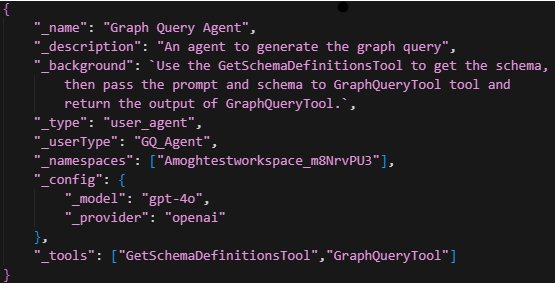
Here's an example of a Twinit AI Agent configured to use a schema and the GraphQueryTool. Notice the agent uses the Twinit system GetSchemaDefinitionTool to access the Item Service schema.
Code Assistant Tool
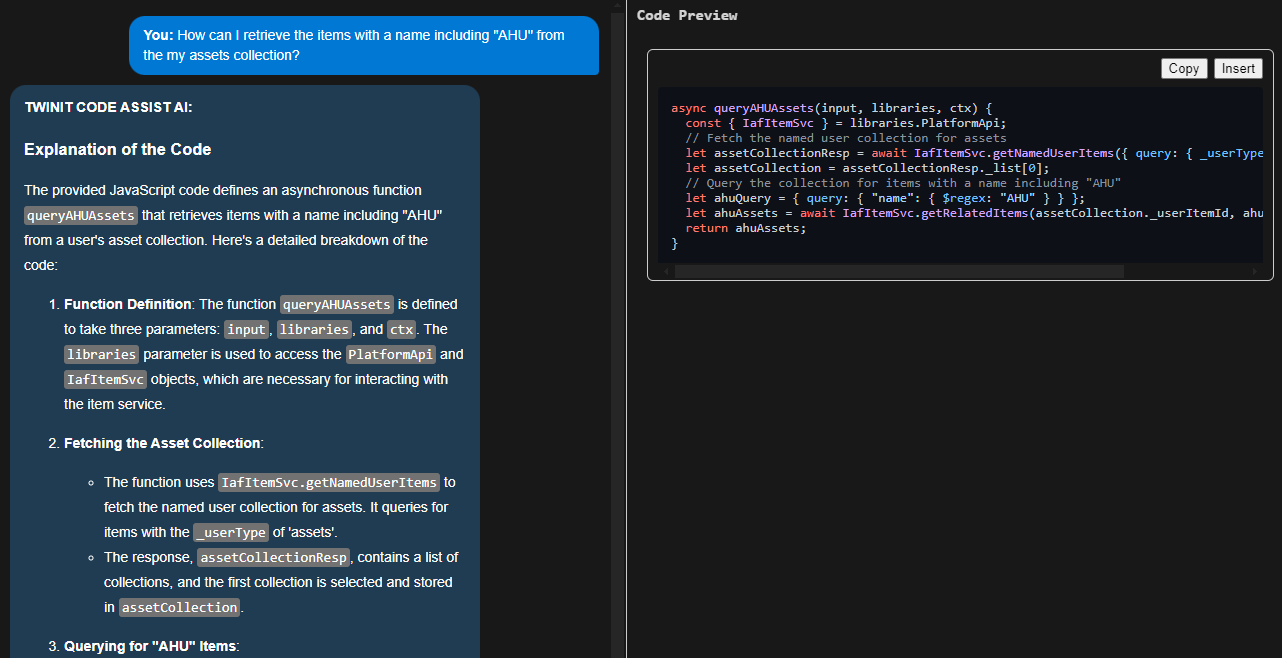
The CodeAssistTool is a specialised tool used by the Twinit AI Service to generate code snippets, explanations, and technical guidance based on a user’s prompt. When the agent receives a request involving coding help, implementation examples, or technical problem-solving, it uses this tool to produce clear, context-aware results.
The tool supports tasks such as generating functions, explaining logic, or helping integrate code into your project. It is optimised for development workflows and is the primary tool used in the Code Assist example, ensuring that responses remain accurate, structured, and developer friendly.
In short, CodeAssistTool enables agents to provide high-quality, actionable coding support directly within your Twinit project.