The Imported Model Data Model
The model import process produces a number of NamedUserItems in the Item Service to represent the model. In order to know how to work with model data after it is imported you must understand how the model is represented in the Item Service.
Model Data in the Item Service
Model NamedCompositeItem

At the top level, the model as a whole is represented by a type of NamedUserItem in the Item Service called a NamedCompositeItem. A NamedCompositeItem serves as a collection of other NamedUserItems. The Model NamedCompositeItem contains relations to other NamedUserCollections containing specific types of model data, such as elements and properties.
The Model NamedCompositeItem also contains useful attributes like information about the bimpk and version from which the model was imported.
Many of your interactions with models will begin at the Model NamedCompositeItem.
Here is a sample Model NamedCompositeItem:
{
   "_uri": "/nameduseritems/642c17d5e1d4bd779a049aa9",
   "_name": "General Medical - Architecture",
   "_userType": "bim_model_version",
   "_tipId": "642c1aa5e1d4bd779a04b67b",
   "_versions": [
      {
         "_userAttributes": {
            "thumbnail": {
               "fileVersionId": "36d3f1c4-b8ca-4833-9fd2-62f70fa969f6",
               "fileId": "a86ca2dc-9d51-40be-b725-9caed3f5f812"
            },
            "bimpk": {
               "fileVersionId": "d6150d34-c284-4294-bd83-0e0c0dfb347e",
               "fileId": "0df4bdd8-0e77-4356-bc85-98a35b5b5e3d"
            }
         },
         "_userItemDbId": "642c17d5e1d4bd779a049aa9",
         "_id": "642c1aa5e1d4bd779a04b67b",
         "_isTip": true,
         "_metadata": {
            "_updatedById": "debda631-0fd7-4bb6-a404-3ae10a44f4a9",
            "_createdAt": 1680612005227,
            "_createdById": "debda631-0fd7-4bb6-a404-3ae10a44f4a9",
            "_updatedAt": 1680612073658
         },
         "_version": 2
      }
   ],
   "_irn": "itemsvc:nameduseritem:642c17d5e1d4bd779a049aa9",
   "_namespaces": [
      "skmtrain_lpkSiQj1",
      "skmtrain_lpkSiQj1"
   ],
   "_nextVersion": 3,
   "_shortName": "General Med_modelver",
   "_tipVersion": 2,
   "_versionsCount": 2,
   "_itemClass": "NamedCompositeItem",
   "_userItemId": "general med_modelver_hKIZIkrD7x",
   "_id": "642c17d5e1d4bd779a049aa9",
   "_description": "BIM model version by transform",
   "_metadata": {
      "_updatedById": "debda631-0fd7-4bb6-a404-3ae10a44f4a9",
      "_createdAt": 1680611285979,
      "_createdById": "debda631-0fd7-4bb6-a404-3ae10a44f4a9",
      "_updatedAt": 1680612005233
   },
   "_kind": "collection"
}
Model Elements NamedUserCollection
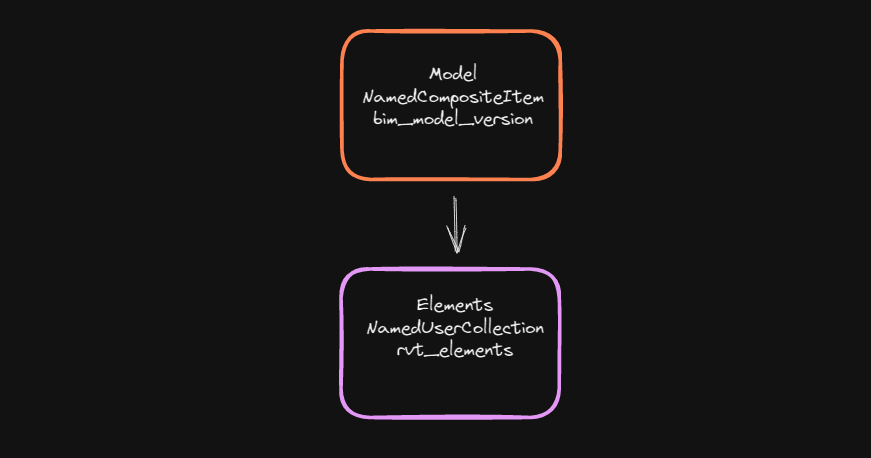
The Model Elements NamedUserCollection contains items that represent the individual elements in a model. They could be levels or spaces, or even doors or windows or boilers. For every element in the model there's a matching item in the Elements NamedUserCollection.
Here's a sample Elements NamedUserCollection:
{
   "_itemId": "642c17d4e1d4bd779a049a9d",
   "_userItemId": "general med_ba_elem_kTPCsV7wFP",
   "_userType": "rvt_elements",
   "_userItemVersion": 2,
   "_userItemVersionId": "642c1aa5e1d4bd779a04b67c",
   "_id": "642c1aa6e1d4bd779a04b682",
   "_userItemClass": "NamedUserCollection",
   "_metadata": {
      "_updatedById": "debda631-0fd7-4bb6-a404-3ae10a44f4a9",
      "_createdAt": 1680612006153,
      "_createdById": "debda631-0fd7-4bb6-a404-3ae10a44f4a9",
      "_updatedAt": 1680612006153
   }
}
And here is a sample Element item:
{
   "relationships": {
      "references_in_spatial_structure": [],
      "aggregates": [],
      "contains_in_spatial_structure": [ ]
   },
   "systemElementId": {
      "val": 30,
      "name": "System.elementId",
      "dName": "System.elementId",
      "id": 7
   },
   "revitCategory": {
      "val": "OST_Levels",
      "name": "REVIT_CATEGORY",
      "dName": "Revit Category",
      "id": 3
   },
   "revitFamily": {
      "val": "Level",
      "name": "REVIT_FAMILY",
      "dName": "Revit Family",
      "id": 4
   },
   "type_id": 1,
   "source_filename": "General Medical - Architecture.rvt",
   "_id": "642c1aa42a7d88104ae72ae2",
   "package_id": 6,
   "source_id": "933c4a06-93b8-11d3-80f8-00c04f8efc32-0000001e",
   "_metadata": {
      "_updatedById": "debda631-0fd7-4bb6-a404-3ae10a44f4a9",
      "_createdAt": 1680612006731,
      "_createdById": "debda631-0fd7-4bb6-a404-3ae10a44f4a9",
      "_updatedAt": 1680612006731
   },
   "revitType": {
      "val": "1/4\" Head",
      "name": "REVIT_TYPE",
      "dName": "Revit Type",
      "id": 5
   }
}
Instance and Type Property NamedUserCollections
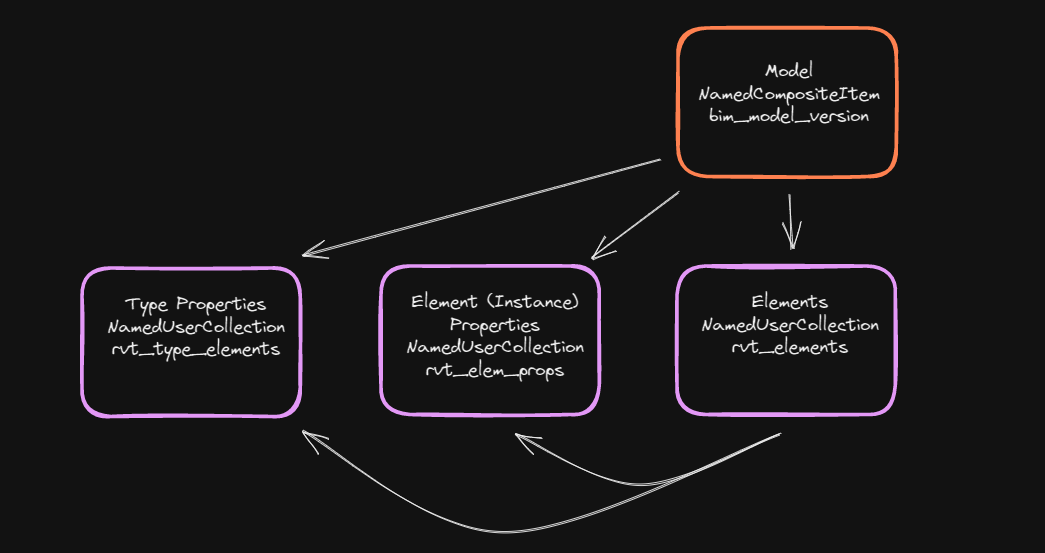
The properties on the elements are separated into two other NamedUserCollections.
Instance (or Element) Properties
Instance (or Element) Properties are properties which apply to one and only one Element. These could be instance specific properties and values like a number on a door. Every door will have a different number. Elements will have a relationship (with the Element as the parent) to its Instance Properties in the Instance Property NamedUserCollection.
Here's an example of an Instance Properties NamedUserCollection:
{
   "_itemId": "642c17d4e1d4bd779a049a9f",
   "_userItemId": "general med_elprops_B1zpOrp9Q0",
   "_userType": "rvt_element_props",
   "_userItemVersion": 2,
   "_userItemVersionId": "642c1aa5e1d4bd779a04b67d",
   "_id": "642c1aa6e1d4bd779a04b683",
   "_userItemClass": "NamedUserCollection",
   "_metadata": {
      "_updatedById": "debda631-0fd7-4bb6-a404-3ae10a44f4a9",
      "_createdAt": 1680612006153,
      "_createdById": "debda631-0fd7-4bb6-a404-3ae10a44f4a9",
      "_updatedAt": 1680612006153
   }
}
And here is an example of an Instance Property item for an Element:
{
   "_id": "642c1aa42a7d88104ae72ae2",
   "_metadata": {
      "_updatedById": "debda631-0fd7-4bb6-a404-3ae10a44f4a9",
      "_createdAt": 1680612018758,
      "_createdById": "debda631-0fd7-4bb6-a404-3ae10a44f4a9",
      "_updatedAt": 1680612018758
   },
   "properties": {
      "SystemelementId": {
         "val": 30,
         "name": "System.elementId",
         "dName": "System.elementId",
         "id": 7
      },
      "Elevation": {
         "val": 100,
         "name": "LEVEL_ELEV",
         "dName": "Elevation",
         "psDispName": "Constraints",
         "id": 10
      },
      "Structural": {
         "val": false,
         "name": "LEVEL_IS_STRUCTURAL",
         "dName": "Structural",
         "psDispName": "Identity Data",
         "id": 13
      },
      "Building Story": {
         "val": true,
         "name": "LEVEL_IS_BUILDING_STORY",
         "dName": "Building Story",
         "psDispName": "Identity Data",
         "id": 14
      },
      "Scope Box": {
         "val": "None",
         "name": "DATUM_VOLUME_OF_INTEREST",
         "dName": "Scope Box",
         "psDispName": "Extents",
         "id": 12
      },
      "Story Above": {
         "val": "Default",
         "name": "LEVEL_UP_TO_LEVEL",
         "dName": "Story Above",
         "psDispName": "Constraints",
         "id": 15
      },
      "Computation Height": {
         "val": 0,
         "name": "LEVEL_ROOM_COMPUTATION_HEIGHT",
         "dName": "Computation Height",
         "psDispName": "Dimensions",
         "id": 11
      },
      "Name": {
         "val": "GROUND FLOOR",
         "name": "DATUM_TEXT",
         "dName": "Name",
         "psDispName": "Identity Data",
         "id": 9
      }
   }
}
Type Properties
Type Properties are properties which apply to a type of Element, and thus apply to one or more Elements. For instance all Glass Sliding Doors would share the same Type Properties. Elements will have a relationship (with the Element as the parent) to a Type Properties item in the Type Properties NamedUserCollection.
Here's an example of a Type Properties NamedUserCollection:
{
   "_itemId": "642c17d5e1d4bd779a049aa1",
   "_userItemId": "general med_type_el_9bYiQ7R4Tg",
   "_userType": "rvt_type_elements",
   "_userItemVersion": 2,
   "_userItemVersionId": "642c1aa5e1d4bd779a04b67e",
   "_id": "642c1aa6e1d4bd779a04b684",
   "_userItemClass": "NamedUserCollection",
   "_metadata": {
      "_updatedById": "debda631-0fd7-4bb6-a404-3ae10a44f4a9",
      "_createdAt": 1680612006153,
      "_createdById": "debda631-0fd7-4bb6-a404-3ae10a44f4a9",
      "_updatedAt": 1680612006153
   }
}
And here is an example of a Type Property item for an Element:
{
   "name": "Level::1/4\" Head",
   "_id": "642c1aa42a7d88104ae72a51",
   "id": 1,
   "source_id": "933c4a06-93b8-11d3-80f8-00c04f8efc32-0000001b",
   "_metadata": {
      "_updatedById": "debda631-0fd7-4bb6-a404-3ae10a44f4a9",
      "_createdAt": 1680612012724,
      "_createdById": "debda631-0fd7-4bb6-a404-3ae10a44f4a9",
      "_updatedAt": 1680612012724
   },
   "properties": {
      "Revit Type": {
         "val": "1/4\" Head",
         "name": "REVIT_TYPE",
         "dName": "Revit Type",
         "id": 5
      },
      "Revit Class": {
         "val": "Autodesk.Revit.DB.Level",
         "name": "REVIT_CLASS",
         "dName": "Revit Class",
         "id": 2
      },
      "Revit Family": {
         "val": "Level",
         "name": "REVIT_FAMILY",
         "dName": "Revit Family",
         "id": 4
      },
      "Revit Category": {
         "val": "OST_Levels",
         "name": "REVIT_CATEGORY",
         "dName": "Revit Category",
         "id": 3
      }
   }
}
Model Data Cache NamedUserCollection
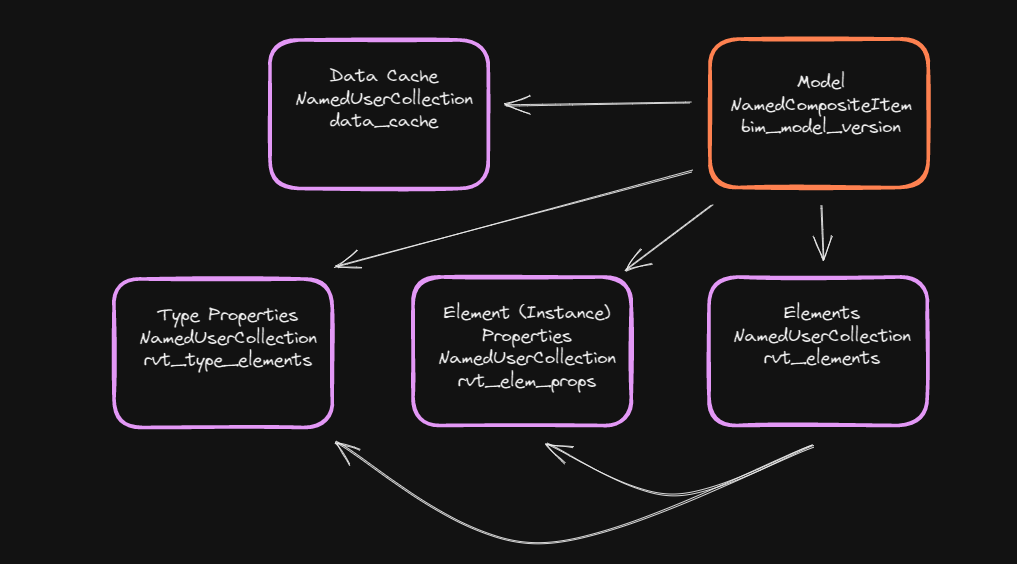
The Model Data Cache NamedUserCollection can be used to store pre-calculated statistics or information about the model that may be expensive and inefficient to calculate on the fly.
Here's an example of a Data Cache NamedUserCollection:
{
   "_itemId": "642c17d5e1d4bd779a049aa7",
   "_userItemId": "general med_data_cache_MacCjKZ1TQ",
   "_userType": "data_cache",
   "_userItemVersion": 2,
   "_userItemVersionId": "642c1aa5e1d4bd779a04b67f",
   "_id": "642c1aa6e1d4bd779a04b687",
   "_userItemClass": "NamedUserCollection",
   "_metadata": {
      "_updatedById": "debda631-0fd7-4bb6-a404-3ae10a44f4a9",
      "_createdAt": 1680612006153,
      "_createdById": "debda631-0fd7-4bb6-a404-3ae10a44f4a9",
      "_updatedAt": 1680612006153
   }
}
And here's an example of a type of cached data item that makes it easy to find the model elements from a specific source file:
{
   "data": {
      "package_ids": [
         6,
         16,
         21,
         26,
         31,
         36,
         41,
         46,
         51
      ],
      "sourcefile": "General Medical - Architecture.rvt"
   },
   "dataType": "sourcefileToPkgIds",
   "_id": "642c1ae4e1d4bd779a04d24c",
   "_metadata": {
      "_updatedById": "debda631-0fd7-4bb6-a404-3ae10a44f4a9",
      "_createdAt": 1680612068668,
      "_createdById": "debda631-0fd7-4bb6-a404-3ae10a44f4a9",
      "_updatedAt": 1680612068668
   }
}
Model Graphics NamedUserCollections
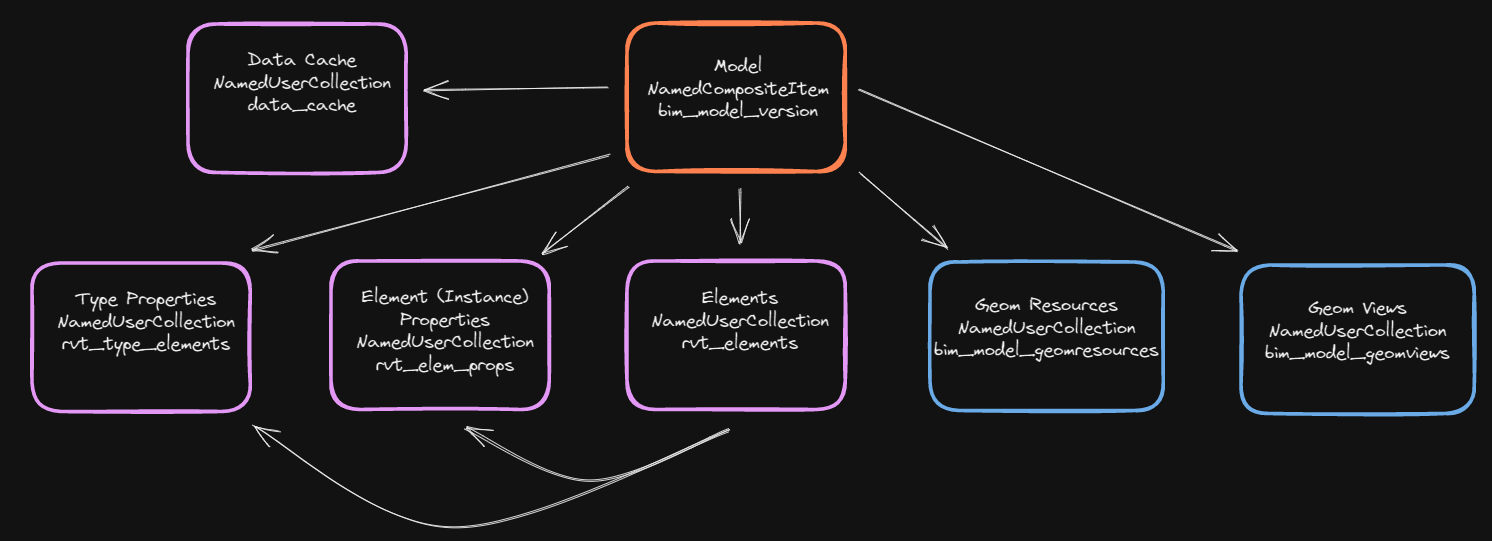
Two other collections store items which track graphics information for the graphics service.
Geom Resources NamedUserCollection
The Geom Resources NamedUserCollection contains items with information about the files in the File Service which contain the graphics data for the model. If you look at the items, you can see each contains a filename, fileId, and fileVersionId of a file in the File Service. The Graphics Service will use this information to stream graphics to the React viewer component.
Here's an example of a Geom Resources NamedUserCollection:
{
   "_itemId": "642c17d5e1d4bd779a049aa3",
   "_userItemId": "general med_geom_file_QptVI3mJDO",
   "_userType": "bim_model_geomresources",
   "_userItemVersion": 2,
   "_userItemVersionId": "642c1aa5e1d4bd779a04b680",
   "_id": "642c1aa6e1d4bd779a04b685",
   "_userItemClass": "NamedUserCollection",
   "_metadata": {
      "_updatedById": "debda631-0fd7-4bb6-a404-3ae10a44f4a9",
      "_createdAt": 1680612006153,
      "_createdById": "debda631-0fd7-4bb6-a404-3ae10a44f4a9",
      "_updatedAt": 1680612006153
   }
}
And here's an example of a Geom Resources item:
{
   "filename": "General Medical - Architecture.scz",
   "_id": "642c1aeae1d4bd779a04d24d",
   "_metadata": {
      "_updatedById": "debda631-0fd7-4bb6-a404-3ae10a44f4a9",
      "_createdAt": 1680612074503,
      "_createdById": "debda631-0fd7-4bb6-a404-3ae10a44f4a9",
      "_updatedAt": 1680612074503
   },
   "_fileId": "522c46c9-8095-4c3e-849e-a71b0b9526b3",
   "_fileVersionId": "6d79a4e4-3dd3-40b5-9f09-ec02c8a388fc"
}
Geom Views NamedUserCollection
The Geom Views NamedUserCollection contains items with information about the types of graphic views available for the model. In its items you can find a reference to the model's 3D view.
Here's an example of Geom Views NamedUserCollection:
{
   "_itemId": "642c17d5e1d4bd779a049aa5",
   "_userItemId": "general med_geom_view_zu6vx3Si7n",
   "_userType": "bim_model_geomviews",
   "_userItemVersion": 2,
   "_userItemVersionId": "642c1aa5e1d4bd779a04b681",
   "_id": "642c1aa6e1d4bd779a04b686",
   "_userItemClass": "NamedUserCollection",
   "_metadata": {
      "_updatedById": "debda631-0fd7-4bb6-a404-3ae10a44f4a9",
      "_createdAt": 1680612006153,
      "_createdById": "debda631-0fd7-4bb6-a404-3ae10a44f4a9",
      "_updatedAt": 1680612006153
   }
}
And here's an example of a Geom View item:
{
   "viewableResources": [
      "642c1aeae1d4bd779a04d24d"
   ],
   "aspect": "View3d",
   "_id": "642c1aebe1d4bd779a04d24f",
   "title": "3dGraphics",
   "_metadata": {
      "_updatedById": "debda631-0fd7-4bb6-a404-3ae10a44f4a9",
      "_createdAt": 1680612075621,
      "_createdById": "debda631-0fd7-4bb6-a404-3ae10a44f4a9",
      "_updatedAt": 1680612075621
   }
}
A Note About the Model Data Data Model
A couple of things should be noted about this data model.
The first is that this is one way of representing the model. As the entire process is configurable, if there is another data model that suits your application needs, you are able to create the scripts and the orchestrators to import a bimpk file in any manner you choose.
The second thing to note is that not all design systems may produce data that results in this entire data model being created. Certain design systems may only create instance properties, for instance, resulting in no Type Properties at all.