Model composition
Model composition
2D and 3D file destructuring
Prior to 4.3, Revit-derived projects were comprised of a single 2D file and a single 3D file. After the release of 4.3, Revit-derived projects are now comprised of an array of linked files. This change means that load times are now optimized. Segmenting the project into multiple 3D and 2D files allows the user to configure which parts of the model to load for their use-case.
Model Composition pane
The Model Composition pane comprises the Compose On Demand and Designer View sections. Use the Compose On Demand section to configure which parts of the model to load, and use the Designer View section to view the source Revit project files and track which of the linked models are loaded and visible and which are not.
Figure: Model Composition pane
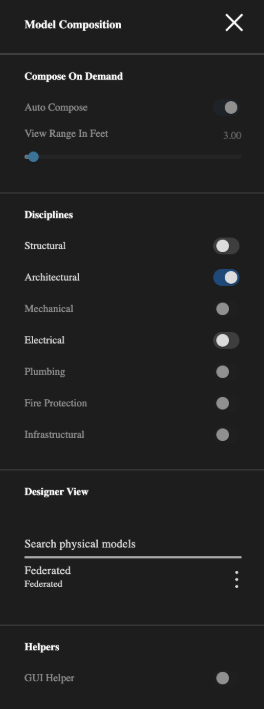
| UI element | Description |
|---|---|
| Auto Compose | Enable to leave the model composition decision-making to the IafViewer and Graphics Service based on view parameters such as view position and the user's enabled disciplines, such as Structural and Electrical. |
| View Range in Feet | Set the range in feet that you want the viewer to load the model. |
| Structural | Enables structural elements |
| Architectural | Always enabled |
| Mechanical | Enables mechanical elements |
| Electrical | Enables electrical elements |
| Plumbing | Enables plumbing elements |
| Search physical models | Search the linked models tags |
For app-side levers that affect load time (disciplines, federation type, quality, concurrent modes), see IafViewer Performance Tips.
Core components
{{modelComposition}} determines which models are loaded. It feeds the View3D, View2D and GIS visualizations. See How prop groups fit together.
| Prop | Type | Purpose |
|---|---|---|
modelComposition.defaultFederationType | string | "SingleModel" | "Project" | "MultiModel" (default: SingleModel) |
modelComposition.clusteredModels | array | Optional clusters of models (filter + shared map outline / site). Used with Project / MultiModel. |
modelComposition.clusteredModels[].evmMode | string | Omit for a View3D cluster; 'aps' for an APS cluster |
modelComposition.clusteredModels[].ids | array | Model IDs (View3D) or design URNs (APS). modelIds is a legacy alias for View3D clusters only. |
modelComposition.initial | object | Disciplines: { Architectural: { load, visible }, ... } |
modelComposition.quality | string | 'low' | 'medium' | 'high' — dynamic-loading eligibility |
Resolved in this order:
{{props.settings}} → {{localStorage}} (iafviewer_settings) → {{props.modelComposition}} → PropertyStore default
For federation type semantics and multi-building GIS consumption, see Federated View3D Buildings on Gis(Mapbox). For mixing View3D and APS clusters, see View3D and APS clusters.
For the full prop reference with required flags, see IafViewer — modelComposition. IafViewerDBM forwards the same modelComposition prop.
Scene Graph features
You can add and remove tags from parts of the model and then use those tags to filter for Scene Graph derived models, such as for Navisworks projects.
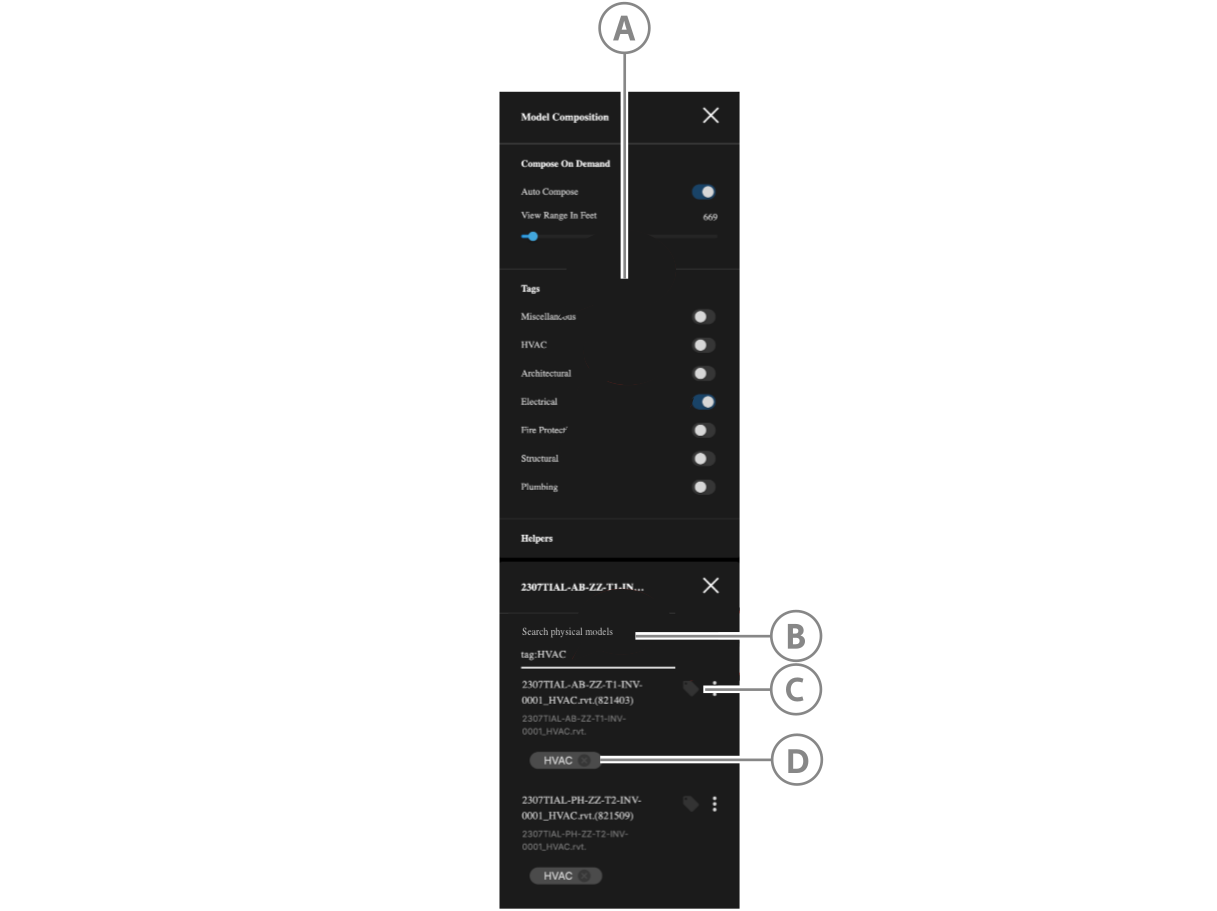
| UI element | Description |
|---|---|
| A | The model's tags appear appear in the Tags section where you can enable or disable their appearance in the model render. Untagged parts of the model appear under the Miscellaneous toggle. |
| B | Search the linked model by tag. |
| C | Click to assign a tag. |
| D | Click to remove a tag. |