Course Overview and Prerequisites

This course is intended to give developers a quick start in working with the Twinit AI Service. The Twinit AI Service provides the core API capabilities used to create and manage AI resources, forming the foundation for all AI-driven functionality across the platform. Introduced in Twinit version 5.0, it adds a range of advanced AI features that enable more natural, human-language interaction with platform data.
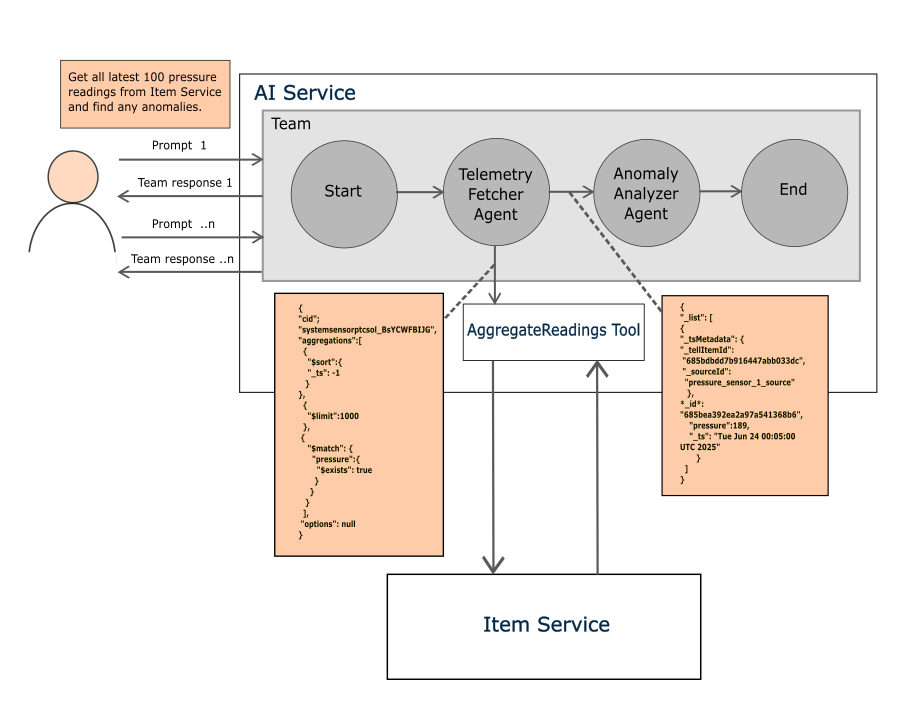
With this service, developers can define and configure intelligent agents that process user prompts, retrieve real-time data, and return intelligent, context-aware responses. It also allows you to set up and configure agents, register and organize tools, manage teams, and create conversations that your applications can interact with.
The AI Service exposes several first-class, namespace-owned resources, such as agents, tools, teams, and conversations, that users can create and share using the Twinit permissions model.
The relationships between these resources are as follows:
- A conversation recruits a team.
- A team manages agents.
- Agents use tools and reference knowledgebases.
Together, these components provide the underlying framework that brings AI capabilities together and enables them to work seamlessly across the platform.
It's also important to know that Twinit currently only supports read-only operations when executed through any Twinit AI Team, Agent, or Tool.
Prerequisites#
Before diving into the hands-on lessons in this course, it is important to ensure you have the right setup and foundational knowledge. These prerequisites will help you follow along smoothly, understand the concepts presented, and successfully execute code against the Twinit AI Service.
Prerequisites for This Course:
- Completed the 2 | Self-Led Developer Basics course
- Completed the 3 | Self-Led Developer Intermediate course
- A working understanding of APIs and REST APIs, including how they work and how to use them
- A working understanding and ability to read asynchronous JavaScript code
- A working understanding and ability to read ES Modules
- A working understanding and ability to read JSON
Twinit IDE Extension#
Be sure you are using the latest version of the Twinit IDE Extension before proceeding with the course.
You can check if a newer version of the extension is available by restarting your IDE and clicking on the Twinit IDE Extension. If a newer version is available, a message will appear with a link to download the installer.