Triggers, scheduling, and enterprise integration patterns
The course has so far started every workflow by hand. This final lesson covers the other ways a workflow starts, the three task types the static course did not exercise directly (REST_CONNECTOR, HAYSTACK, MQTT_PUBLISH), and a reference mapping of Twinit tasks onto standard enterprise integration patterns.
Triggers
A workflow definition is inert until something starts it. There are three triggers.
Manual Run
A direct API call: from an app, a page-component action, or a workbench. This is what runWeatherWorkflow and what the 'Run Workflow' command does throughout the course.
POST /workflowsvc/api/v1/workflows
{
    "_workflowDefId": "…",
    "_inputParams": { "_urn": "urn:…" }
}
Scheduled
Attach one or more Schedules to a WorkflowDef. Schedules are sub-resources managed through their own REST endpoints, using a cron expression:
{
    "_schedule": {
        "_type": "TIME_BASED",
        "_runInterval": "0 0/5 * ? * *",
        "_timeZone": "UTC"
    }
}
The example above runs the workflow every five minutes. This is how you turn any of the course workflows into an unattended job (e.g. poll a weather API every 15 minutes and store readings).
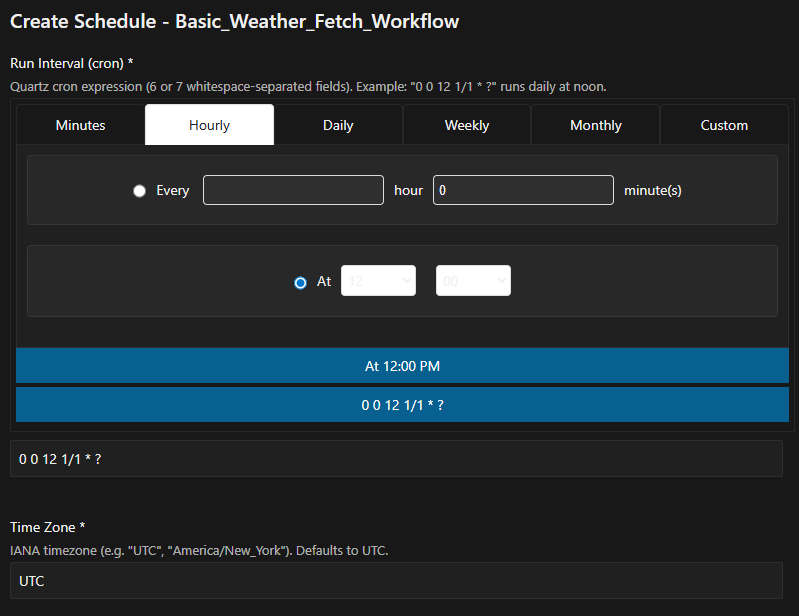
You can create Workflow Schedule using a user interface int he IDE Extension.
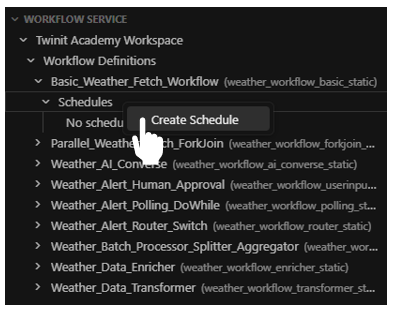
- Expand the Workflow Definition in the Workflow Service to show the Schedules
- Right click the Schedules node and select 'Create Schedule'
- A web form will open with controls to make screaitng a schedule easy
Event-Driven
Configure a Notification Service trigger that fires a custom script when a matching event is emitted anywhere in Twinit; the script calls IafWorkflowSvc.runWorkflow.
filter: { event: "resource.ResourceCreated", "resource.type": "filesvc.*" }
    → script → runWorkflow(defId, …)
This is how "when a file is uploaded, process it" style automation is built, and it is the same mechanism that would deliver the USER_INPUT pause notification to an approver.
The Three External Task Types
These task types require live endpoints, so the course did not cover them, but their shape is worth knowing because they are how workflows reach outside Twinit.
REST_CONNECTOR
The production counterpart of the course's generate...WeatherData scripts. It supports NoAuth, Basic, Bearer, and OAuth2, client-credentials, so most enterprise APIs need no custom auth code. Its result is exposed as ._output.result (or .body) for downstream binding.
{
    _name: "fetch",
    _type: "REST_CONNECTOR",
    _inputParams: {
        _url: "${workflow.input._url}",
        _auth: { _type: "OAuth2ClientCreds", /* ... */ },
        _args: { method: "GET", headers: { Accept: "application/json" } },
        to: "json"
    }
}
To convert any course workflow to live data, replace a generate...WeatherData SCRIPT_EXECUTION task with a REST_CONNECTOR task and update the downstream binding from ._output.scriptOutput to ._output.result. Everything else is unchanged.
It's also worth noting that fetch() can be used directly in a SCRIPT_EXECUTION task as well. Depending on your use case, fetch() may be a more flexible implementation than the REST_CONNECTOR task.
HAYSTACK
A first-class task for SkySpark, Niagara, and other Haystack-compliant BMS endpoints. It supports actions such as pointhistory:
{
    _name: "fetch_ahu_history",
    _type: "HAYSTACK",
    _sequenceno: 1,
    _inputParams: {
        _project: "site-A",
        _url: "https://skyspark.example.com/api",
        _uname: "twinit",
        _pwd: "${secret:skyspark_pwd}",
        _action: "pointhistory",
        _cmd: "point and his and equip->ahu",
        _hisStartDate: "${workflow.input._since}",
        _to: "json"
    }
}
Combine it with FORK_JOIN to fetch history for several point groups at once, then a SCRIPT_EXECUTION to normalise each history frame into telemetry readings (_ts + _tsMetadata._sourceId).
MQTT_PUBLISH
Publishes a message to any MQTT broker (ActiveMQ, HiveMQ, AWS IoT Core, or a BACnet-MQTT gateway). Used for command messages to devices:
{
    _name: "publish_setpoint",
    _type: "MQTT_PUBLISH",
    _inputParams: {
        _mqtt_target: [ { _config: { _url: "ssl://gw.example.com:8883",
                                     _username: "twinit-bms",
                                     _password: "${secret:bldg_a_pwd}",
                                     _mqtt_version: 5 } } ],
        _topic: "bldg/A/ahu/03/setpoint",
        _messages: [ "{ \"objectId\": \"analog-value:12\", \"value\": ${workflow.input.setpointC}, \"correlationId\": \"${workflow._id}\" }" ]
    }
}
Note correlationId: "${workflow._id}": the run id correlates the command with the device's echoed state on a separate topic, which flows back through Twinit's IoT ingest pipeline.
Task-to-Pattern Reference
Twinit's built-in tasks map directly onto the most-used enterprise integration patterns. This table is the quick reference for choosing a task:
| Pattern | Twinit implementation | Course lesson |
|---|---|---|
| Router | SWITCH on ${prev._output.field} | 06 |
| Recipient List | FORK_JOIN of REST_CONNECTORs | 05 |
| Splitter + Aggregator | SCRIPT_EXECUTION (fan-out) → FORK_JOIN (join) | 07 |
| Filter | SWITCH with a drop branch (or in-script decision) | 06, 08 |
| Message Translator | SCRIPT_EXECUTION (map schema A → B) | 09 |
| Enricher | REST_CONNECTOR → SCRIPT_EXECUTION (merge) | 07 |
| Poll | DO_WHILE around REST_CONNECTOR | 08 |
| Command Message | MQTT_PUBLISH with correlationId | 13 |
| Request–Reply / Human Task | REST_CONNECTOR + USER_INPUT | 10 |
| Process Manager | the workflow itself (25-task envelope) | all |
| AI-backed Translator / Router | AI_CONVERSE | 11 |