Calling an AI Team with AI_CONVERSE
An AI_CONVERSE task sends a prompt to an AI Service team and returns the team's response as a task output, ready for a downstream task to use. This lets a workflow delegate reasoning, classification, or drafting to an AI agent while keeping deterministic control flow around it.
Prerequisites
This lesson assumes familiarity with the Twinit AI Service. The concepts of agents, tools, teams, and conversations, and how they relate. If those terms are new, work through the AI Service introduction first:
Prerequisite: AI Service concepts. Complete the AI01 — Introduction to the Twinit AI Service course before this lesson. It introduces the AI Service resource model. A conversation recruits a team; a team manages agents; agents use tools and reference knowledgebases.
Prerequisite: OpenAI key. This is the one lesson that needs an external credential. The Weather Forecaster agent is configured to use OpenAI (
_provider: "openai",_model: "gpt-4o"), so anAI_CONVERSEcall fails until an administrator has configured the organisation's OpenAI API key. If you have not done that, read the lesson for the mechanics and return to run it once the key is in place. (This is the same missing-key condition that makes STEP 4 of project setup skip agent creation — see Lesson 2.)
Make sure the agent and team exist
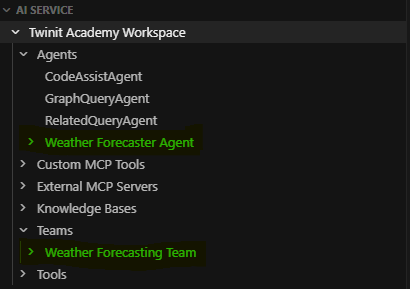
The AI_CONVERSE task talks to the Weather Forecasting Team, which is backed by the Weather Forecaster Agent. Both are created by during project setup (STEP 4). But that step is skipped when the OpenAI key is not configured. Agent creation needs the key, so on a key-less project setup logs STEP 4: SKIPPED … and the agent and team do not exist yet (see Course Materials and Setup).
You can see the Agent and Team in the IDE Extension AI Service panel.
The Workflow
The Weather_AI_Converse workflow uses a SCRIPT_EXECUTION task to create a prompt which it then passes the AI_CONVERSE task.
fetch_weather (SCRIPT_EXECUTION)
  → build_ai_prompt (SCRIPT_EXECUTION)   ← turn forecast data into a natural-language prompt
    → ask_ai (AI_CONVERSE)               ← send the prompt to the team
      → log_ai_response (SCRIPT_EXECUTION) ← record the reply
The AI_CONVERSE task needs the Twinit AI Team id and the prompt:
{
    _type: "AI_CONVERSE",
    _name: "ask_ai",
    _sequenceno: 3,
    _retryCount: 0,
    _timeoutSeconds: 120,
    _inputParams: {
        _teamId: teamId,
        _userPrompt: "${build_ai_prompt._output.scriptOutput.prompt}"
    }
}
Prompt In, Response Out
build_ai_promptcomposes a natural-language question from the forecast (temperatures, rain chance, condition). Its a SCRIPT step that adapts structured data into the text an AI expects.logAIResponsereceives the AI's reply.AI_CONVERSEoutput is an envelope{ _id, _output: {...} }; the script forwards the whole_outputand best-effort-extracts the human-readable reply from its likely fields (message/reply/response/_content), since the exact field depends on the team's configuration.
This "SCRIPT to build the prompt → AI_CONVERSE → SCRIPT to consume the reply" sandwich is the standard way to embed an AI step: deterministic code shapes the input and interprets the output, with the model call isolated in the middle.
Run the Workflow
- Continue using Code
- Continue using IDE Extension
- Run
runWeatherWorkflowwith input copying and pasting this value into the input field:
`{ "workflowUserType": "weather_workflow_ai_converse_static" }
- Monitor with
getLatestWorkflowRunByUserType.
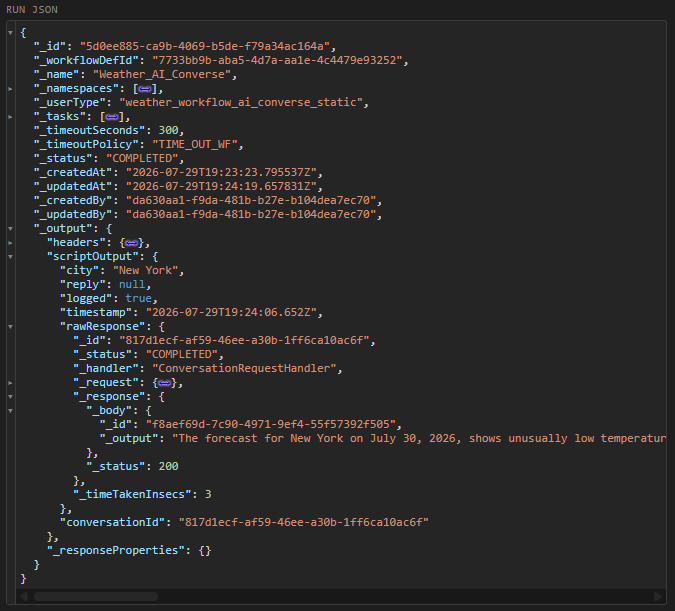
When the workflow completes read the ask_ai task output and the log_ai_response result to see the model's answer.
Right click the Weather_AI_Converse workflow in the Workflow Service panel and select 'Run Workflow'.
After the workflow starts right click it again and select 'Show Workflow Runs'. Refresh the runs until the Workflow shows as COMPLETE.
Examine the workflow output to see the AI reponse.