Content-based routing with SWITCH
A SWITCH task inspects a value and runs one of several branches depending on it. This is the content-based router pattern: the message decides its own route through the workflow.
The Workflow
Three tasks: fetch the weather, analyse its severity, then route on that severity.
fetch_weather (SCRIPT_EXECUTION)
  → analyze_weather (SCRIPT_EXECUTION → { severity: "SEVERE"|"MODERATE"|"LOW" })
    → route_by_severity (SWITCH)
The SWITCH Definition
The Switch task type reads the switch value from one of its _inputParams and executes an array of tasks matching the switch value. In the case below a previous task named analyze_weather produces a severity. That value is passed to the Switch task in its _inputParams. Based on its value (either SEVERE, MODERATE, or LOW) a different branch of tasks will execute (much like the previous FORK JOIN example). If the value of severity does not match any of the configured values then the defaultCase array of tasks will execute.
{
    _type: "SWITCH",
    _name: "route_by_severity",
    _sequenceno: 3,
    _inputParams: {
        // the value to switch on MUST live inside _inputParams
        _switchCaseValue: "${analyze_weather._output.scriptOutput.severity}"
    },
    _decisionCases: {
        "SEVERE":   [ { _type: "SCRIPT_EXECUTION", _name: "send_urgent_alert", _sequenceno: 1,
                        _inputParams: { _userType: "weather_workflow_demo_static",
                                        _scriptName: "sendUrgentAlert",
                                        severity: "${analyze_weather._output.scriptOutput}" } } ],
        "MODERATE": [ { _type: "SCRIPT_EXECUTION", _name: "send_warning", _sequenceno: 1,
                        _inputParams: { _userType: "weather_workflow_demo_static",
                                        _scriptName: "sendWarning",
                                        severity: "${analyze_weather._output.scriptOutput}" } } ],
        "LOW":      [ { _type: "SCRIPT_EXECUTION", _name: "log_info", _sequenceno: 1,
                        _inputParams: { _userType: "weather_workflow_demo_static",
                                        _scriptName: "logInformation",
                                        severity: "${analyze_weather._output.scriptOutput}" } } ],
        "defaultCase": [ { _type: "SCRIPT_EXECUTION", _name: "log_info_default", _sequenceno: 1,
                        _inputParams: { _userType: "weather_workflow_demo_static",
                                        _scriptName: "logInformation",
                                        severity: "${analyze_weather._output.scriptOutput}" } } ]
    }
}
Three Rules the Validator Enforces
_switchCaseValuegoes inside_inputParams, not as a sibling of it. This is the value the switch compares against the case keys.- A
defaultCaseentry is required in_decisionCases. It runs when no other case key matches (the safety net). - Every case task needs a
_sequenceno(each case's tasks number from 1).
Values are Compared as Strings
The case keys ("SEVERE", "MODERATE", "LOW") are strings, and _switchCaseValue is compared to them as a string. This matters when you switch on a boolean-like value: emit "true"/"false" strings, not the JavaScript booleans true/false, and give your _decisionCases string keys to match. You will see exactly this in the polling lesson.
Run the Workflow
- Continue using Code
- Continue using IDE Extension
- Run
runWeatherWorkflowwith input copying and pasting this value into the input field:
{ "workflowUserType": "weather_workflow_router_static" }
- Monitor with
getLatestWorkflowRunByUserType.
The static New York forecast has an 80% chance of rain, which
analyzeWeatherSeverity classifies as SEVERE, so the SEVERE branch
(send_urgent_alert) runs and the others do not. In the completed run you will see only the matched branch's task executed under the switch. To exercise a different branch, adjust the static forecast in generateNewYorkWeatherData (for example lower the rain chance) and re-run.
Right click the Weather_Alert_Router_Switch workflow in the Workflow Service panel and select 'Run Workflow'.
After the workflow starts right click it again and select 'Show Workflow Runs'. Refresh the runs until the Workflow shows as COMPLETE.
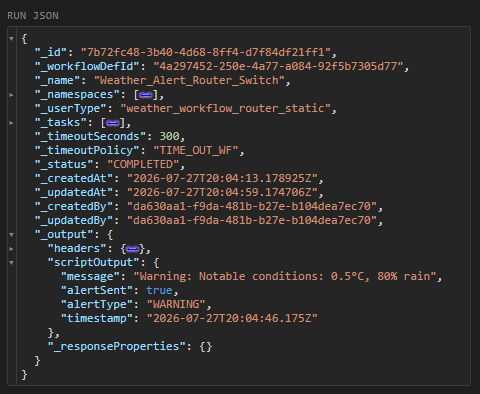
You can examine the workflows _output to see the results of the workflow which has produced an alert.
Filter = SWITCH with a drop branch
One pattern the Switch task is also useful for is the Filter pattern. The Filter pattern is just a SWITCH where one branch does nothing (or logs and stops). The polling lesson uses this idea: a step decides whether a change is "significant" and only significant changes are stored.