Message Transformation with SCRIPT_EXECUTION
Integrations spend much of their effort reshaping data: converting units, mapping one schema onto another, validating, and normalising. In the Workflow Service this can be accomplished purely with SCRIPT_EXECUTION tasks chained together.
The Workflow
Five sequential tasks take an external-format forecast and produce a validated, internal-format record that is then stored:
fetch_weather_external (SCRIPT_EXECUTION)          ← source-format data
  → transform_to_celsius (SCRIPT_EXECUTION)         ← unit conversion
  → transform_to_standard_format (SCRIPT_EXECUTION) ← schema mapping
  → validate_transformed (SCRIPT_EXECUTION)         ← validation gate
  → store_transformed (SCRIPT_EXECUTION)            ← persist
Each stage binds to the output(s) it needs. Note that transform_to_standard_format consumes two upstream outputs: the original data and the converted units, showing that a task can depend on more than one predecessor:
{
    _type: "SCRIPT_EXECUTION",
    _name: "transform_to_standard_format",
    _sequenceno: 3,
    _inputParams: {
        _userType: "weather_workflow_demo_static",
        _scriptName: "transformToInternalFormat",
        weatherData:      "${fetch_weather_external._output.scriptOutput}",
        transformedUnits: "${transform_to_celsius._output.scriptOutput}"
    }
}
What Each Stage Does
| Task | Script | Role |
|---|---|---|
transform_to_celsius | transformTemperatureUnits | Adds derived unit values (°C/°F/K), a value transformation. |
transform_to_standard_format | transformToInternalFormat | Maps the source fields onto a structured internal record (metadata, location, forecasts[]). |
validate_transformed | validateTransformedData | Checks the internal record has the required parts and returns { valid, errors }. |
store_transformed | parseAndStoreWeatherFromWorkflow | Persists readings to the telemetry collection. |
The transformation is deliberately simple (the source is already in Celsius, so it simply converts to Fahrenheit and Kelvin) so that the structure of a translator pipeline is what stands out: convert → map → validate → persist, each step a small, independently testable function.
// weather_workflow_demo_static script
async function transformTemperatureUnits(input, libraries, ctx) {
    const p = getParams(input);
    const weatherData = p.weatherData;

    if (!weatherData || !weatherData.forecast) {
        return { transformed: false };
    }

    // Data is already in Celsius from API, but demonstrate transformation
    const transformed = {
        location: weatherData.location.name,
        forecast: weatherData.forecast.forecastday.map(day => ({
            date: day.date,
            tempC: day.day.avgtemp_c,
            tempF: (day.day.avgtemp_c * 9/5) + 32,
            tempK: day.day.avgtemp_c + 273.15
        }))
    };

    return {
        transformed: true,
        data: transformed
    };
}
Validation as an Explicit Stage
validateTransformedData returns a structured verdict rather than throwing:
return { valid: errors.length === 0, errors, validatedAt: ... };
Making validation an explicit task has two benefits. First, the verdict is visible in the run's task results, so a data-quality problem is diagnosable from the audit trail. Second, a following SWITCH could branch on valid to route bad records to a dead-letter path instead of storing them, turning the linear pipeline into a validating router with no new machinery.
Why Translators are Scripts
Because a translator is a plain function, you can develop and unit-test it outside the workflow entirely: call transformToInternalFormat from the Twinit IDE Extension with a sample forecast (the getParams helper means it accepts inputs directly), confirm the output shape, then wire it into the definition. This "test the script, then bind it" loop is the fastest way to build reliable pipelines.
Run the Workflow
- Continue using Code
- Continue using IDE Extension
- Run
runWeatherWorkflowwith input copying and pasting this value into the input field:
{ "workflowUserType": "weather_workflow_transformer_static" }
- Monitor with
getLatestWorkflowRunByUserType.
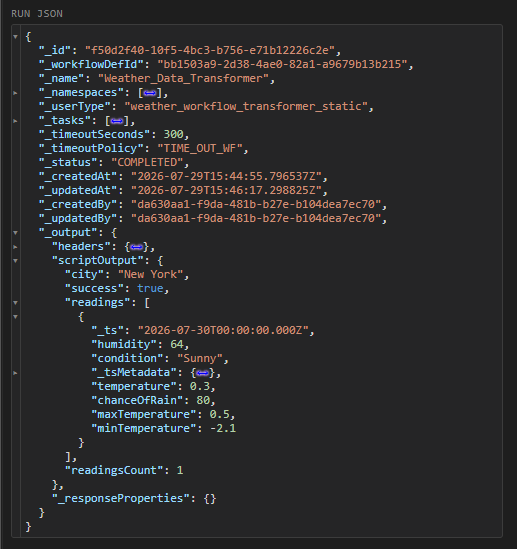
In the completed run you can read each stage's output in turn: the converted units, the mapped internal record, the validation verdict, and finally the store result.
Right click the Weather_Data_Transformer workflow in the Workflow Service panel and select 'Run Workflow'.
After the workflow starts right click it again and select 'Show Workflow Runs'. Refresh the runs until the Workflow shows as COMPLETE.
You can see the converted and persisted data in the workflow result scriptOutput.