Enricher and Splitter–Aggregator
By using the different tasks types its possible to compose many different pipeline patterns. In this lesson we'll examine two of them: a pattern that enriches data from multiple sources before handing it to the next portion of the workflow and a pattern that splits data to be processed by multiple independent workflow branches. Both of these patterns use tasks you already know (SCRIPT_EXECUTION and FORK_JOIN).
Pattern: Data Enricher
A Data Enricher takes a base set of data and adds related data to it from other sources before the worflow continues. In this example, a base forecast is enriched, in parallel, with site information, historical readings, and air-quality data.
The Weather_Data_Enricher workflow uses a SCRIPT_EXECUTION task to fetch weather data, which it then hands to a FORK_JOIN task that will then take that data and in parallel retrieve the site data, any historical data, and the air quality data for each site. All of the data is then merged back together in the final SCRIPT_EXECUTION task after the FORK_JOIN has completed.
fetch_current_weather (SCRIPT_EXECUTION)
  → enrich_parallel (FORK_JOIN)
       ├─ fetch_site_data
       ├─ fetch_historical_data
       └─ fetch_air_quality
  → merge_enriched_data (SCRIPT_EXECUTION)
The enrichment tasks do real retrieval of data.
fetchSiteInformation matches the forecast's city to a site, and fetchHistoricalWeather reads existing telemetry from the weather collection. So this workflow demonstrates a task reaching back into Twinit data, not just transforming its input.
The FORK_JOIN runs the three independent enrichment lookups at once. Each branch takes the same base forecast as input via a binding to the first task. Here's the fetch_site_data task for instance which accepts weatherData as "${fetch_current_weather._output.scriptOutput}":
_inputParams: {
    _userType: "weather_workflow_demo_static",
    _scriptName: "fetchSiteInformation",
    weatherData: "${fetch_current_weather._output.scriptOutput}"
}
The merge step then binds all the pieces together (the base plus each branch output) exactly as the fork-join aggregator did, addressing branch tasks by name at the top level:
{
    _type: "SCRIPT_EXECUTION",
    _name: "merge_enriched_data",
    _sequenceno: 3,
    _inputParams: {
        _userType: "weather_workflow_demo_static",
        _scriptName: "mergeEnrichedWeatherData",
        weatherData:    "${fetch_current_weather._output.scriptOutput}",
        siteData:       "${fetch_site_data._output.scriptOutput}",
        historicalData: "${fetch_historical_data._output.scriptOutput}",
        airQuality:     "${fetch_air_quality._output.scriptOutput}"
    }
}
mergeEnrichedWeatherData assembles a single enriched object, recording which sources contributed. The enrichment lookups are real Item Service reads:
Run the Workflow
- Continue using Code
- Continue using IDE Extension
- Run
runWeatherWorkflowwith input copying and pasting this value into the input field:
{ "workflowUserType": "weather_workflow_enricher_static" }
-
Monitor with
getLatestWorkflowRunByUserType. -
Examine the Workflow output to see the results of the enriched weather data.
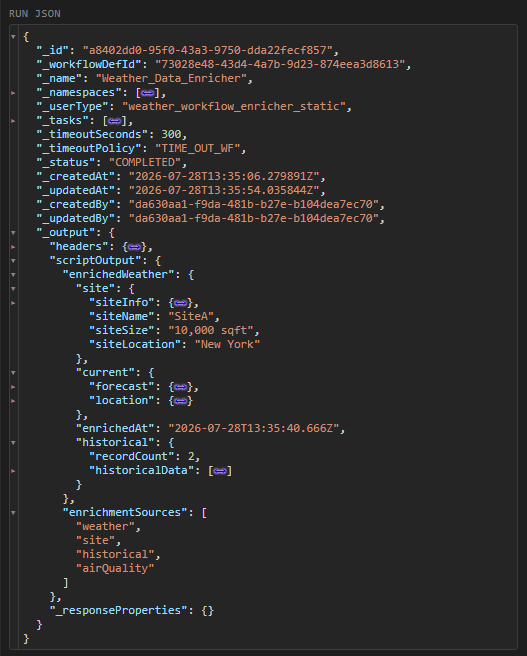
Right click the Weather_Data_Enricher workflow in the Workflow Service panel and select 'Run Workflow'.
After the workflow starts right click it again and select 'Show Workflow Runs'. Refresh the runs until the Workflow shows as COMPLETE.
You can examine the workflows _output to see the results of the workflow which has produced an alert.
Pattern: Splitter–Aggregator
The Splitter-Aggregatorpattern is composed of a Splitter taskes that breaks data into many and Aggregator task that collects the processed parts back into one result. Together they can process a variable-length list of data.
The Weather_Batch_Processor_Splitter_Aggregator workflow uses a SCRIPT_EXECUTION task to break data down into discrete batches. Those batches are then handed to a FORK_JOIN task to process the batches in parallel. The final SCRIPT_EXECUTION task aggregates all the processed batches into a final output.
split_cities (SCRIPT_EXECUTION)      ← splits the input list into batches
  → process_batches (FORK_JOIN)      ← one branch per batch, in parallel
       ├─ process_batch_1
       ├─ process_batch_2
       └─ process_batch_3
  → aggregate_batch_results (SCRIPT_EXECUTION)   ← recombines
The workflow declares an array input of the cities to process:
_inputParams: {
    cities: { type: "array", value: ["New York", "San Francisco", "London", "Tokyo", "Paris"] }
}
The first split_cities task reads ${workflow.input.cities} and chunks it into batches. Each FORK_JOIN branch processes one batch by index, binding to the splitter's output and a fixed batchIndex:
_inputParams: {
    _userType: "weather_workflow_demo_static",
    _scriptName: "processCityBatch",
    batches:    "${split_cities._output.scriptOutput.batches}",
    batchIndex: 0
}
Finally aggregate_batch_results collects the three batch outputs by task name.
{
    "_name": "aggregate_batch_results",
    "_type": "SCRIPT_EXECUTION",
    "_sequenceno": 3,
    "_inputParams": {
        "batch1": "${process_batch_1._output.scriptOutput}",
        "batch2": "${process_batch_2._output.scriptOutput}",
        "batch3": "${process_batch_3._output.scriptOutput}",
        "_userType": "weather_workflow_demo_static",
        "_scriptName": "aggregateBatchResults"
    },
    "_timeoutSeconds": 60
}
A robustness detail
splitCitiesIntoBatches and processCityBatch both guard against cities / batches arriving as a JSON string rather than an array:
let cities = p.cities || [];
if (typeof cities === "string") {
    try { cities = JSON.parse(cities); } catch (e) { cities = []; }
}
Whether an array-typed input reaches a script as an array or a string can depend on how the run was started, so normalise it inside the script. This is the same defensive-input habit introduced earlier.
Splitter Dynamism vs. Fixed Branches
Note the asymmetry: the split is dynamic (any number of cities → any number of batches), but the FORK_JOIN has a fixed set of branches (three, one per batchIndex). A FORK_JOIN's branches are declared statically in the definition. If the number of batches exceeds the number of branches, the extra batches are not processed. Size the branches to the maximum you expect, or process leftover batches in a following step. Recognising this limit is part of using the pattern correctly.
Run the Workflow
- Continue using Code
- Continue using IDE Extension
- Run
runWeatherWorkflowwith input copying and pasting this value into the input field:
{ "workflowUserType": "weather_workflow_splitter_static" }
-
Monitor with
getLatestWorkflowRunByUserType. -
Examine the Workflow output to see the results of the enriched weather data.
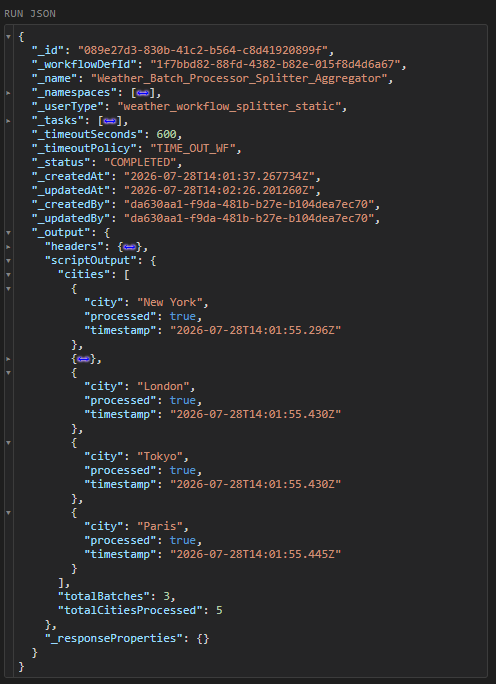
Alternatively, you can run the workflow by passing the workflowUserType and a custom list of cities specific for the workflow run.
{
    "workflowUserType": "weather_workflow_splitter_static",
    "inputParams": { "cities": ["Berlin", "Paris", "Rome", "Cairo"] }
}
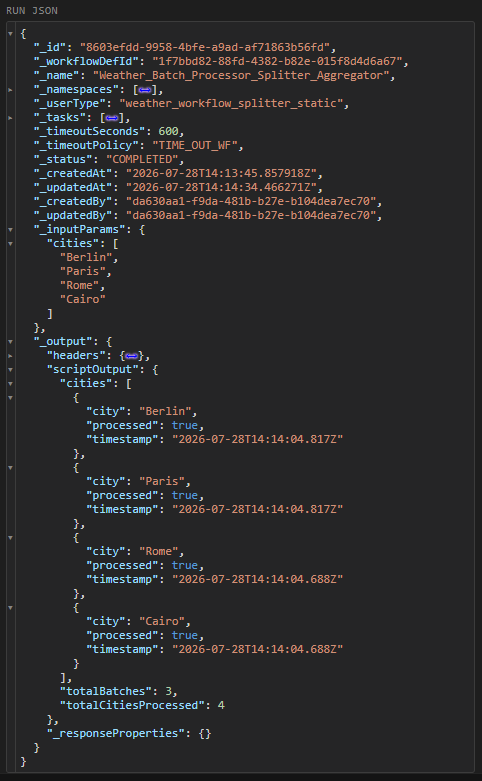
Right click the Weather_Batch_Processor_Splitter_Aggregator workflow in the Workflow Service panel and select 'Run Workflow'.
After the workflow starts right click it again and select 'Show Workflow Runs'. Refresh the runs until the Workflow shows as COMPLETE.
You can examine the workflows _output to see the results of the workflow which has produced an alert.
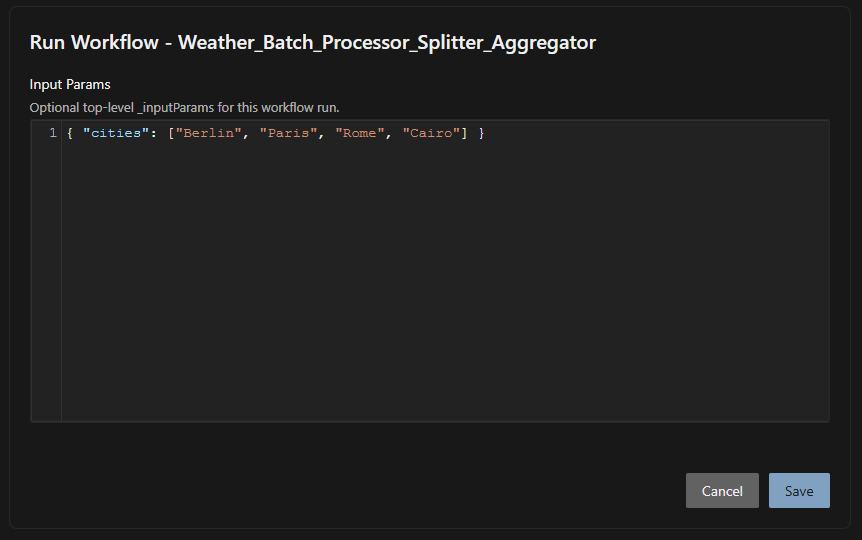
Alternatively, you can right click Weather_Batch_Processor_Splitter_Aggregator and select 'Run Workflow with Input' and provide a custom list of cities to override the default cities the workflow is configured to use.
{ "cities": ["Berlin", "Paris", "Rome", "Cairo"] }
Takeaway
Enricher and Splitter–Aggregator are not new machinery. They are compositions of SCRIPT_EXECUTION (to transform/fan-out/merge) and FORK_JOIN (to parallelise). Most real workflows are built this way: a handful of task types arranged into the pattern the integration needs.