Polling loops with DO_WHILE
A workflow using a DO_WHILE task repeats a chain of tasks while a condition holds. Once a given condition is met the DO_WHILE task completes allowing the rest of the workflow tasks to proceed.
The Workflow
The Weather_Alert_Polling_DoWhile workflow sets up a polling workflow in a SCRIPT_EXECUTION task, then begins looping in a DO_WHILE task until a given number of loops have completed.
initialize_polling (SCRIPT_EXECUTION)   ← set up loop state
  → poll_weather (DO_WHILE)             ← repeat the body while the condition holds
       ├─ fetch_weather_update
       └─ filter_and_log
  → finalize_polling (SCRIPT_EXECUTION) ← wrap up
The DO_WHILE definition
At the start of the Workflow Definition it declares a maxPolls input parameter with a default value of 3. Since this is declared as a Workflow _inputParam it can be used by any task in the Workflow and can be overridden at workflow runtime.
The workflow declares the bound maxPolls:
_inputParams: {
    maxPolls: { type: "integer", value: 3 }
}
The DO_WHILE task below accepts the workflow parameter in its own _inputParams. It also uses the maxPolls value in its _loopCondition to control how many times the tasks defined in _loopOver will execute.
{
    _type: "DO_WHILE",
    _name: "poll_weather",
    _sequenceno: 2,
    // Local binding so the JSONPath in _loopCondition can resolve $.maxPolls.
    _inputParams: {
        maxPolls: "${workflow.input.maxPolls}"
    },
    _loopCondition: "$.poll_weather.iteration < $.maxPolls",
    _loopOver: [
        { _type: "SCRIPT_EXECUTION", _name: "fetch_weather_update", _sequenceno: 1,
          _retryCount: 2, _timeoutSeconds: 30,
          _inputParams: { _userType: "weather_workflow_demo_static",
                          _scriptName: "generateNewYorkWeatherData" } },
        { _type: "SCRIPT_EXECUTION", _name: "filter_and_log", _sequenceno: 2,
          _inputParams: { _userType: "weather_workflow_demo_static",
                          _scriptName: "filterSignificantWeatherChanges",
                          currentWeather: "${fetch_weather_update._output.scriptOutput}" } }
    ]
}
How the loop condition works
Three details make this DO_WHILE task work:
- The body lives in
_loopOver: an array of tasks, each with its own_sequenceno, just like aFORK_JOINbranch. - The condition is a JSONPath expression evaluated against the task's own resolved
_inputParams, using the$.form. That is whymaxPollsis bound into this task's_inputParams(maxPolls: "${workflow.input.maxPolls}") and then referenced as$.maxPolls. ADO_WHILEcondition reads from the task's local scope, not directly from${workflow.input.*}. $.poll_weather.iterationis the runtime-maintained loop counter for this task.$.poll_weather.iteration < $.maxPollstherefore runs the bodymaxPollstimes.
The filter-and-log body
Inside the loop, filterSignificantWeatherChanges decides whether the reading is significant and logs accordingly (an inline Filter). It returns its decision as a string so that a SWITCH could compare it:
return {
    isSignificant: isSignificant ? "true" : "false",  // string, not boolean
    reason: ...,
    data: currentWeather
};
The practical guidance: Prefer flat
DO_WHILEbodies made ofSCRIPT_EXECUTIONtasks. If a loop iteration needs to branch, make the decision inside a script rather than nesting aSWITCH(or other composite) inside_loopOver.
Run the Workflow
- Continue using Code
- Continue using IDE Extension
- Run
runWeatherWorkflowwith input copying and pasting this value into the input field:
{ "workflowUserType": "weather_workflow_polling_static" }
-
Monitor with
getLatestWorkflowRunByUserType. -
Examine the Workflow output to see the results of the enriched weather data.
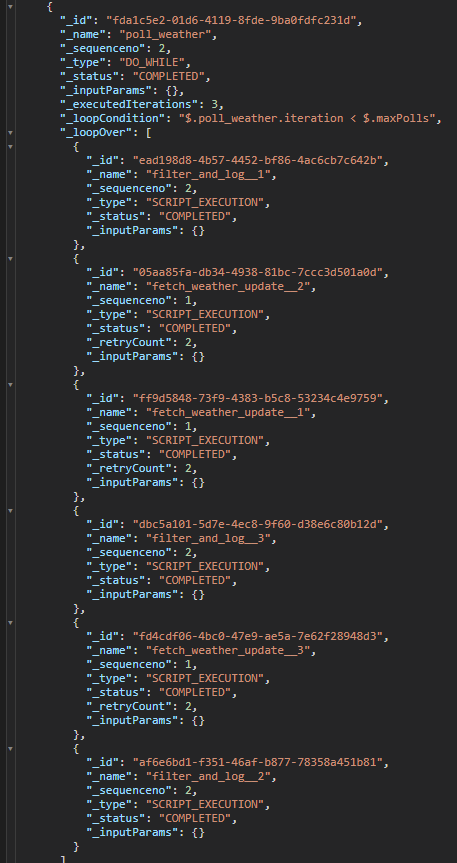
In the completed run, the poll_weather task shows its body executed maxPolls times, followed by finalize_polling.
Right click the Weather_Alert_Polling_DoWhile workflow in the Workflow Service panel and select 'Run Workflow'.
After the workflow starts right click it again and select 'Show Workflow Runs'. Refresh the runs until the Workflow shows as COMPLETE.
In the results, expand the tasks to see the DO_WHILE task result.
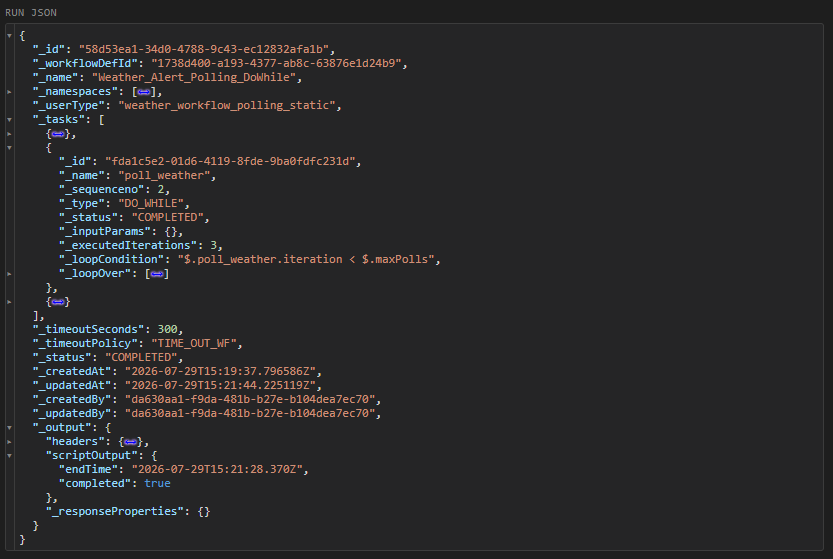
Expand _loopOver to see the individual iterations of each task in the loop.
Polling cadence in production
With a real REST_CONNECTOR in the loop body, the polling cadence is controlled by task-level _retryLogic and _retryDelaySeconds, while the task's _timeoutSeconds caps the total wait for each attempt. The loop condition should then tests a status field on the response, e.g. status ∈ {success, failed}.