Install the Twinit IDE Extension
The Twinit IDE Extension turns Microsoft Visual Studio Code and Cursor into a powerful Twinit IDE. All training materials and code will be run using the Twinit IDE Extension.
Install a Supported IDE
The Twinit IDE Extension supports popular IDEs including Microsoft Visual Studio Code and Cursor. All training material will refer to using Microsoft Visual Studio Code but all training content is identical if you choose to use Cursor.
If you do not yet have Microsoft Visual Studio Code, visit https://code.visualstudio.com/Download to download VSCode for your operating system.
Get the Twinit IDE Extension
- Visit the Twinit Developer documentation here: https://twinit.dev
- Click the Marketplace > Developer Tools > Twinit IDE Extension > Overview topic
- Follow the directions to download and install the extension
- Only follow the directions for downloading and installing the extension
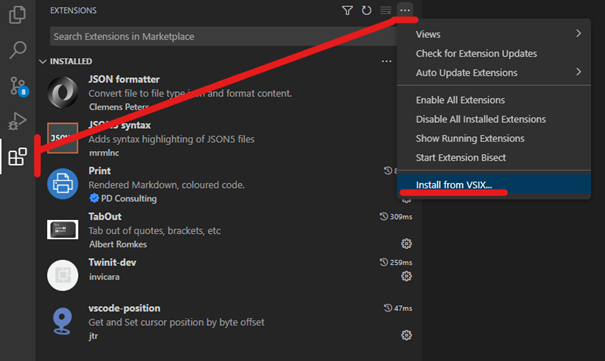
- Instructions on providing configuration for the extension will be provided as part of this training. You can install the extension by dragging and dropping the vsix file onto the extension panel or by using the Install from VSIX option that can be found here: