Collections
Overview
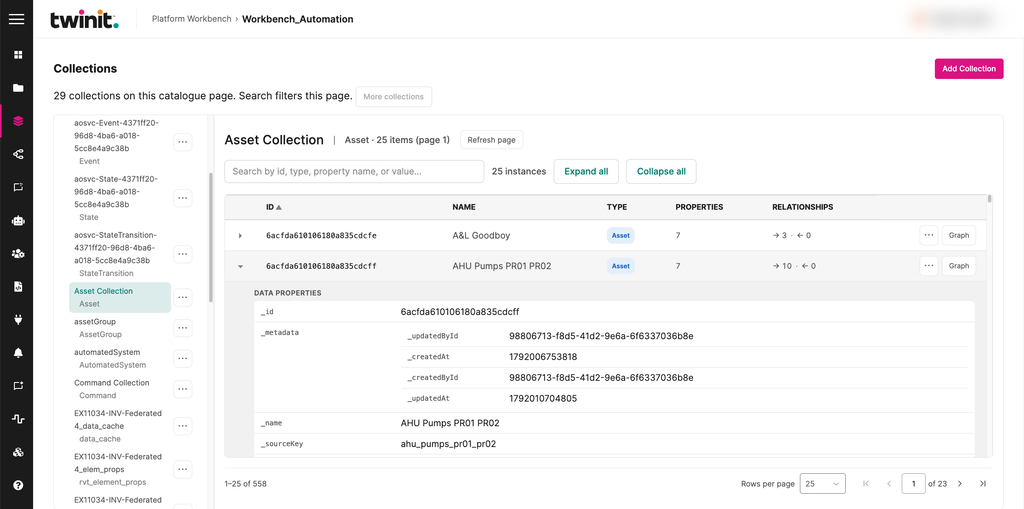
Use the Collections area to browse and manage the project's item collections, their items, and the relationships between items. For more information about collections, see Item Service.
The Collections page has the following parts:
- A collection sidebar
- A paged item table
- Expandable raw fields for each item
- Relationship links
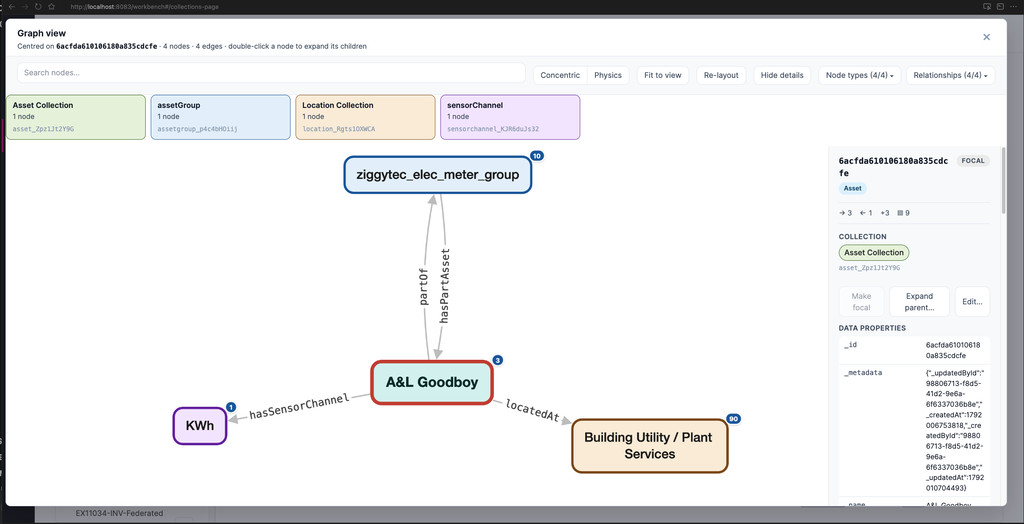
- A neighborhood graph for the selected item
The Item Service decides which operations you can perform.
Figure: Collections page
Browsing a collection
To browse a collection, do the following:
- In the collection sidebar, select a collection. To load more collections, select More collections.
- Search or page through its items.
- To see an item's raw properties, expand the item.
- To open a related item, select a relationship link.
Viewing an item's neighborhood
To view the items related to an item, select Graph in the item's row. Workbench loads the item's relationships and opens them in the Graph view.
In the Graph view, you can search nodes, change the layout, and filter by node type and relationship. To expand a node's children, double-click the node.
Figure: Graph view
Managing collections and items
You can do the following:
- Create, edit, and delete collections. To create a collection, select Add Collection.
- Import up to 5,000 items into a collection.
- Create, edit, and delete individual related items.
Each action opens a drawer. Workbench asks you to confirm before it deletes anything. When an action succeeds, the drawer closes and the collection refreshes.
Collections limits
- Search applies only to the current catalog page of 25 rows.
- Standard collections and telemetry collections page separately.
- You can't replace all the members of a composite at once.
If Workbench loads only some of an item's relationships, it shows the rows it has with a warning.