Dashboard
Overview
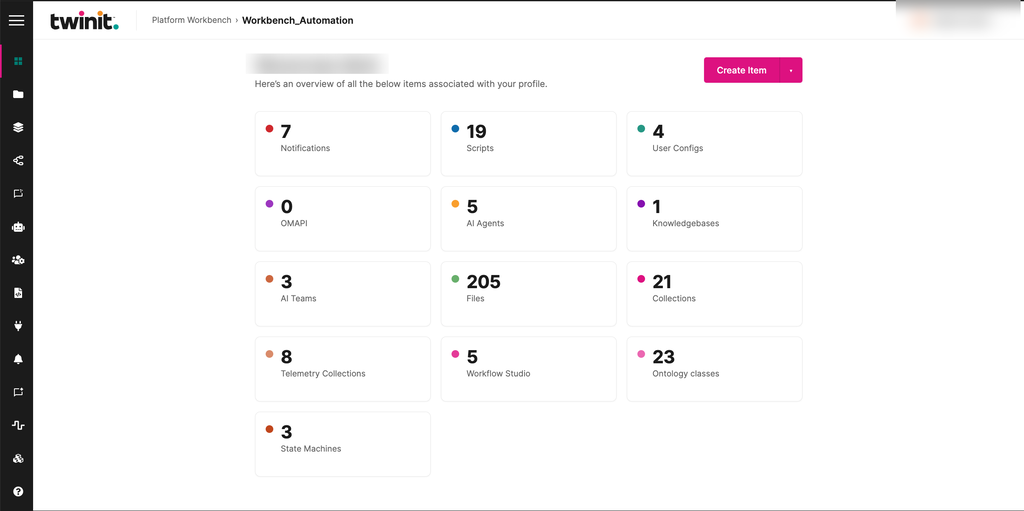
The Dashboard is the Workbench home page. It shows a personalized greeting and a tile for each area of the project. Each tile shows how many items that area contains.
The Dashboard has tiles for the following:
- Notifications
- Scripts
- User Configs
- OMAPI
- AI Agents
- Knowledgebases
- AI Teams
- Files
- Collections
- Telemetry Collections
- Workflow Studio
- Ontology classes
- State Machines
Figure: Workbench Dashboard
Using the Dashboard
- To open an area, select its tile.
- To create an item, select the arrow next to Create Item, then select one of the following. Workbench opens the page where you create it.
- Notification
- Script
- User Config
- API Config
- AI Agent
- Knowledgebase
- AI Team
- Workflow
Note: The Workflow tile and Workflow creation need Workflow Service permissions. Without read access, the Workflow tile is disabled.
Tile states
- Each tile loads separately and shows a loading animation until its count arrives.
- Zero is a valid count.
- If the Workflow, Telemetry, or Ontology count fails to load, the tile shows an alert with a Retry button.
- If another count fails to load, the tile shows zero and Workbench shows an error message.
Note: Each count is a separate request. The counts aren't a single snapshot of the project, so they might not match each other exactly.