OMAPI
Overview
Use the OMAPI area to manage the project's Object Model API configurations. For more information, see Object Model API and API configs.
The Object Model Service decides which operations you can perform.
Managing API configurations
In the OMAPI area, you can do the following:
- Search and page through the API configurations.
- View the JSON of the latest version of a configuration.
- Create a configuration.
- Edit a configuration's JSON.
- Delete a configuration.
Workbench opens each configuration in a drawer. Workbench asks you to confirm before it deletes a configuration.
Creating an API configuration
To create an API configuration, do the following:
- Select Add OMAPI Config.
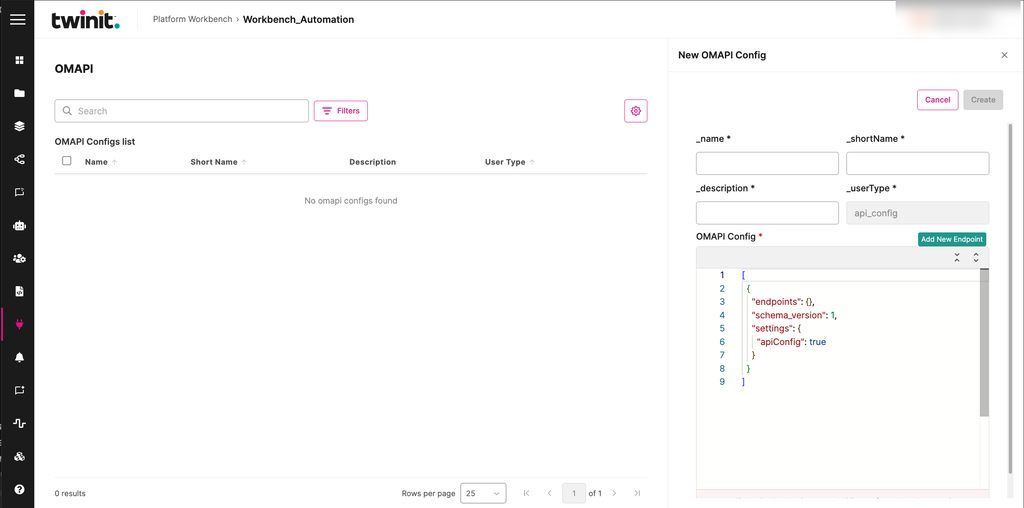
- Enter values in the _name, _shortName, and _description fields. Workbench sets _userType to
api_config. - In the OMAPI Config editor, enter the configuration JSON. To add an endpoint, select Add New Endpoint.
- Select Create.
Figure: New OMAPI Config drawer
Note: You can't deploy or test an API configuration from Workbench, or check its deployment status.
If Workbench can't load the list, select Retry.