Manage Data
Overview
Use the Manage Data area to bring data into the ontology. You can import OWL/TTL files or infer data from existing project data.
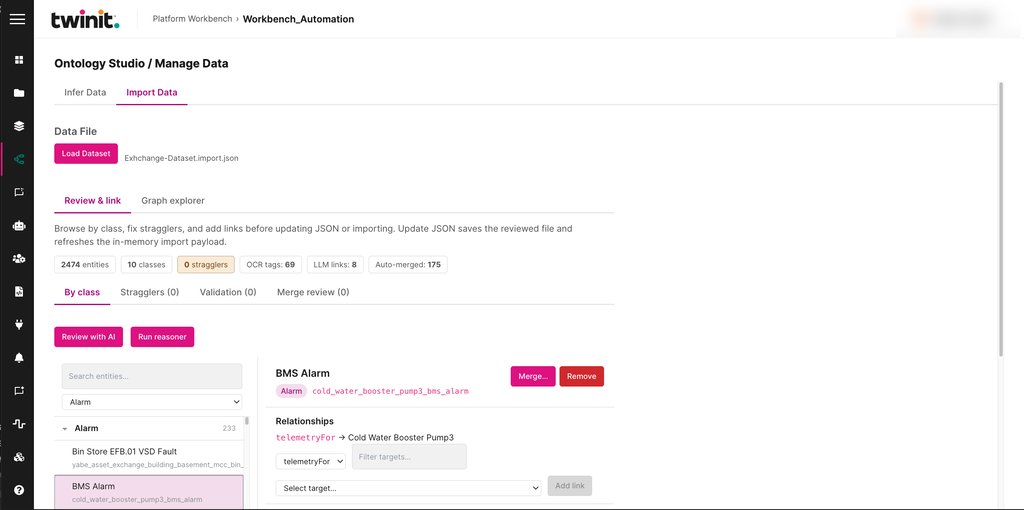
The Manage Data area has two tabs: Infer Data and Import Data. On the Import Data tab, you load a data file, then review it before you import it. You can review the entities by class, fix stragglers, check validation results, and review merges. You can also select Review with AI or Run reasoner.
Figure: Import Data tab
Importing an OWL/TTL file
To import an OWL/TTL file, do the following:
- On the Import Data tab, select Load Dataset, then select the file.
- Review the reasoned preview.
- Map the fields.
- Select Preview Import.
- Select Import to platform.
Inferring data
To infer data, do the following:
- On the Infer Data tab, choose to infer from the Item Service schema or from File Service data.
- Review the instance map.
- Prepare the Item Service mappings.
- Queue the import of individuals and relationships.
Note: When you infer from File Service data, Ontology Studio sends the file references to the AI Service. It doesn't run OCR or parse the files itself.